eBay fees missing or look wrong
Fees missing, not split by type, or different from Seller Hub? The usual reasons in ProfitClerk and how to fix each one, order by order or for all sales.
Most fee problems have a simple cause: eBay has not recorded the fees yet, a credit arrived later, or the fee you are looking for belongs somewhere else. Open the order, check the eBay fees lines and the chip next to Total eBay fees, then use the fixes below.
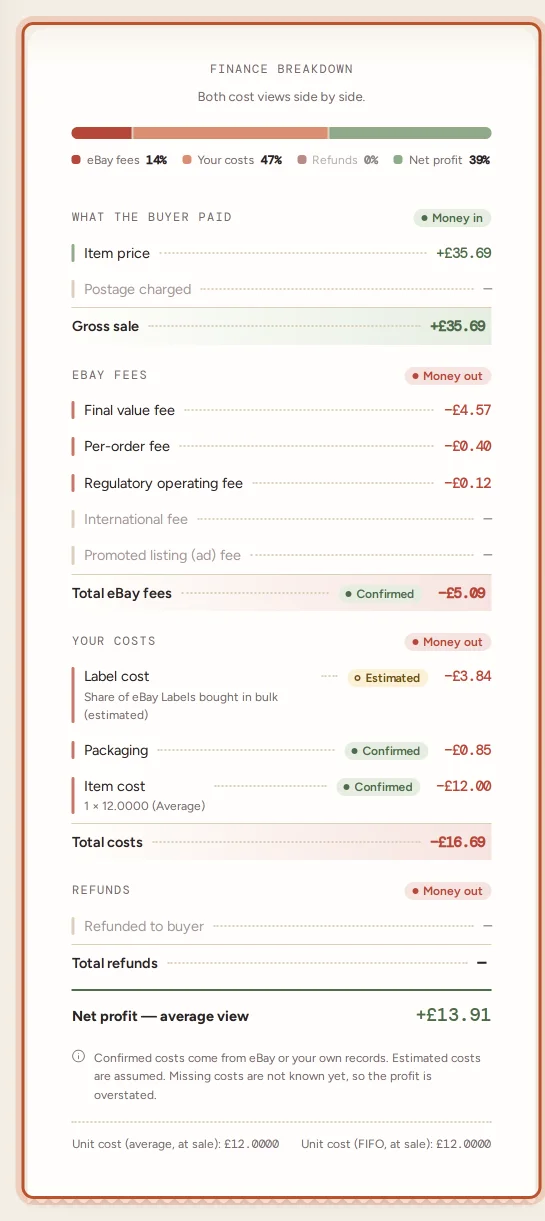
Fees are zero or missing
The chip says Waiting for eBay's finance data.
- A new sale: eBay often records fees a little after the sale. They fill in on a later sync, which runs every 15 minutes. After a sync, a message can say fees for some orders will fill in on the next syncs.
- Can't wait: press Refresh finance entries on the order to read it from eBay straight away.
- An older order: if the order is from before you connected eBay, import your history with Import two years under Settings (on plans that include it).
- A sync message says eBay fees and refunds could not be read this time: they are read again on the next sync. If it keeps happening, check your eBay connection in Settings and reconnect if asked.
Until the fees arrive, the order's profit leaves them out and is too high.
"Not split by type yet"
The fees are right in total, but eBay's data for that order has not been split into fee types yet. Press Refresh finance entries on the order and the line is split into final value, per-order and the rest.
Fees differ from Seller Hub
- Compare the whole eBay order. ProfitClerk stores each item of a multi-item order as its own line and shares fees over them by sale. Add the lines up, or compare the Net of all entries under eBay finance entries.
- Look for credits and late fees. A fee credit or late fee may have arrived on one side first. Press Refresh finance entries.
- Check where a charge belongs. eBay Labels postage is in Label cost, not fees. Priority and Offsite ads, the shop subscription and listing fees are not on orders at all.
- Check VAT. On a personal eBay account in a VAT country, the fees include VAT. The order shows them as eBay recorded them; the profit and loss adjusts for VAT you reclaim. See VAT on eBay fees.
For some accounts eBay also shares each order's earnings. If ProfitClerk's breakdown differs from eBay's figure, the order page says eBay's figure for this order differs, with the difference.
Fees seem too high
Look at each line rather than the total:
- Promoted listing (ad) fee: the order sold through a General ad. See Promoted Listings costs and the ads report.
- International fee: the buyer was abroad.
- Other eBay fees: often a performance or dispute fee. The memo under eBay finance entries says what it was.
- Charity donation: part of the sale went to charity.
Remember that eBay's final value fee is usually worked out on the total including postage.
An old order's fees changed
eBay recorded something new on it: a fee credit, a refund or a late fee. Each night ProfitClerk re-reads the last 30 days to catch these. See eBay fee credits and refunds after a sale.
Fees missing for many orders
- Plan limit reached: new orders wait, but orders already in ProfitClerk keep their fees up to date.
- eBay connection: if the connection has expired, sales and fees stop updating. Reconnect the account in Settings.
- A busy period: after connecting or a history import, fees for many orders can take a few syncs to arrive.
If an order still looks wrong after Refresh finance entries, note the order number and contact us from the Contact page.
Questions people ask
Why are an order's eBay fees zero?
eBay has probably not recorded them yet, which is normal for a few hours after a sale. The fee chip says Waiting for eBay's finance data until they arrive on a later sync.
The fees differ from Seller Hub by a small amount. Why?
Usually a fee credit or late fee arrived on one side but not yet the other, or the order has several items and the fees are shared over them. Refresh finance entries on the order and compare the totals for the whole order.
Why do my fees look higher than eBay's fee rates?
The total can include Promoted Listings, international and regulatory fees, and VAT on fees for a personal account. Check each line in the order's breakdown.
Where are my shop subscription and Priority ads?
They belong to no order, so they are not in an order's fees. You find them in Expenses, the Promoted Listings report and the profit and loss.
Thanks for telling us.