How ProfitClerk gets your real eBay fees
ProfitClerk reads the fees eBay really charged on each order from eBay's finance data, keeps them up to date and shows every entry, so nothing is estimated.
ProfitClerk does not estimate your eBay fees. eBay records every sale, fee, credit, refund and label as a transaction in its finance data, and ProfitClerk reads those transactions for your account and puts each fee on the order it belongs to. What you see is what eBay charged.
Where the fees come from
When you connect eBay, you give ProfitClerk permission to read your eBay finances. It uses that to read your transactions: the sale, each fee, any fee credit, refunds and eBay Labels charges. eBay does not offer a separate read-only finance permission, but ProfitClerk only ever reads; it cannot move money or change anything on eBay.
For every order, ProfitClerk:
- Collects all of eBay's transactions for it.
- Sorts each fee into its type: final value, per-order, regulatory, international, Promoted Listings, charity donation or other.
- Takes off any fee credit eBay gave back.
- Keeps eBay Labels postage apart, as your label cost.
- Works out the order's profit again.
On an eBay order with several items, the fees are shared over the items by each item's share of the sale.
When fees are read
- Every sync (every 15 minutes, or when you press Sync now) reads the transactions eBay recorded since the last one, in one go for the whole account.
- Each night, the last 30 days are read again, because eBay sometimes dates a transaction in the past.
- Missing sales: if a recent order still has no sale transaction, ProfitClerk looks it up by order a few days later.
- On the order page, Refresh finance entries reads that one order from eBay straight away.
Only orders whose transactions changed are worked out again, so a late fee credit or refund updates just that order.
See every transaction on an order
Open an order and scroll to eBay finance entries. It lists every transaction recorded for the eBay order, with its Type (Sale, Fee, Fee credit, Refund, Shipping or Other), Amount, When and eBay's Memo, and the Net of all entries.
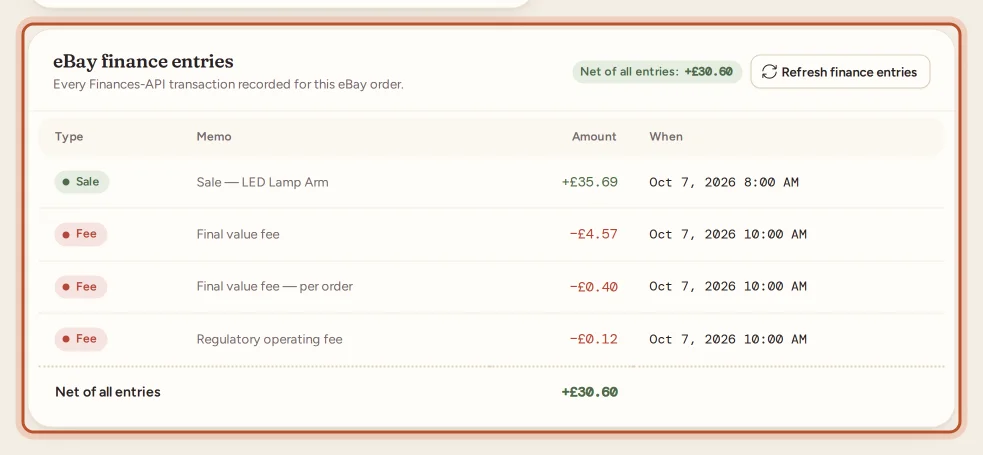
The fee lines in the profit breakdown are worked out from these entries.
Fees and the confidence chip
The Total eBay fees line on each order has a chip:
- Confirmed: From eBay's finance data once the fees have arrived.
- Missing: Waiting for eBay's finance data while eBay has not recorded them yet. The profit leaves the fees out until then, so it is too high for now.
New orders usually get their fees within a few syncs.
Older orders
The normal sync covers recent orders. To bring in older ones with their real fees, owners can use Import two years for each eBay account under Settings, on plans that include it. It runs in the background a month at a time, reading fees for the whole period in bulk.
eBay's own figure for an order
For some accounts, eBay also shares each order's total earnings. Where ProfitClerk can read them, it checks the order against eBay's figure. If they differ, the order page shows eBay's figure for this order differs with the amount, so you can refresh the order or check it in Seller Hub.
When you reach your plan's order limit
Syncs carry on. New orders wait, but the orders you already have keep their fees, credits and refunds up to date.
Questions people ask
Are the fees estimated?
No. The fees on your orders are the amounts eBay recorded in its finance data for each order. Only the calculators, which work before a sale, use eBay's published rates.
How often are fees updated?
Every sync, which runs every 15 minutes. Each night, the last 30 days are read again to catch anything eBay dated in the past.
Can ProfitClerk change anything in my eBay account?
No. eBay's finance permission is only used to read your transactions. ProfitClerk never changes listings, orders or money on eBay.
Do I get fees for orders from before I joined?
The normal sync covers recent orders. On plans that include it, Import two years in Settings brings in two years of orders with their fees and refunds.
What does Waiting for eBay's finance data mean?
eBay has not recorded the fees for that order yet, which is common in the first hours after a sale. They fill in on a later sync.
Thanks for telling us.