Promoted Listings costs and the ads report
See what eBay Promoted Listings cost you, the sales they brought in and where ads wipe out your profit, listing by listing, in ProfitClerk's ads report.
Promoted Listings are eBay's ads, and their fees can quietly eat your profit. ProfitClerk reads every ad charge from eBay, puts General ad fees on the order they came from, and gathers all your ad spend in the Promoted Listings report, so you can see which ads pay for themselves.
The kinds of Promoted Listings charge
- General (cost per sale): you pay the ad rate you set only when an item sells through the ad. eBay charges it on the order, and ProfitClerk shows it on that order as Promoted listing (ad) fee, with the note Promoted Listings General fee for this order. It is part of the order's eBay fees and profit.
- Priority (cost per click): you pay for clicks, whether or not the item sells. eBay bills it to the listing, not an order.
- Offsite: ads outside eBay, also billed to the listing.
Priority and Offsite charges are not on any order. ProfitClerk takes them off the listing's profit in the ads report and counts them in your profit and loss.
Open the report
- Website: Reports › Promoted Listings.
- App: Money › More reports › Promoted Listings.
Choose the months and press Show. Export CSV gives every listing with its figures.
The headline figures
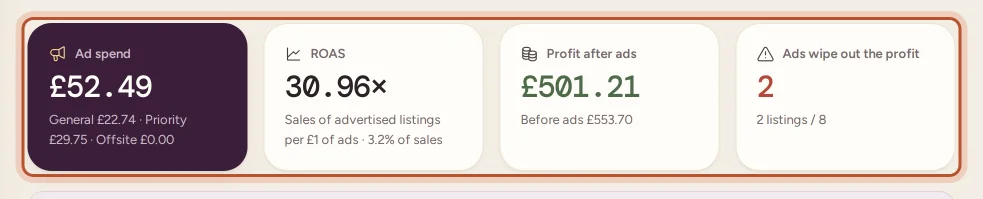
- Ad spend: everything your ads cost in the period, split into General, Priority and Offsite.
- ROAS: return on ad spend, the sales of advertised listings for each unit of currency spent on ads, with ad spend as a share of sales.
- Profit after ads: your profit on those listings once all ads are paid, with the profit before ads underneath.
- Ads wipe out the profit: how many listings lose their profit to ads.
Where ads wipe out the profit
This card lists listings that made money before ads but not after, and listings that had ad spend and sold nothing (Ads, no sales). Badges flag Profit wiped out and Ads take over half of the profit. These are the first ads to lower or switch off.
Return on ad spend by listing
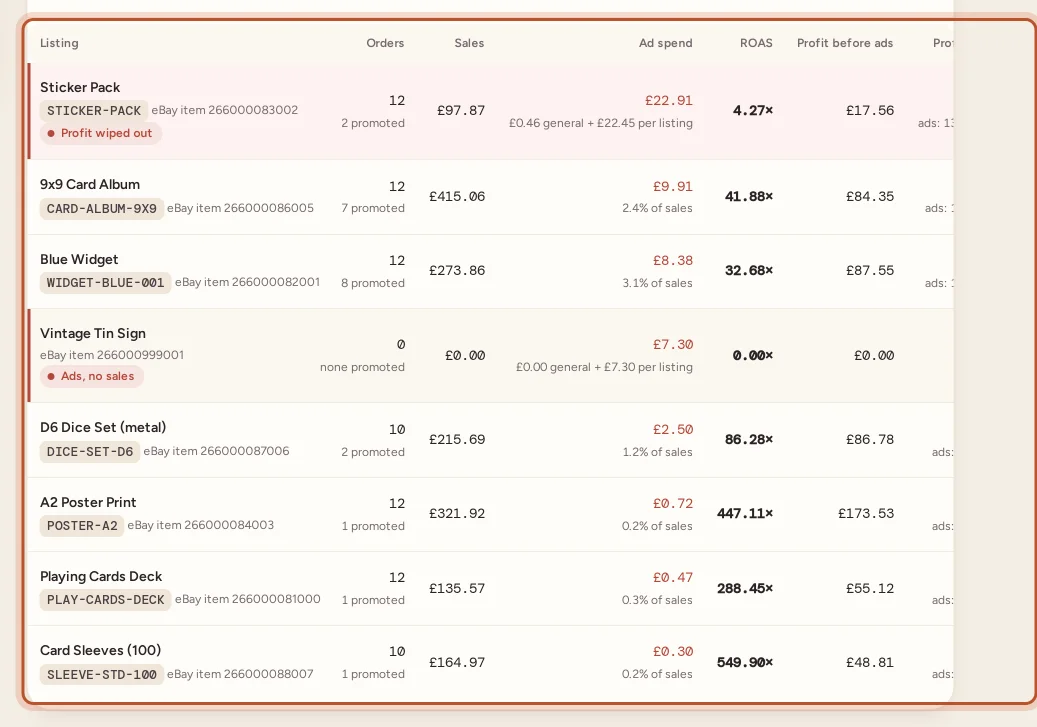
Every listing with ad spend, biggest spend first. For each one you see its orders and how many were promoted, its sales, the ad spend split into General ads and Priority / Offsite, ROAS, and Profit before ads against profit after.
Orders the ad fee turned into a loss
The last card lists single orders that made money before their ad fee and lost money after it, with the Ad fee and the Profit. If many are low-priced items, a lower ad rate on cheap listings may help.
Promoted Listings elsewhere in ProfitClerk
- Order page: the General ad fee under eBay fees.
- Fee breakdown report: General ad fees as the Promoted listing (ad) fee row. See The eBay fee breakdown report.
- Profit and loss: all ad spend, General, Priority and Offsite, as Promoted Listings, separate from eBay fees.
- Expenses: Promoted Listings charges are left out of the From eBay card, so they are never counted twice.
Checking an ad rate before you list
The deal calculator and the free eBay fee calculator both have a Promoted Listings ad rate box. Enter your rate to see the break-even price and profit with the ad fee included. See The free eBay fee and deal calculators.
Questions people ask
Which Promoted Listings costs are included?
General ad fees charged on orders, and Priority (cost per click) and Offsite ad charges billed to a listing. Together they are your ad spend.
Why does the order page show only part of my ad spend?
An order only carries the General ad fee for that sale. Priority and Offsite ads are billed to the listing, not an order, so they are taken off the listing's profit in the ads report and counted in your profit and loss.
What is ROAS?
Return on ad spend: the listing's sales divided by what its ads cost. A ROAS of 10× means it sold ten times what you spent on its ads.
What does Ads wipe out the profit mean?
The listing made money before its ads but not after, or you paid for ads on it and it sold nothing.
How far back are ad charges read?
Ad charges are read from eBay on each sync. The first sync looks back 90 days.
Thanks for telling us.