Profit by category, brand, label, site or country
See which eBay categories, brands, labels, eBay sites and buyer countries make you money: revenue, profit, margin and average sale price per group.
Breakdowns group your sales so you can see which kinds of stock make you money: by Category, Brand, Label, eBay Marketplace or Buyer country. For each group you get revenue, profit, margin, average sale price and its share of your total profit.
On the website, go to Reports › Breakdowns. In the app, go to Money › More reports › Breakdowns.
Choose how to group
Use the tabs at the top:
- Category: the category you set on each product, or eBay's category for the listing when you have not set one.
- Brand: the brand you set on each product, or the Brand eBay shows on the listing when you have not set one.
- Label: your own tags, such as a supplier, a season or a box.
- Marketplace: the eBay site each item was listed on, such as eBay UK, eBay US or eBay Germany.
Groups ignore upper and lower case, so "Nike" and "nike" are one group. Order lines with nothing to group by make one group (No category, No brand, No label or Marketplace not recorded), listed last.
The totals

- Most profitable: the group that made the most profit, and its share of the total.
- Groups: how many groups there are, and how many order lines are not grouped yet.
- Average sale price: per unit, across all units sold.
The table
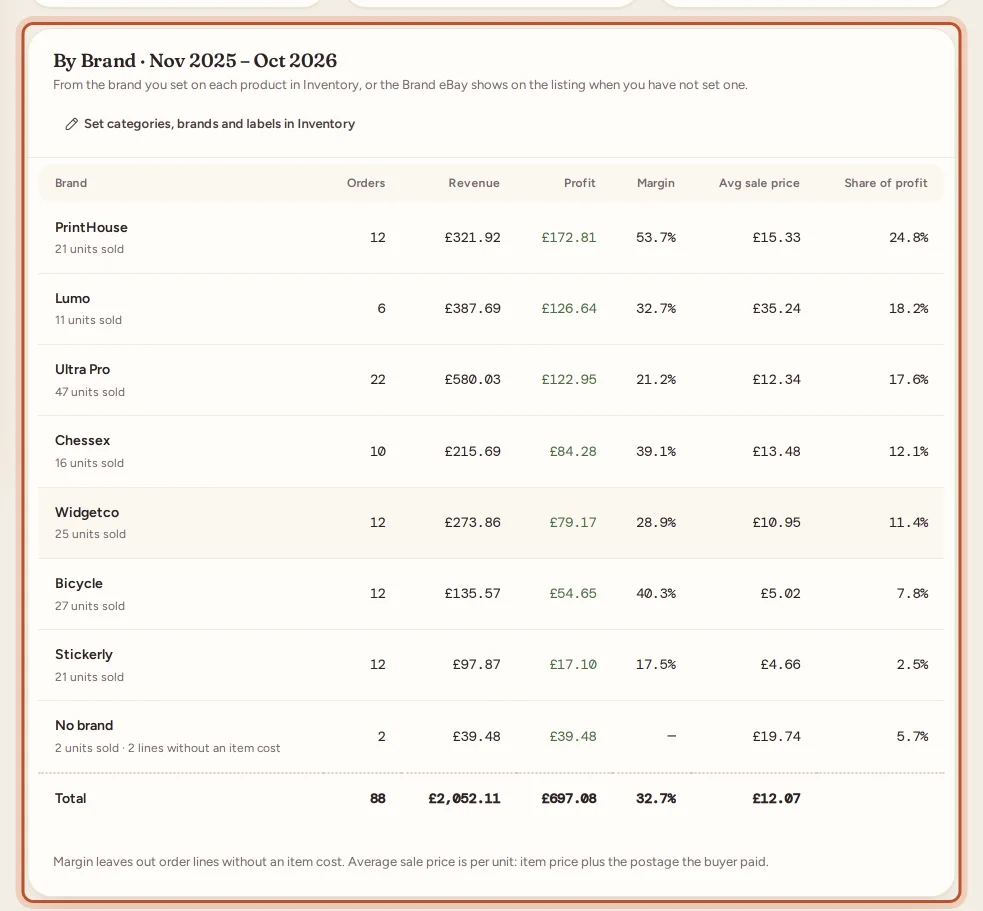
For each group:
- Orders and Units;
- Revenue: what buyers paid, including postage;
- Profit;
- Margin: profit as a share of revenue;
- Avg sale price: per unit, item price plus the postage the buyer paid;
- Share of profit.
The Total row adds them up. A note under the table shows how many lines have no item cost.
Set categories, brands and labels
The more products you group, the more useful the report. Select Set categories, brands and labels in Inventory on the report, or:
- On the website, open a product in Inventory, edit it, and fill in Category, brand and label.
- In the app, open the item in Stock and edit it.
As you type, ProfitClerk suggests the names you already use, so you do not end up with "Trainers" and "Trainer". Leave category or brand empty to use eBay's.
Ideas for labels
- The supplier or source of a batch ("Supplier A", "Car boot").
- A season or range ("Summer 2026").
- Where the stock is stored ("Box 12").
For profit by where you bought stock, also see the sourcing report.
Marketplace
Marketplace shows which eBay site each sale was listed on, so you can see whether selling to other countries is worth it. Orders synced before this was recorded show as Marketplace not recorded until eBay sends them again or their listing is read.
Buyer country: where your buyers are
Buyer country groups your sales by the country in the buyer's shipping address, with a flag beside each. It shows where your profit comes from and whether shipping abroad pays. Orders without an address show as Country not recorded.
Click a country (in the app, tap it) to see its regions: the state, county or province from the shipping address, as the buyer wrote it. Spellings that differ only in capitals are counted together; addresses without one show as Region not given. All countries goes back.
Period and export
The report opens on the last 12 months. Change it to 3 months, 6 months, This tax year or Last tax year at the top; see Report periods. In the app, it starts on the period chosen on the Money tab.
Select Export CSV to download the groups you are looking at, for the period shown. See Export reports.
Questions people ask
Where do the categories and brands come from?
From the category and brand you set on each product in Inventory. If you leave them empty, eBay's category for the listing and the Brand shown on the listing are used instead.
What is a label?
Your own tag on a product, such as a supplier, a season, a box or "Car boot". Set it on each product in Inventory, then group your sales by it.
Why is there a "No category" group?
Order lines with nothing to group by are put together in one group, listed last. Set a category, brand or label on those products to group them.
Why does margin look higher than I expect?
Margin leaves out order lines without an item cost, so lines with an unknown cost do not drag it up or down. The report says how many lines have no item cost.
Where does the buyer's country come from?
From the shipping address eBay sends with each order. Open a country to see its regions, the state, county or province the buyer wrote in the address.
Are "Trainers" and "trainers" separate groups?
No. Groups ignore upper and lower case, so they are counted together.
Thanks for telling us.