All reports and where to find them
A tour of every ProfitClerk report for eBay sellers: profit over time, profit and loss, fees, tax, ads, breakdowns, best sellers, unsold stock and sourcing.
ProfitClerk has a report for each question an eBay seller asks: how much did I make, what did eBay take, what sells, what does not, where should I buy and what do I owe in tax. This page lists them all and where to find each one on the website and in the app.
On the website
Open Reports in the menu. The page shows your profit for a date range, and buttons at the top open each detailed report.
The Reports page
- Total profit, Units sold, Avg profit / day and Best day for the dates you choose.
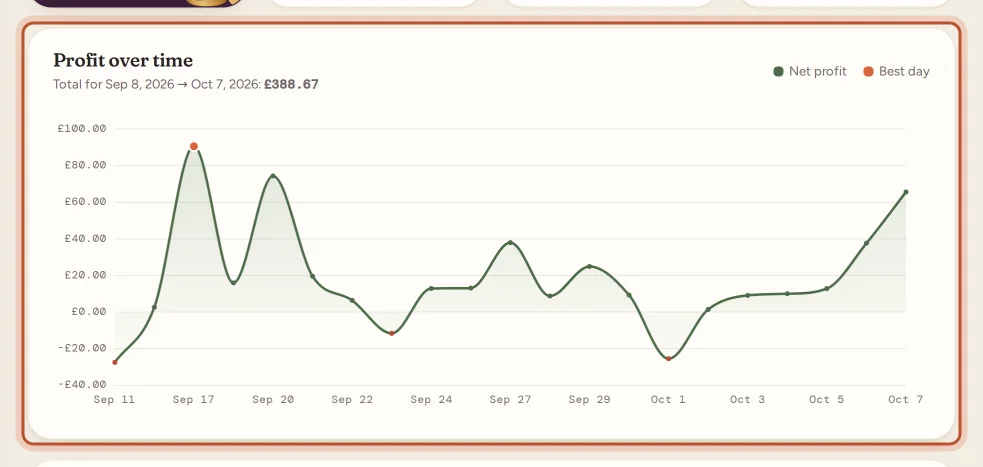
- Profit over time: a chart of profit day by day, with the best day marked.
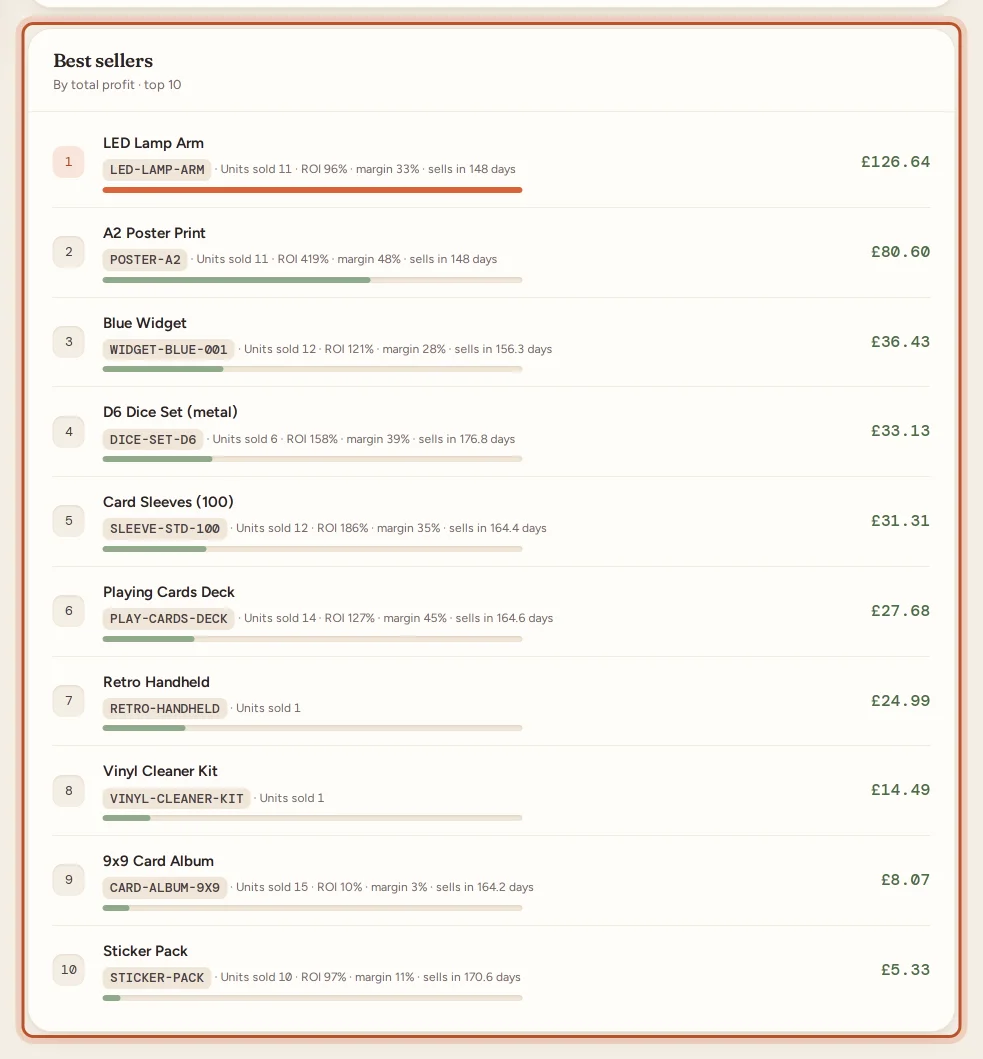
- Best sellers: up to 15 products by total profit, with units sold, return on cost, margin and days to sell. Only sales with a SKU count.
Choose the dates with From and To, then Apply, or use This tax year or Last tax year. It opens on the last 30 days.
The detailed reports
- Profit and loss: your statement for the period, down to net profit, on your accounting basis. See Profit and loss.
- Fee breakdown: every eBay fee type by month, in money and as a share of sales. See Fee breakdown report.
- Tax collected: sales tax and VAT eBay collected from buyers, tax you collected, and where your buyers are. See Sales tax collected by eBay.
- Promoted Listings: ad spend, return on ad spend and where ads wipe out profit. See Promoted Listings report.
- Sourcing: which places you buy from pay best. See Sourcing report.
- Unsold stock: what is on the shelf, how old it is and what to do about it. See Unsold stock.
- Breakdowns: profit by category, brand, label or marketplace. See Breakdowns.
- Best sellers & slow movers: your top 10 products and the stock that has sat longest. See Best sellers and slow movers.
Money and tax pages
Some reports have their own place in the menu:
- Expenses: business costs by category, with receipts. See Expenses.
- Mileage: your trips and what they are worth. See Mileage.
- Tax: the tax centre, with your forms, tax to put aside, thresholds, deadlines and tax-year exports. See The tax centre.
- Accounting: your eBay payouts and posting to accounting software. See eBay payouts.
In the app
- Money tab: your net profit and the Profit and loss for the chosen period, a Profit over time chart, and tiles for Tax centre, Expenses, Mileage and eBay payouts.
- Money › More reports: Accounting, eBay fees, Promoted Listings, Sales tax and VAT, Best sellers & slow movers and Breakdowns.
- Stock tab: Unsold stock and Sourcing.
Reports opened from More reports start on the period chosen on the Money tab. CSV exports open in your browser.
Which report answers what
| Question | Report |
|---|---|
| How much did I make this tax year? | Profit and loss |
| How is profit trending? | Reports page, Profit over time |
| What did eBay take? | Fee breakdown |
| Are my ads worth it? | Promoted Listings |
| What sells best? | Best sellers & slow movers, Breakdowns |
| What is not selling? | Unsold stock |
| Where should I buy? | Sourcing |
| What do I owe in tax? | Tax centre, Tax collected |
| Why does my bank deposit differ? | eBay payouts |
Periods, exports and item cost
- Most reports share the same periods: 3 months, 6 months, 12 months, This tax year and Last tax year. See Report periods.
- Most reports have Export CSV. See Export reports.
- Reports cost your stock at average cost on the website. See Item cost in reports.
Questions people ask
Where are the reports in the app?
On the Money tab, under More reports. Unsold stock and Sourcing are on the Stock tab, and the profit and loss is on the Money tab itself.
Which report should I use for my tax return?
Start with the profit and loss for Last tax year, then the tax centre for your country's form boxes and exports. They are estimates, so check them with an accountant or your tax authority.
Why do the Reports page and the profit and loss show different profit?
The Reports page adds up the profit on each sale. The profit and loss also takes off business expenses, mileage, return postage, eBay charges outside orders and any VAT or GST on your sales.
Can everyone in my team see reports?
Yes. Owners, managers and viewers can open every report and download its exports.
Why is a report empty?
There may be no sales in the period yet, or your eBay account has not synced. Try a longer period, and check the eBay connection in Settings.
Thanks for telling us.