Unsold stock and how old it is
See what is sitting on your shelf, how long it has been there, the money tied up in it, sell-through, whether it is listed, and what to do about it.
The Unsold stock report shows what is sitting on your shelf, how long it has been there, how much money is tied up in it, and a suggestion for each item, such as listing it, dropping the price or clearing it.
On the website, go to Reports › Unsold stock. In the app, open the Stock tab and tap Unsold stock.
The totals

- Money in stock: what the units on hand cost you, and how many units and items that is.
- Older than 90 days: the cost of stock bought more than 90 days ago.
- No sale in 90 days: how many items have not sold in 90 days, and what they are worth at cost.
How old your stock is
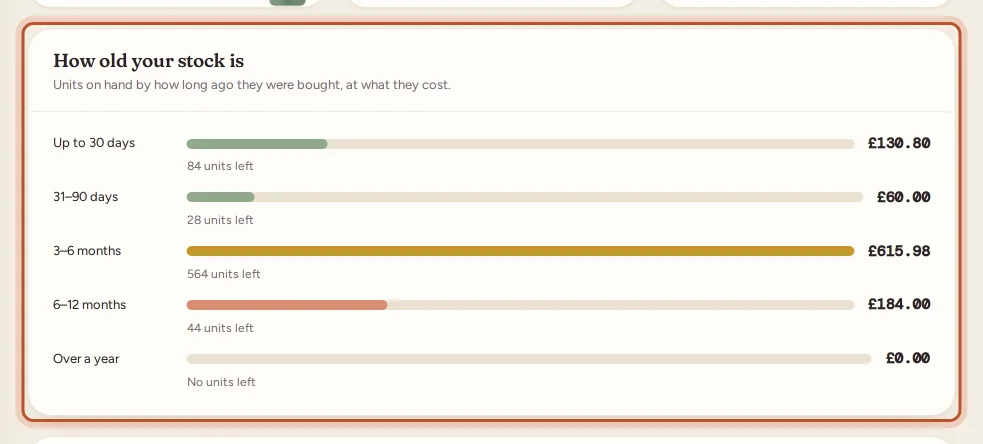
Units on hand by how long ago they were bought, at what they cost:
- Up to 30 days
- 31–90 days
- 3–6 months
- 6–12 months
- Over a year
Ages come from your restock dates, oldest stock first, the same way sales use up your stock. When you add or restock an item, fill in Date bought so the age is right; empty means the day you added it.
Items on hand
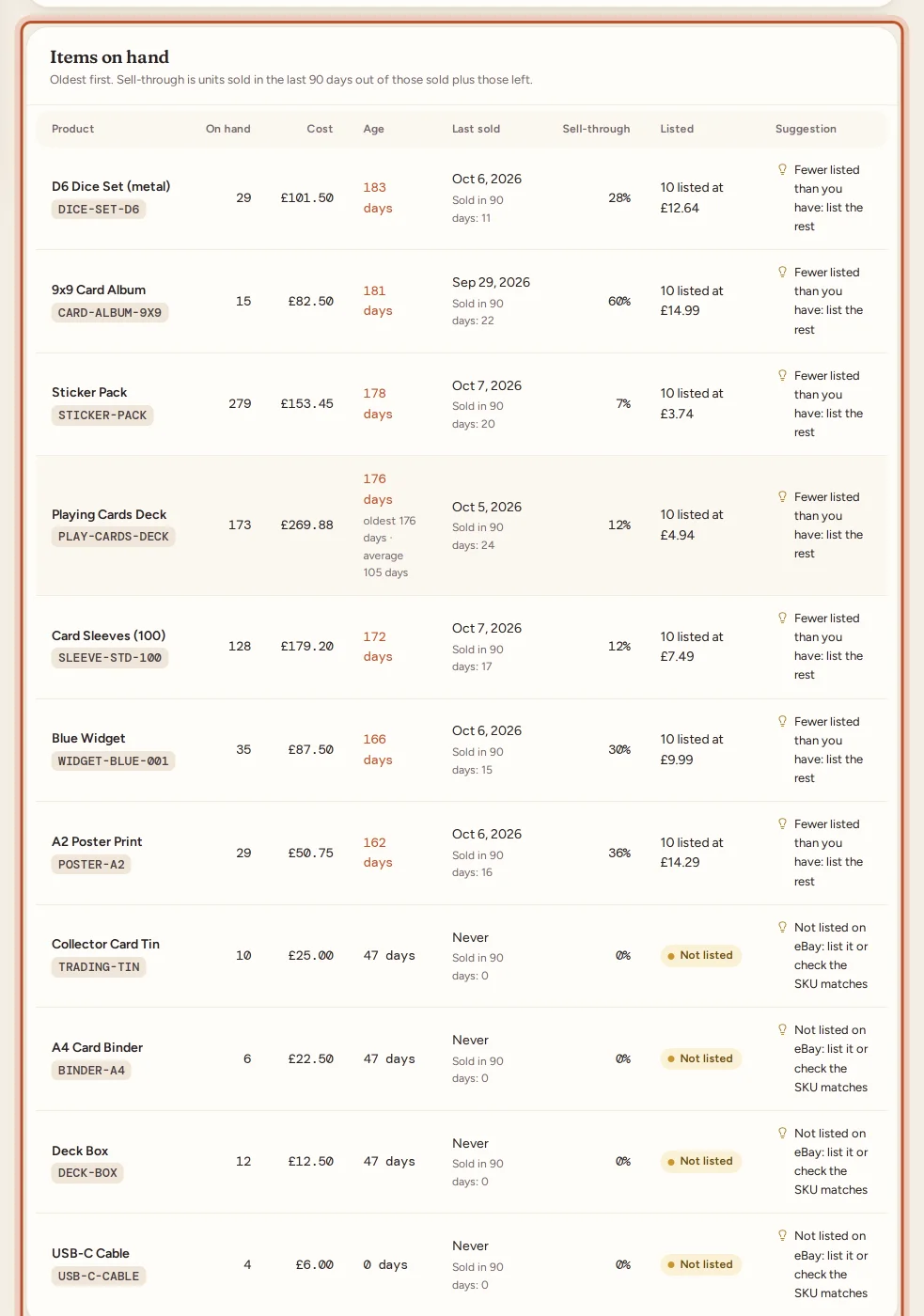
Every item with units on hand, oldest first. For each:
- the item and its Location, if you set a storage location;
- On hand and Cost;
- Age: the oldest unit and the average age, in days;
- Last sold, or Never;
- Sold in 90 days and Sell-through;
- Listed: how many are listed on eBay and at what price, or Not listed;
- a Suggestion.
Sell-through is units sold in the last 90 days out of those sold plus those left. Listing details appear once your eBay listings are synced.
Suggestions
- Not listed on eBay: list it or check the SKU matches.
- Fewer listed than you have: list the rest.
- No sale in 90 days: try a price drop, an offer or a promotion.
- Over a year old: consider clearing it (auction, bundle or job lot).
They are prompts, not rules: you know your stock best.
Using the report
- Start with Not listed: stock that is not listed cannot sell. If it is listed, the SKU on the listing probably does not match the one in Inventory.
- Look at items with no sale in 90 days and a low sell-through. A small price drop or an offer often moves them.
- Clear very old stock to free up cash for stock that sells.
- See which sources the slow stock came from in the sourcing report.
For a short list of the slowest items next to your best sellers, see Best sellers and slow movers.
Export
Select Export CSV to download the items on hand. In the app, the download button opens the same file in your browser. The report always shows today's stock, so there is no period to choose.
Questions people ask
How is the age of stock worked out?
From the date each unit was bought, as recorded when you added or restocked it. Each item shows its oldest unit and the average age of the units on hand.
What is sell-through?
Units sold in the last 90 days out of those sold plus those still on hand. A low figure means the item is selling slowly compared with how many you hold.
Why does an item say it is not listed on eBay?
ProfitClerk found no active eBay listing for its SKU. List it, or check the SKU on the listing matches the one in Inventory.
Does the report change with the period?
No. It shows your stock as it is today. The 90-day figures always look back from today.
Is the value at what I paid or what it will sell for?
At what it cost you, from your restock costs. It is the money tied up in the stock, not its selling value.
Thanks for telling us.