Average cost or FIFO in your reports
Which item cost ProfitClerk's reports use: average cost on the website, your Avg or FIFO choice in the app, and how to compare profit both ways for any period.
ProfitClerk can cost the items you sell two ways: average cost, where every unit of an item costs the same, or FIFO (first in, first out), where the oldest units are sold first at what they cost. On the website, the reports use average cost. In the app, the reports on the Money tab follow your Avg / FIFO choice.
For how the two methods work and an example, see Average cost vs FIFO.
On the website
The Average / FIFO switch is on:
- the Overview;
- the Orders list;
- each order's page.
The report pages under Reports cost items at their average cost:
- the Reports page (profit over time and best sellers);
- Profit and loss;
- Breakdowns and Best sellers & slow movers;
- Sourcing, Promoted Listings and Tax collected;
- the CSV exports of those reports.
The tax centre and the margin scheme stock book also use average cost.
In the app
Tap the Avg cost / FIFO cost pill beside the figure on the Money card to switch. The app remembers your choice, and these follow it:
- the net profit and Profit and loss on the Money tab;
- Breakdowns;
- Best sellers & slow movers;
- Promoted Listings.
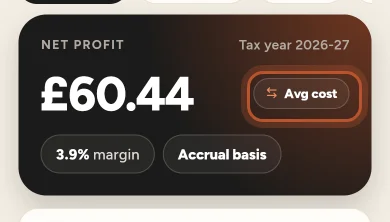
Sourcing on the Stock tab uses average cost, and Unsold stock values what is on the shelf from your restock records. CSV exports opened from the app download the website's file, which uses average cost.
What changes and what does not
Only the item cost of each sale changes, and so the profit, margin and return on cost built on it. Sales, eBay fees, postage, packaging, refunds and expenses are the same either way.
- Accrual basis: the Cost of items sold line in the profit and loss depends on the method.
- Cash basis: the profit and loss counts Stock bought in the period, which is the same either way.
- A cost you typed on an order is used in both methods.
- Unsold stock values what is on the shelf from your restock records, whichever method you choose for profit.
Over time, once an item's units have all sold, both methods have counted much the same total cost; they differ in which sales carry it. When prices rise, FIFO shows lower costs and higher profit on the next sales; when they fall, the reverse.
Which to look at
Use the same method consistently when you compare periods, otherwise a change in profit may only be the method. If you buy the same item at very different prices, the two methods can differ a lot on individual sales, so compare both before drawing conclusions about one product.
Comparing both
- In the app, switch the pill and look at the profit and loss for the same period both ways.
- On the website, the Orders export always has Cost (avg), Cost (FIFO), Profit (avg) and Profit (FIFO) for every sale, so you can total either in a spreadsheet.
- On an order's page, both net profits are shown side by side.
Questions people ask
Which cost method do the website reports use?
Average cost. The Average and FIFO switch is on the Overview, the Orders list and each order's page; the report pages always cost items at their average.
Can I see a FIFO profit and loss?
In the app, yes. Switch the Money tab's cost pill to FIFO cost and the profit and loss on that tab follows it.
Does the cost method change a cash-basis profit and loss?
No. On a cash basis the profit and loss counts the stock you paid for in the period, not the cost of the items sold, so both methods give the same figure.
Which method should I use for tax?
That depends on your country's rules and your situation. Ask your accountant or check the official guidance. ProfitClerk keeps both so you can see either.
How do I get both figures in a spreadsheet?
Export your orders. The Orders export always has the cost and profit of each sale both ways.
Thanks for telling us.