Sourcing report: which places pay best
Compare the places you buy stock from: spent, sales, profit, return on cost, days to sell and stock left for each source, from car boots to wholesalers.
The Sourcing report shows which places you buy from make you money, and how fast that stock sells. For each source, such as a car boot sale, a charity shop or a wholesaler, you see what you spent, what it sold for, the profit, the return on cost, the days to sell and what is still on the shelf.
On the website, go to Reports › Sourcing. In the app, open the Stock tab and tap Sourcing.
Record where you bought stock
The report needs a source on your stock. Fill in Where you bought it whenever you:
- add a new item to Inventory;
- restock an item;
- buy a lot (Buy a lot in Inventory), where the whole lot gets one source.
ProfitClerk suggests the sources you have used before, so "Car boot" does not become "car boot sale" the next time. Sources ignore upper and lower case.
Also fill in Date bought, so days to sell is right.
The totals

- Best source: the source with the best return on cost, or Not enough sales yet.
- Spent on stock: what you spent in the period, and how many units you bought.
- Still on the shelf: what is left, and how many units.
The table
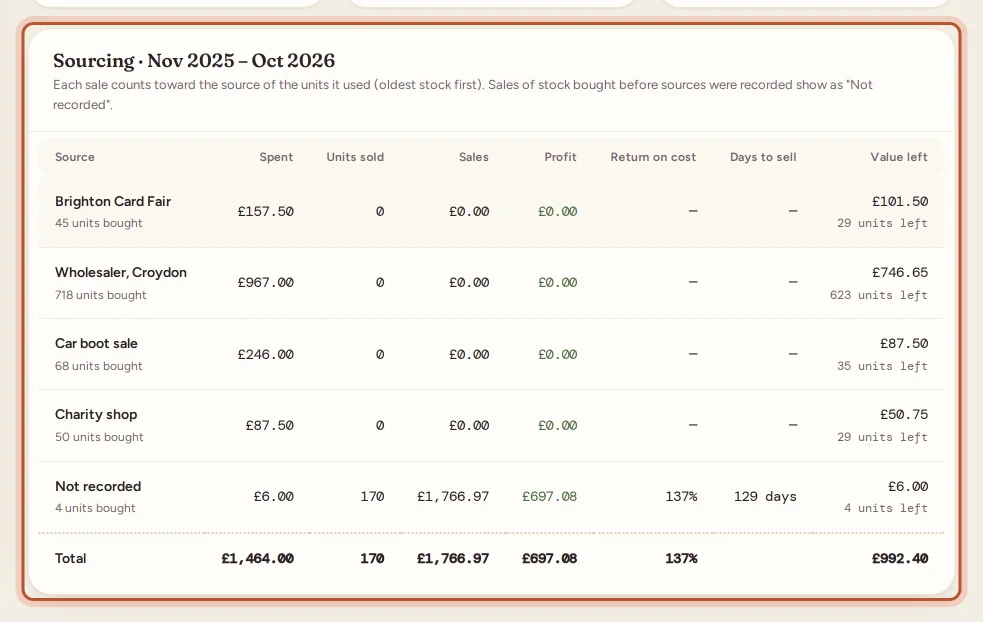
For each Source:
- Units bought and Spent in the period;
- Units sold and Sales in the period, from that source's stock;
- Profit;
- Return on cost: profit as a percentage of what the sold items cost;
- Days to sell: on average, from buying to selling;
- Units left and Value left at cost.
Each sale counts toward the source of the units it used, oldest stock first. A sale that used units from two sources counts toward the one that supplied most of them.
Sales of stock bought before sources were recorded show as Not recorded.
Reading it
- A source with a high return on cost and few days to sell is where to go back to.
- A source with lots of units left and slow sales may look profitable on paper while tying up your cash. Check those items in Unsold stock.
- Compare sources over a longer period, such as 12 months or Last tax year, so one lucky find does not skew the picture.
The report counts purchases dated in the period and sales made in the period, so stock bought late in a period may not have sold yet. Returned items put back on the shelf are never counted as stock bought.
Period and export
The report opens on the last 12 months. Change it to 3 months, 6 months, This tax year or Last tax year; see Report periods.
Select Export CSV to download the table for the period. In the app, the download button opens the file in your browser.
For profit by your own tags, such as a supplier name on each product, also see Breakdowns grouped by Label.
Questions people ask
How do I record where I bought stock?
Fill in Where you bought it when you add an item, restock it or buy a lot. ProfitClerk suggests the sources you have used before, so the names stay consistent.
How does a sale know which source it came from?
Sales use your oldest stock first. Each sale counts toward the source that supplied most of the units it used.
What does "Not recorded" mean?
Stock bought before you recorded a source, or added without one. Its purchases and sales are grouped together as Not recorded.
Why is a source's profit high but its return on cost low?
You may have spent a lot there. Return on cost is profit as a percentage of what the sold items cost, so it shows how hard each pound or dollar worked.
Do returned items count as stock bought?
No. Items a buyer returned and you put back on the shelf are never counted as stock bought.
Thanks for telling us.