Average cost vs FIFO for your eBay profit
ProfitClerk works out every sale's item cost two ways, average cost and FIFO. Learn how each works, how they differ and where to switch between them.
ProfitClerk records the cost of every item you sell in two ways at once: average cost, which blends all the units on your shelf into one cost, and FIFO (first in, first out), which uses the price of the oldest units you bought. You can switch every profit figure between the two at any time, and nothing is lost when you do.
How average cost works
Each stock item has one cost per unit: the average of everything on the shelf.
- It changes only when you restock: (units on hand × current average + what the new buy cost) ÷ (units on hand + new units).
- Selling units does not change it.
- Every sale uses the average at the moment it sold.
How FIFO works
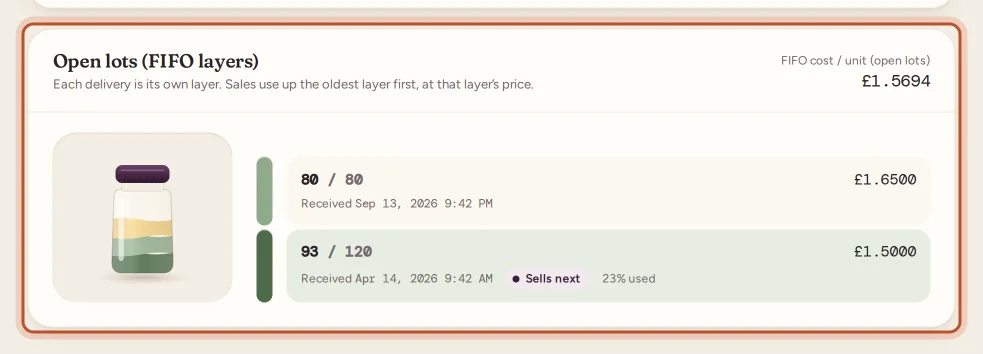
Each time you add or restock an item, that buy becomes a lot (a layer) with its own cost per unit. Sales use up the oldest lot first, at that lot's price. If a sale needs units from two lots, its unit cost is the mix of both.
You can see an item's lots on its page under Open lots (FIFO layers), oldest first, with the one that Sells next marked.
An example
You buy 10 phone cases for 20.00 (2.00 each) and sell 5. Then you restock 10 more for 40.00 (4.00 each). You now have 15 on hand.
- Average: (5 × 2.00 + 40.00) ÷ 15 = 3.3333 per unit.
- FIFO: the 5 left from the first buy at 2.00, then the 10 new ones at 4.00.
Your next sale of one case costs 3.3333 in the average view and 2.00 in the FIFO view. Five sales later, FIFO moves on to 4.00 while the average stays at 3.3333 until you restock again.
When prices go up, FIFO shows lower item costs (and higher profit) on the next sales than average does; when prices fall it is the other way round. Once every unit of an item has sold, both views have counted much the same total cost; they differ in which sales carry it.
Where to switch
On the website
Use the Average / FIFO switch:
- on Overview, next to Cost view;
- at the top of Orders (the cost and profit columns say which view they use, for example Cost · avg);
- at the top of an order's page.
Average is the default. The choice carries over when you go from the Orders list to an order and back.
In the app
- Tap the small Avg cost / FIFO cost pill beside the figure on the Home or Money card.
- In Sales, tap the sliders button and choose Average cost or First in, first out.
The app remembers your choice between launches and reloads Home, Sales and Money with it.
The per-order switch
An order's page has its own switch, so you can compare one sale both ways without changing anything else:
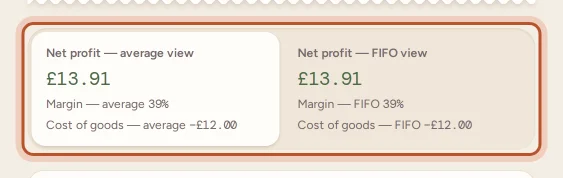
- On the website, the Average / FIFO switch at the top of the order's page, and the two boxes under the breakdown that show Net profit — average view and Net profit — FIFO view side by side.
- In the app, the Avg / FIFO pill on the order's profit card. It switches that order only.
What stays the same in both views
Only the item cost changes. The gross sale, eBay fees, label, packaging, return postage and refunds are the same in both views.
- Costs are frozen at the time of sale. A restock or a quantity correction later never changes past sales in either view.
- A cost you set on an order by hand (with Edit, Add cost or a cost import) is used for both views.
- Selling more than your recorded stock: the extra units are costed at the average in both views, and the item cost is tagged Estimated. See cost confidence.
- CSV export: the Orders export always has both, in Cost (avg), Cost (FIFO), Profit (avg) and Profit (FIFO).
For more on lots and restocks, see how item costs flow into profit.
Questions people ask
Which cost view does ProfitClerk use by default?
Average. Switch to FIFO whenever you like; both figures are always stored, so nothing is recalculated or lost when you switch.
Does switching change my stored data?
No. The switch only changes which of the two stored costs the figures on screen use. You can go back and forth as often as you like.
Which one should I use for my tax return?
That depends on your country's rules and your situation, so ask your accountant or check the official guidance. ProfitClerk keeps both so you can report whichever applies.
Why are average and FIFO the same on some sales?
If every unit you bought cost the same, or you set the item cost on the order by hand, both views use the same unit cost.
Can I use FIFO for one product and average for another?
No. The switch applies to all your figures at once. On a single order, the order's own switch only changes that page.
Thanks for telling us.