Cancelled eBay orders and your profit
When an eBay order is cancelled, ProfitClerk records it as fully refunded. See how to put the stock back and clear postage so the sale nets to zero.
When an order is cancelled on eBay, ProfitClerk picks up the cancellation and records the order as refunded: the refund equals what the buyer paid, and any fees eBay credits back come off. Two things are left for you to tidy up: put the units back into stock, and clear a label cost you never paid. Then the sale nets to zero, or to just the fees eBay kept.
What ProfitClerk does by itself
On the next sync after eBay cancels the order:
- The order's status becomes refunded, and the refund date shows under the status on Orders.
- Refunded to buyer in the finance breakdown equals the Gross sale.
- Fee credits from eBay reduce Total eBay fees. When eBay credits every fee, the fees on the order are zero; a fee eBay keeps stays a cost.
- The order's eBay finance entries list the sale, the refund and the credits as eBay recorded them.
Because the buyer's money all went back, what the buyer paid nets to nothing. What remains on the sale are your costs.
What is still on the sale
| Cost | Why it is still there | What to do |
|---|---|---|
| Item cost | The sale took units off your stock when it came in, and a cancellation does not put them back | Record a return with Back in stock |
| Label cost | With no eBay label bought, the label cost is assumed to equal the postage the buyer paid | Set the label cost to 0 |
| Packaging | Only if you entered it | Set it to 0 if you did not use any |
| Fees eBay kept | eBay did not credit them | Nothing: they are a real cost |
Tidy up a cancelled order
1. Put the item back into stock
- Open the order (Orders › click the product, or Sales › tap the sale in the app).
- On the Returns card, click Record a return.
- Choose Back in stock, keep the number of Units, and set the Date.
- Click Record return.
The units go back on the shelf at the cost they had on this sale, and the item cost leaves the sale. See refunds and returns.
2. Clear the label cost if you never posted it
- On the same page, find Label and packaging.
- Type 0 in Label cost (and in Packaging cost if needed).
- Click Save costs.
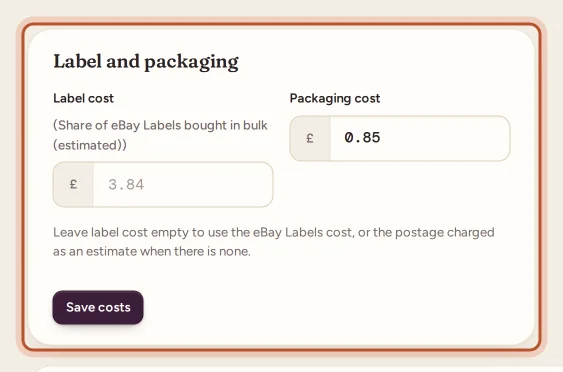
In the app, tap Postage under the profit card, enter 0 for the Postage label, and save.
After both steps, the order's net profit is zero, or minus any fee eBay kept.
A worked example
A buyer pays 25.00 including 3.00 postage, then the order is cancelled before you post it. The item cost you 8.00, and eBay credits all its fees.
- Straight after the cancellation: 25.00 − 25.00 refund − 3.00 estimated label − 8.00 item = −11.00.
- After Back in stock and a label cost of 0: 0.00.
These numbers are made up to show the sum.
Finding cancelled orders
There is no separate filter for cancellations. On Orders, choose Refunded in the Status menu (in the app, the Refunded chip), then open each one: a cancellation has a refund for the whole sale and, usually, fee credits in its eBay finance entries.
Questions people ask
Is there a Cancelled status in ProfitClerk?
No. A cancelled order is shown as refunded, because the buyer got all their money back. Its eBay finance entries show the refund and any fee credits.
Do I get eBay's fees back on a cancelled order?
eBay normally credits the fees on a cancellation. Credits that arrive bring the order's fees down, often to zero; any fee eBay keeps stays a cost of the sale.
Why does my cancelled order show a loss?
The item cost and the estimated label cost are still on the sale. Record the units as back in stock and set the label cost to 0 if you never posted it.
Does a cancellation put the item back into my stock?
Not automatically. Record a return with Back in stock on the order to put the units back on the shelf and take their cost off the sale.
Thanks for telling us.