How label costs get onto your sales
See where ProfitClerk gets each sale's postage label cost: eBay Labels, shares of bulk purchases, imported files, costs you type, or an estimate shown in amber.
ProfitClerk puts a postage label cost on every sale so your profit is real. It takes the cost from eBay Labels automatically, from a file you import, or from a figure you type; when none of those is known yet, it uses the postage the buyer paid as an estimate and shows it in amber.
Where a label cost can come from
Every order shows where its label cost came from, in small text under the amount. These are the sources, and the words you see on screen:
| Source | What you see | Real or a guess |
|---|---|---|
| eBay Labels bought one at a time | From eBay Labels | Real |
| A share of eBay Labels bought in bulk, shared out by ProfitClerk | Share of eBay Labels bought in bulk (estimated) | A guess until you check it |
| A share you have checked | Share of eBay Labels bought in bulk (checked by you) | Real |
| An imported file | Imported from ShipStation, Royal Mail Click & Drop, Pirate Ship, eBay Labels or a CSV import | Real |
| Typed by you | Entered by you | Real |
| Nothing known yet | Estimated from postage charged | A guess |
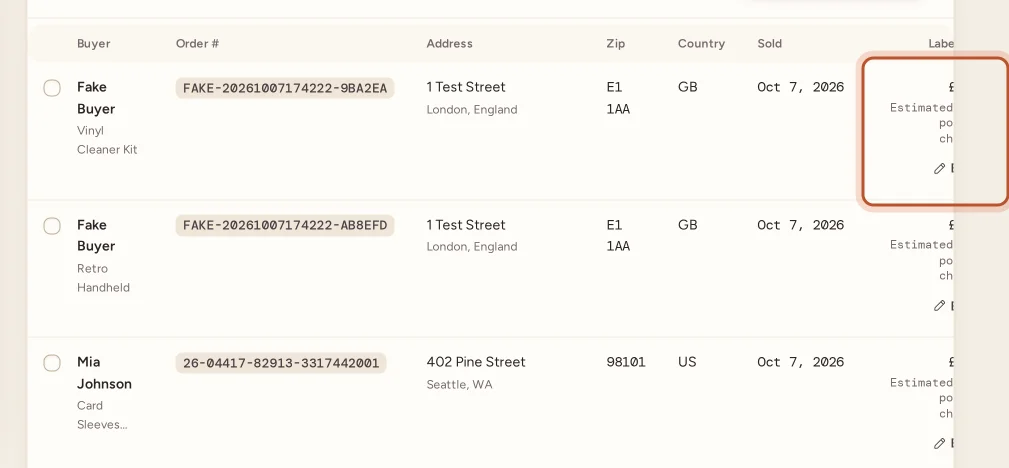
Guesses (the estimate and an unchecked automatic share) show in amber on the Shipping page and in the app, so you can see at a glance which parcels still need a real figure.
eBay Labels: automatic
If you buy your labels on eBay, you do not need to do anything. eBay records each label as a charge in its finance data, and ProfitClerk reads that data on every sync. The label lands on the order it was bought for and replaces the estimate. A voided label that eBay credits back comes off that order's label cost again. See eBay Labels bought one at a time.
eBay Labels bought in bulk
When you buy many labels at once, eBay sometimes posts the whole purchase as one charge on a single order, or on no order at all. ProfitClerk spots these, works out which orders were shipped with it and shares the cost over them. You can check and change the shares under Shipping › Label charges to check. See eBay Labels bought in bulk.
Labels from another service
If you buy labels through ShipStation, Royal Mail Click & Drop, Pirate Ship or another service, eBay does not know what they cost. Export your shipments from that service and bring them in with Shipping › Import label costs. See Import label costs from a file.
Typing a cost yourself
You can type any parcel's label cost by hand: on the website with Edit in the Label cost column of the Shipping page, or on an order's page under Label and packaging; in the app from Sales › To ship or the order's Postage and packaging. Clearing the box sends it back to automatic. See Type or clear a parcel's label cost.
Which source wins
When more than one source has a figure for the same parcel, ProfitClerk uses this order:
- A cost you typed or imported. Syncs never change it.
- eBay's own label total for the order, where eBay provides it for your account.
- The order's own eBay Labels charges, with any bulk purchase eBay stamped on it taken out, plus its share of bulk purchases.
- The postage the buyer paid, as an estimate.
Where the label cost shows
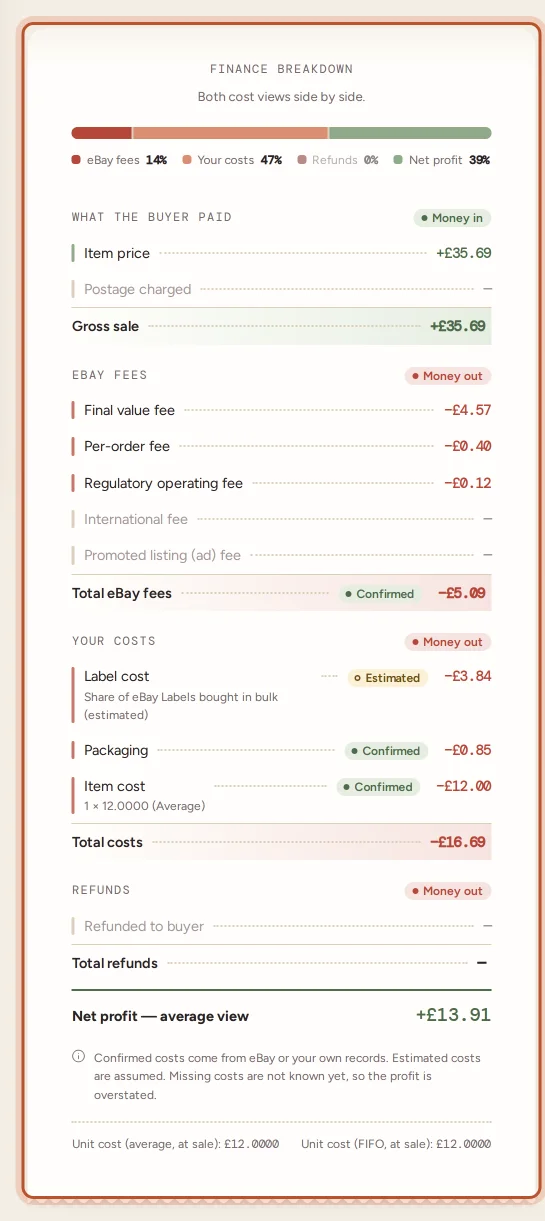
- Order page: in the profit breakdown under Your costs, as Label cost, with a chip saying whether it is confirmed or estimated.
- Shipping page (website) and To ship (app): one figure per parcel with its source.
- Profit and loss: all your sales' label costs together as Postage labels.
- Orders export (CSV): the Label Cost and Label Cost Source columns.
Parcels with several items
eBay charges a label per parcel, but one eBay order can hold several items. ProfitClerk shares the parcel's label cost over its items by each item's share of the sale, so every line's profit carries its part. When you type a parcel's cost on the Shipping page, it is shared the same way.
Questions people ask
Why does a label cost show in amber?
Amber means it is a guess. Either no real label cost is known yet and the postage the buyer paid is used instead, or it is an automatic share of a bulk eBay Labels purchase that you have not checked.
Will a sync overwrite a label cost I typed in?
No. A cost you typed or imported is kept as it is. eBay's data only ever replaces estimates and costs that came from eBay Labels.
I don't use eBay Labels. How do I get real label costs in?
Import the export from your shipping service on the Shipping page, or type each parcel's cost by hand. Until then, the postage the buyer paid stands in as an estimate.
What happens on an order with several items?
The parcel's label cost is shared over its items by each item's share of the sale, so each line's profit carries its fair part.
Is the label cost an eBay fee?
No. ProfitClerk shows eBay Labels postage as your label cost under Your costs, not as an eBay fee, so your fees report shows only real selling fees.
Thanks for telling us.