Label cost looks wrong? How to fix it
A label cost that is zero, too high, the same as the postage charged or missing? Find the cause in ProfitClerk and the quickest way to put it right.
Start with the small text under the label cost: it says where the figure came from. Most wrong label costs are an estimate that has not been replaced yet, a bulk eBay Labels purchase sitting on one order, or a cost typed in earlier. Each has a quick fix below.
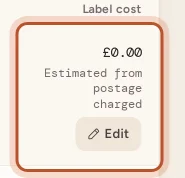
You can see the source on the website's Shipping page (Label cost column), on the order's profit breakdown, and in the app under Sales › To ship.
It says "Estimated from postage charged"
No real label cost is known, so the postage the buyer paid is used instead. It is shown in amber.
- You bought the label on eBay: eBay may not have recorded the charge yet. Wait for the next sync, or open the order and press Refresh finance entries.
- You bought it elsewhere: import your labels, see Import label costs from a file, or type the cost, see Type or clear a parcel's label cost.
- Free postage: the estimate is zero, so the profit is too high until the real cost is in.
One order has a huge label cost
If one order carries far more than one parcel could cost, eBay probably posted several labels bought together on it.
- Open Shipping › Label charges to check (in the app, the tag icon in To ship).
- Look for the charge under To check or Shared automatically.
- Share it over the orders it was for, or say it was one label.
If the charge is not listed, it may not have looked large enough to flag. Type each parcel's real cost on the Shipping page, or import eBay's transaction report. See eBay Labels bought in bulk.
A label cost dropped back to an estimate
When ProfitClerk decides a charge on an order is really a bulk purchase, it takes it off that order and the order goes back to its estimate while the right orders are found. Check Label charges to check for the charge.
It says "Share of eBay Labels bought in bulk (estimated)"
The order carries an automatic share of a bulk purchase, worked out from the postage each buyer paid. It is close but not exact. Open the purchase from the order page (See the purchase), check the shares and press Save and confirm or Accept these shares.
It says "Entered by you" or "Imported from …"
Someone typed this figure or brought it in from a file, and syncs never change it. If it is wrong:
- Typed: change it, or clear it to go back to automatic.
- Imported: undo the import under Shipping › Import label costs › Recent label imports, or fix the parcel by hand. An import does not replace these unless you tick Also replace label costs from eBay Labels, entered by hand or imported before.
The order has several items and each shows part of the label
That is expected. One eBay order is one parcel, so its label is shared over its items by each item's share of the sale. The Label cost on the Shipping page is the total for the parcel.
A voided label is still counted
The label comes off when eBay credits it back. Until the credit shows in eBay's finance data, the charge stays. If you voided a label from a bulk purchase, the credit joins the purchase and its shares are worked out again; a share you had confirmed goes back to To check.
Still not right?
Compare the order with the label in eBay Seller Hub. If eBay's figures differ from what ProfitClerk shows after Refresh finance entries, type the right cost on the Shipping page and contact us from the Contact page with the order number.
Questions people ask
Why does one order have a label cost much bigger than the postage?
Most often it is a bulk eBay Labels purchase that eBay posted on one order. Check Shipping › Label charges to check; if it is there, share it over the right orders.
Why is the label cost zero?
The order had free postage and no real label cost is known yet, so the estimate is zero. Buy the label on eBay, import it, or type it in.
I typed a cost but now want eBay's figure back. How?
Clear the label cost on the Shipping page or the order and save. The parcel goes back to automatic.
My label was voided but the cost is still there. Why?
The cost comes off when eBay credits the voided label back in its finance data. Once the credit appears, the next sync takes it off.
Why are my orders' label costs right but the total for one payout looks odd?
A bulk label purchase sits in your payout as one charge, while ProfitClerk shares it over the orders it was for. The total is the same; only where it sits differs.
Thanks for telling us.