Record return postage you paid
When a buyer sends an item back and you pay the return postage, record it on the order in ProfitClerk so the sale's profit and your profit and loss include it.
When a buyer sends an item back and you pay for the postage outside eBay, record it with the return. Open the order, press Record a return and fill in Return postage you paid. It comes off that sale's profit as Return postage.
Which return postage to record
- Paid outside eBay: for example a return label you bought from a carrier and sent to the buyer. Record it.
- Bought on eBay: a return label bought through eBay is an eBay Labels charge on the order. ProfitClerk already has it in the order's label cost, so do not record it again.
If the buyer paid for the return themselves, there is nothing to record; leave the box empty.
Record a return on the website
- Open the order from Orders.
- Find the Returns card and press Record a return.
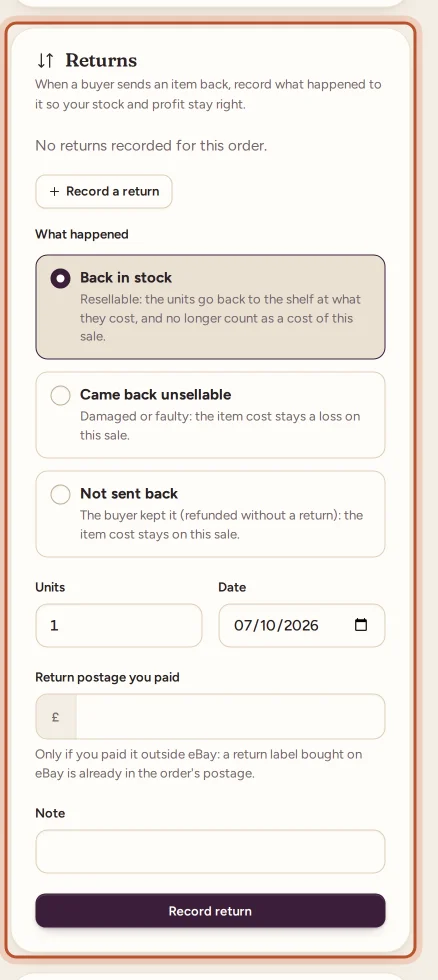
- Under What happened, choose:
- Back in stock: resellable; the units go back to the shelf at what they cost and no longer count as a cost of this sale.
- Came back unsellable: damaged or faulty; the item cost stays a loss on this sale.
- Not sent back: the buyer kept it; the item cost stays on this sale.
- Set Units and the Date.
- Type Return postage you paid.
- Add a Note if you like, then press Record return.
The return is listed on the card with its units, what happened and the return postage.
Record a return in the app
- Open the order from Sales.
- Tap Record a return.
- Choose What happened, the units and the date, then fill in Return postage you paid.
- Save.
Where it shows
- On the order: Return postage appears under Your costs in the profit breakdown, and the net profit goes down by that amount.
- Profit and loss: all return postage for the period, as Return postage, by the date you gave the return.
- The order list: you can filter Orders to Returns recorded to see every order with a return.
If you record more than one return on the same order, their return postage is added together.
Orders with several units
When a buyer bought several units and sends back only some, record just those units. You can record more returns on the same order later, up to the number of units sold; once every unit has a return, the card says so. Each return can have its own outcome and its own return postage, so one unit back in stock and another unsellable is no problem.
Refunds are separate
Recording a return does not change the refund. The money you refunded to the buyer comes from eBay's finance data and shows as Refunded to buyer under Refunds. Recording the return adds what happened to the item and what you paid to get it back.
Undo a return
Press Undo next to the return on the order and confirm. Its return postage comes off the order again. Units that went back in stock are taken out again; if they have already sold again, the return cannot be undone.
Questions people ask
I bought the return label on eBay. Do I record it?
No. A return label bought on eBay is an eBay Labels charge on the order, so it is already in the order's label cost. Only record return postage you paid outside eBay.
Where does return postage show?
On the order, as Return postage under Your costs, and in your profit and loss as Return postage for the period of the return's date.
Does recording a return also record the refund?
No. Refunds come from eBay's own data. Recording a return tells ProfitClerk what happened to the item and any return postage you paid.
I recorded the wrong amount. How do I fix it?
Press Undo next to the return on the order, then record it again with the right figure.
Thanks for telling us.