Postage the buyer paid vs postage you paid
See how ProfitClerk treats the postage the buyer paid as part of the sale and your label cost as a cost, so you can spot when postage loses you money.
ProfitClerk keeps the two apart. The postage the buyer paid is part of the sale, shown as Postage charged. What the label really cost you is a cost, shown as Label cost. The difference between them is what you made or lost on postage for that order.
How an order shows it
Open any order. The profit breakdown is laid out like a receipt:
- What the buyer paid: Item price and Postage charged, adding up to the Gross sale.
- eBay fees: the fees eBay charged on the sale.
- Your costs: Label cost (with where it came from), Packaging, Item cost, and any Return postage.
- Refunds: anything refunded to the buyer.
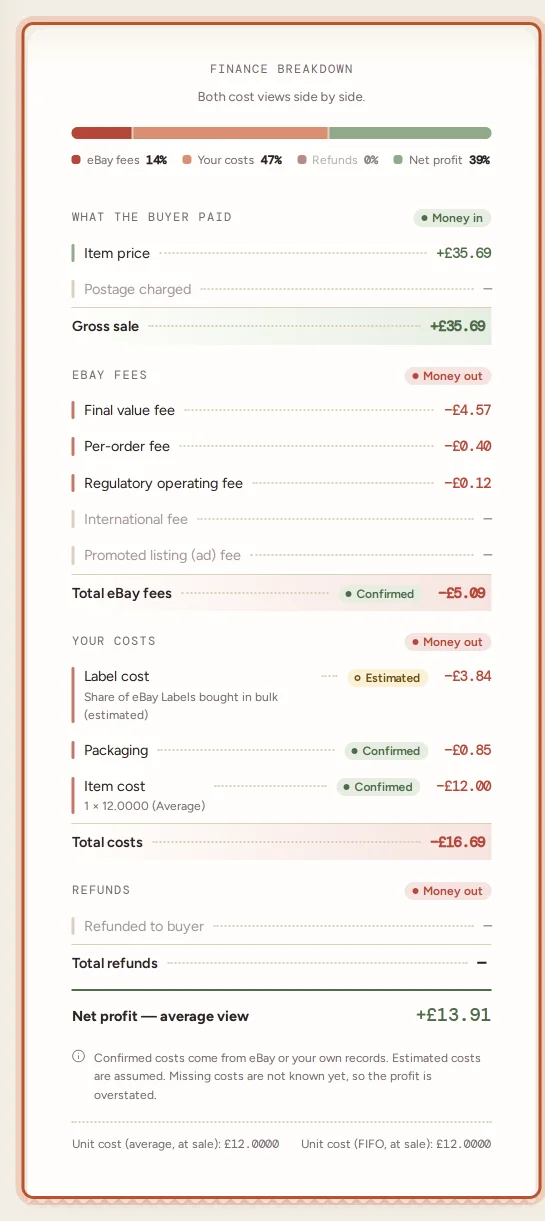
So if a buyer paid £3.20 for postage and your label cost £2.85, the order is 35p better off on postage, before packaging.
When the label cost is an estimate
Until the real label cost is known, ProfitClerk assumes the label cost what the buyer paid for postage. The order shows Estimated from postage charged in amber, and the label chip says it is estimated.
That keeps the profit close on most orders, but it hides any gain or loss on postage. It is most wrong when:
- You offer free postage. The buyer paid nothing, so the estimate is zero and the profit is too high until the real cost comes in.
- Your postage charge is a flat rate that does not match what labels really cost.
- You combine several orders in one parcel.
To replace the estimate with the real figure:
- Buy labels on eBay; they come in automatically. See eBay Labels bought one at a time.
- Import your labels from another service. See Import label costs from a file.
- Type the cost yourself. See Type or clear a parcel's label cost.
When the postage charged on an order changes on eBay, an estimated label cost follows the new postage charged. A real label cost stays as it is.
Across a period
- Profit and loss: your Sales include the postage buyers paid. Postage labels and Packaging are listed under Costs, and Return postage too when you recorded any. Comparing them shows whether postage pays for itself.
- Orders export (CSV): the Postage Charged, Label Cost, Label Cost Source and Packaging columns let you work it out order by order in a spreadsheet.
- Breakdowns report: the average sale price there is per unit and includes the postage the buyer paid.
Free postage and eBay fees
On free postage listings, the item price has to pay for the label. When you set prices, the deal calculator lets you enter the postage the buyer pays and your label cost separately, so you can see the break-even price either way. See The free eBay fee and deal calculators.
Questions people ask
Is the postage the buyer paid counted as income?
Yes. It is part of what the buyer paid, shown as Postage charged in the order's breakdown and included in your sales. Your label cost is then taken off as a cost.
Why is my label cost exactly the same as the postage charged?
No real label cost is known yet, so ProfitClerk uses the postage the buyer paid as an estimate. It shows in amber as Estimated from postage charged until eBay Labels, an import or you give the real cost.
I offer free postage. What label cost is used?
With free postage the buyer paid nothing, so the estimate is zero and the profit is overstated until the real label cost arrives. Buy on eBay Labels, import your labels or type the cost.
How can I see if postage is losing me money?
Compare Postage charged with Label cost and Packaging on an order. Across a period, compare your sales with Postage labels and Packaging in the profit and loss.
Thanks for telling us.