Add packaging costs to your sales
Add what boxes, mailers and padding cost to each eBay sale in ProfitClerk, by hand or from a spreadsheet, so every order's profit includes its packaging.
Packaging is a cost of each sale that eBay never sees, so ProfitClerk lets you add it yourself. Type it on the order's page under Label and packaging, in the app under Postage and packaging, or bring it in for many orders at once with a spreadsheet. It then comes off that sale's profit as Packaging.
What packaging covers
Anything that went into the parcel: boxes, mailers, bubble wrap, tape, tissue, labels you printed on your own printer, a thank-you card. A rough average per order is fine; many sellers use one figure for small parcels and another for large ones. To find your figure, divide what you spent on supplies last month by the number of parcels you sent.
The postage label itself is separate. See How label costs get onto your sales.
Add packaging to one order (website)
- Open the order from Orders.
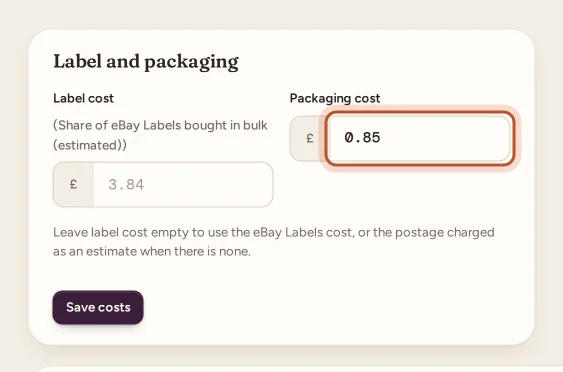
- Under the profit breakdown, find Label and packaging.
- Type the amount in Packaging cost.
- Leave Label cost empty if you want the label to stay automatic (eBay Labels, or the postage estimate).
- Press Save costs. The message shows the new net profit.
Add packaging in the app
- Open the order from Sales.
- Tap Postage.
- Type the amount in Packaging and tap Save.
Add packaging to many orders at once
Use Orders › Import costs on the website. Besides the item cost, your spreadsheet can have a Packaging cost column (and a Postage label cost column). Map it on the column step, check the preview and apply. You can undo the import afterwards.
Where packaging shows
- Order page: a Packaging line under Your costs, marked confirmed, as you entered it.
- Profit and loss: all your sales' packaging together as Packaging, next to Postage labels.
- Orders export (CSV): a Packaging column.
- Tax centre exports: packaging appears as its own kind of cost in the journal.
A sale with no packaging simply has none; the profit is not marked as uncertain because of it.
Packaging as an expense instead
If you buy supplies in bulk and do not want to add them order by order, record the purchase under Expenses with the category Packaging and shipping supplies. It then comes off your profit in the profit and loss for the period you bought it, rather than on each sale.
Packaging and the deal calculator
When you check a buy before you make it, the deal calculator has its own Packaging box, so the break-even price and the most you can pay include it. See The free eBay fee and deal calculators.
Questions people ask
Does ProfitClerk add packaging automatically?
No. eBay knows nothing about your packaging, so it is 0 until you add it on the order or import it from a spreadsheet.
Should I add packaging per order or as an expense?
Choose one. Per order gives each sale its true profit; a bulk purchase of supplies in Expenses is simpler. Doing both counts the same packaging twice.
Does changing packaging change my label cost?
No. Packaging is saved on its own. On the website, leaving the label box empty keeps the label automatic while you change packaging.
Where does packaging show in my reports?
On each order under Your costs, as Packaging in your profit and loss, and in the Packaging column of the orders export.
Thanks for telling us.