eBay Labels bought in bulk
eBay can post a bulk label purchase as one charge on a single order. See how ProfitClerk finds these, shares them over the right orders and how you check them.
If you buy several eBay Labels at once, eBay sometimes posts the whole purchase as one charge on a single order, or on no order at all. ProfitClerk spots these charges, finds the orders that were shipped with them and shares the cost over those orders. You check the result under Shipping › Label charges to check.
Why this matters
Without this, one order would carry the labels for ten parcels and show a big loss, while the other nine would look more profitable than they are. Your totals would still be right, but every one of those orders would be wrong.
How ProfitClerk spots a bulk purchase
After every sync, each new eBay Labels charge is looked at once. A charge is treated as a possible bulk purchase when:
- eBay names several orders in it. It is shared over those orders straight away.
- It is several times your usual eBay label, or far more than the postage the buyer paid. Your usual label is worked out from your own recent orders that had one label.
- eBay posted several label charges on the order at the same moment.
- It was posted on no order. These are always held for you to check.
A charge that is clearly too large for one parcel is taken off the order at once, so that order goes back to its postage estimate while the right orders are found.
How the orders are found
ProfitClerk reads, from eBay, when your recent orders were shipped (this uses read-only access). The order the charge was posted on gives the time of the purchase. Orders of the same eBay account that were sold in the weeks before, have no label of their own and were shipped within a few minutes of it are taken as the batch.
The charge is then shared by postage paid: each order carries a part in line with the postage its buyer paid. Orders with free postage get the average of the others; if every order had free postage, the charge is shared equally. Odd pennies go where the rounding left the most, so the shares always add up exactly.
If the result looks like one label per order, it is applied by itself and the charge goes under Shared automatically. If it does not look right, nothing is shared and the charge waits under To check, with the orders shipped around then suggested.
Orders whose label cost you typed or imported are never touched.
Where you check them
On the website, open Shipping and choose Label charges to check. A banner on the Shipping page tells you when charges are waiting, and the weekly profit email lists them too.

In the app, open Sales, tap the truck icon for To ship, then the tag icon.
The list has three tabs:
- To check: charges that could not be shared out safely. Their amount is on no order yet.
- Shared automatically: charges ProfitClerk shared by itself. The shares are on the orders, as estimates shown in amber.
- Done: charges you checked, kept as one label, or that eBay voided.
Checking a charge
Open a charge to see why it was flagged, and the orders under Which orders was it for? with the buyer and items, Postage paid, when it was Shipped, its Label now and its Share.
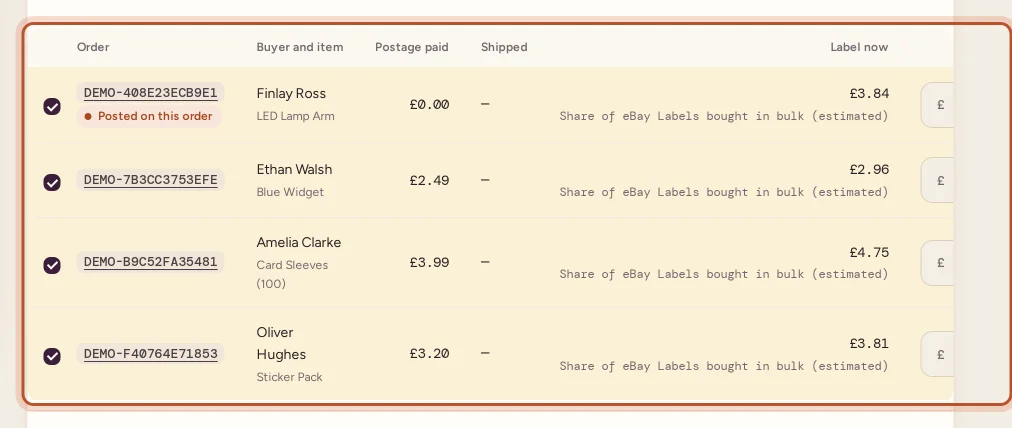
- Tick the orders the charge was for. The order eBay posted it on is marked Posted on this order; orders shipped near the time are marked Shipped around then.
- If an order is missing, search for it under Find an order by order number, buyer or item, and press Add.
- Press Share by postage paid or Share equally, or type each share yourself.
- Watch the total: it says Left to share or Too much by until it Adds up to the charge.
- Press Save and confirm. The orders' profits are worked out again at once.

Shares must add up to the charge to the penny, and an order can only carry a share of one bulk purchase.
Other choices
- Accept these shares: for an automatic share that looks right, confirms it as it is.
- It is one label for order …: the whole charge was really for that order. It goes back on it in full.
- Leave it on no order: for a charge eBay posted on no order. It stays in your payout totals only.
- Back to automatic: clears your shares and looks for the orders again.
Voided labels in a bulk purchase
If you void a label from the purchase and eBay credits it back, the credit joins the charge. An automatic share is worked out again; a share you confirmed goes back to To check so you can adjust it. If every label was voided, the charge is marked voided.
Questions people ask
Why did one order get a huge label cost on eBay?
When you buy labels in bulk, eBay sometimes posts the whole purchase as one charge on just one of the orders, or on no order. ProfitClerk takes it off that order and shares it over the orders shipped with it.
Are the automatic shares exact?
No, they are an estimate. ProfitClerk shares the charge by the postage each buyer paid, which is close but not exact. Check them and change any share you know better, then confirm.
Do I have to check every bulk purchase?
Only those under To check need you. Ones under Shared automatically are already on their orders as estimates; check them when you have a moment so they count as real costs.
What if the charge really was one expensive label?
Open it and choose It is one label for order, followed by the order number. The whole amount goes on the order eBay posted it on.
Can I undo my shares?
Yes. Back to automatic clears your shares and looks for the orders again from eBay's shipment data.
Where does a charge on no order go if I leave it?
Choose Leave it on no order. It stays in your payout totals but is not on any order's profit.
Thanks for telling us.