eBay Labels bought one at a time
When you buy postage labels on eBay one at a time, ProfitClerk puts each label's real cost on its order automatically, including voids and multi-item parcels.
When you buy a postage label on eBay, eBay records it as a charge against that order in its finance data. ProfitClerk reads that data on every sync and puts the label's real cost on the order for you, marked From eBay Labels. You do not need to type or import anything.
How it works
- You sell an item. Until a label is bought, ProfitClerk uses the postage the buyer paid as an estimate (Estimated from postage charged, shown in amber).
- You buy the label on eBay. eBay records a shipping label charge for the order.
- On the next sync, ProfitClerk reads the charge from eBay's finance data and replaces the estimate with the real cost.
- The order's profit is worked out again straight away, and the label cost chip turns to confirmed.
Syncs run on their own every 15 minutes. To pick up a label sooner, press Sync now, or open the order and press Refresh finance entries.
What counts as an eBay Labels cost
- Each label bought for the order. If you bought two labels for one order (for example a replacement), they are added together.
- Voided labels. When you void a label and eBay credits it back, the credit comes off the order's label cost.
- Return labels bought on eBay. They are eBay Labels charges on the order too, so they are already in its postage. Do not add them again as return postage.
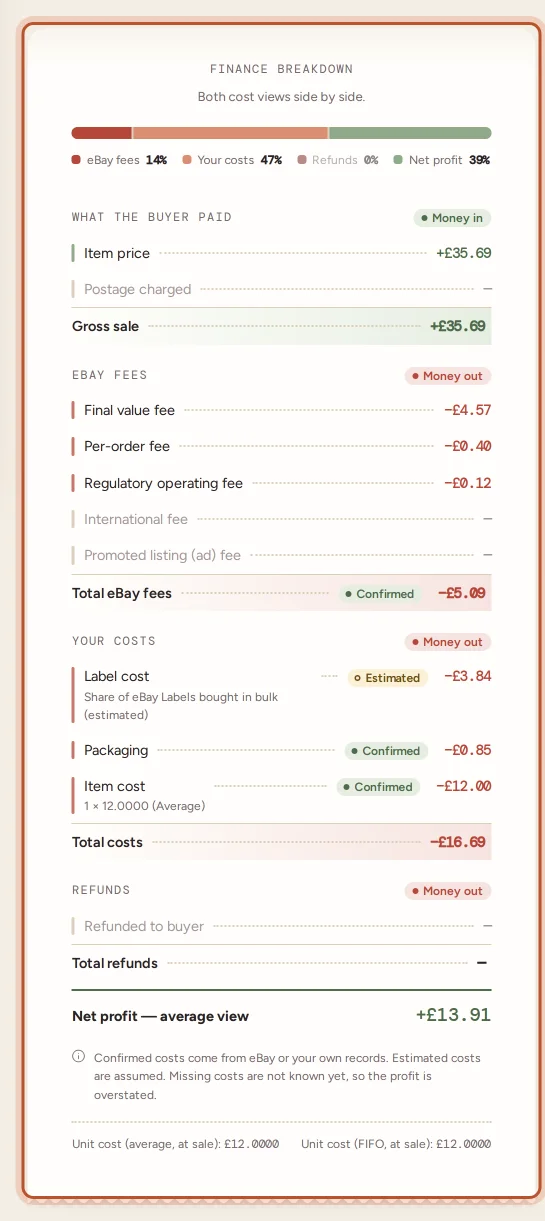
eBay Labels postage is a cost of sending the parcel, not a selling fee, so ProfitClerk shows it under Your costs as Label cost and keeps it out of eBay fees and the fees report.
Orders with several items
One eBay order can hold several items in one parcel. eBay charges one label for the parcel, so ProfitClerk shares its cost over the items by each item's share of the sale. A £20 item and a £5 item in one parcel carry four fifths and one fifth of the label.
When eBay's figure is not used
A label cost from eBay Labels is used unless something more certain is known:
- You typed or imported a cost for that parcel. Your figure always wins, and syncs never change it. Clear it to go back to eBay's figure; see Type or clear a parcel's label cost.
- The charge looks like a bulk purchase. If one label charge is several times your usual label, or eBay posted several label charges on the order at the same moment, it is probably labels for several orders bought together. ProfitClerk takes it off the order (which goes back to its estimate) and shares it over the right orders or asks you to check it. See eBay Labels bought in bulk.
Checking a label cost
- On the website, open Shipping: the Label cost column shows each parcel's cost and From eBay Labels under it.
- In the app, open Sales, then the truck icon for To ship.
- On an order's page, the profit breakdown lists Label cost under Your costs.
If the figure looks wrong, compare it with the label in eBay Seller Hub. Pressing Refresh finance entries on the order reads its finance data again.
Questions people ask
How soon does an eBay label cost appear on the order?
On the next sync after eBay records the charge. Syncs run every 15 minutes, and you can also press Sync now or Refresh finance entries on the order page.
I voided a label. Does the cost go away?
Yes. When eBay credits a voided label back, the credit comes through eBay's finance data and is taken off that order's label cost.
Why does my label still say Estimated from postage charged?
eBay has not recorded a label charge for the order yet, or the label was bought somewhere else. Wait for the next sync, refresh the order, or type or import the real cost.
Is the eBay label counted as an eBay fee?
No. eBay Labels postage is your label cost and shows under Your costs, not in eBay fees or the fees report.
One single label was much bigger than usual. Why was it not put on the order?
A single charge several times your usual label usually means eBay posted labels for several orders on one order. ProfitClerk holds it under Label charges to check so you can share it out or confirm it was one label.
Thanks for telling us.