Restock an item or correct its quantity
Add a new buy of an item you already stock, or correct how many are on the shelf after a count. See what each does to costs and where changes are logged.
Restock when you buy more of an item you already stock: enter how many you bought and what they cost, and the item's average cost and FIFO lots update. Edit the remaining quantity when the count on your shelf is wrong, after a breakage or a stock take: the number changes but no cost does. Both are logged on the item's page, and neither changes the profit of sales already made.
Restock: you bought more
On the website
- Open the item from Inventory (or click Restock on its row).
- In Restock this SKU, fill in Quantity to add and Total cost of this buy.
- Optionally add Where you bought it and Date bought.
- Check Cost / unit (this buy) and Remaining after.
- Click Restock.
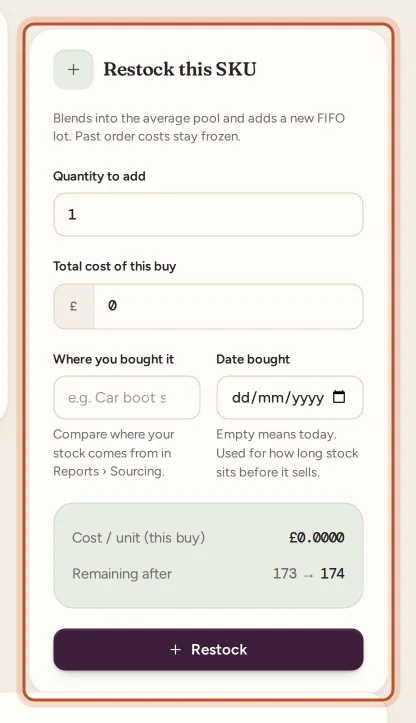
You can also restock from the Add / restock inventory form on the Inventory page: type the existing SKU and ProfitClerk says "Restocking … — 3 left, becomes 13" before you save.
In the app
Open the item in Stock, tap Restock, enter Units bought, Total paid, where you bought it and Bought on, then tap Restock. Or use + › Stock with the same SKU.
What a restock does
- Remaining and Ever bought go up by the units added; Total cost paid (ever) goes up by the cost.
- The average cost blends the new buy in: (units on hand × current average + cost of this buy) ÷ (units on hand + units added).
- A new FIFO lot opens at this buy's cost per unit, behind the older lots.
- Past sales keep their costs. See how item costs flow into profit.
Restocking an item you already have never counts against your plan's SKU limit.
Correct the quantity: the count is wrong
On the website
- Open the item and click Edit details (or the pencil on its Inventory row).
- Under Stock count, change Quantity remaining.
- Add a Note for remaining change, for example "Stock count correction" or "damaged unit".
- Click Save changes.
The message confirms the change, for example "Remaining 5 → 3 (logged; FIFO adjusted; past profits unchanged)".
In the app
Open the item, tap Edit, change Units on hand ("Changing this keeps past profit as it is."), add Why it changed and tap Save.
What a correction does
- Lower: the units come off the oldest lots first, like a sale, but no sale or cost is recorded.
- Higher: the units join the newest lot that still has units, at that lot's cost. If every lot is used up, they go into a new lot at a cost of zero.
- The average cost, Qty purchased (lifetime) and Total cost paid (lifetime) do not change; those two are locked on the edit page ("Locked — use Restock").
- Past sales are not touched.
Where changes are logged
On the item's page, pick a Month and Year and click Apply to see that month's:
- Restock history: each buy with units, cost per unit, the average after it, units left, where it came from, and Returned by a buyer for units a return put back;
- Remaining quantity adjustments: When, Type (Increase or Decrease), Before, Change, After and your Note;
- Month costs: units added, purchase average, units sold and the cost used on them.
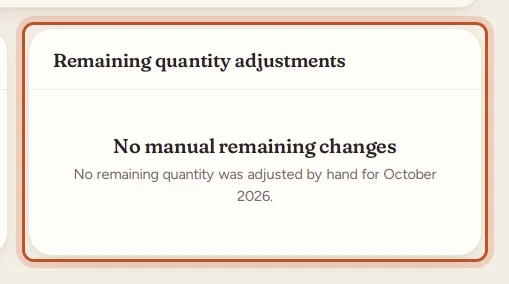
In the app, the item's page lists Restocks and Changes by hand. Corrections also appear in the Product timeline as "Stock adjusted by …".
Other changes on the edit page
Edit details also lets you change the SKU, Product name, Storage location, and the item's Category, Brand and Label. See categories, brands and labels. Changing the SKU affects which future sales match the item; past sales keep their costs.
Questions people ask
Does restocking change the profit of sales I already made?
No. Past sales keep the cost they had when they sold. A restock only changes the cost of sales from now on.
What is the difference between Restock and changing Remaining?
Restock records a real buy: more units and what they cost. Changing Remaining corrects the count only and never changes any cost. For units that broke, went missing or were given away, use Write off stock, which records what they cost.
Why can I not edit Qty purchased or Total cost paid?
They are the item's lifetime totals and are locked so your costs stay consistent. Real buys go through Restock; a wrong count goes through Remaining.
Where can I see past restocks and corrections?
On the item's page, under Restock history and Remaining quantity adjustments, month by month. In the app, the item's page lists Restocks and Changes by hand.
What cost do units added through Remaining get?
They join the newest lot that still has units, at that lot's cost. If no lot has units left, they are added at a cost of zero, so record a real buy with Restock instead when you paid for them.
Thanks for telling us.