Your lot purchases list and fixing a lot
See every job lot you recorded in ProfitClerk, what was in it and each item's share of the price, and learn how to correct a lot entered with a mistake.
Lot purchases lists every job lot you recorded with Buy a lot: when you bought it, where, how the price was shared, which items it contained with each item's share, and what you paid in total. Open it from Inventory › Lot purchases on the website, or Job lots on the app's Stock tab.
Open the list
- Website: go to Inventory and click Lot purchases at the top. Buy a lot there records a new one.
- App: on the Stock tab, tap Job lots ("Lot purchases"). Tap Buy a lot to add one.
What each lot shows
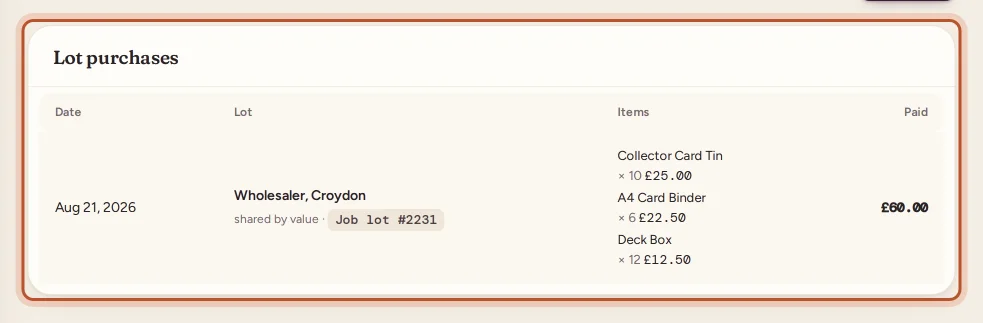
| Column | What it shows |
|---|---|
| Date | The date you bought the lot |
| Lot | Where you bought it (or Not recorded), how the price was shared (shared by value, shared evenly or costs entered) and the receipt or lot number |
| Items | Each item with its quantity and its share of the price; the name links to the stock item |
| Paid | The total you paid for the lot |
In the app, each lot shows its total, the number of units and, for each item, its SKU, quantity and cost per unit.
Fixing a lot entered with a mistake
A saved lot cannot be edited or deleted as a whole: it is the record of a purchase, and its items may already have sold. Instead, correct what it created.
A wrong quantity
You entered 6 units of something but there were 5.
- Click the item in the lot's row to open it.
- Click Edit details, lower Quantity remaining by the difference and add a note such as "Job lot miscount".
- Click Save changes.
The item's cost per unit is not changed by this. See restock or correct quantities.
A wrong SKU
If you typed a SKU that does not match the eBay listing, its sales will be unmatched. Open the item, click Edit details and correct the SKU. See match sales to your stock.
A wrong price or split
If the total or the shares were wrong, the item costs are off. What to do depends on whether the items have sold:
- Sales already made keep the cost they had when they sold. Correct each one on Orders with Edit in the Cost column.
- Units still on the shelf: to start the item again with the right cost, lower its Quantity remaining to 0 with a note, then Restock it with the right quantity and cost. Its average cost and FIFO lots then follow the new buy.
An item that should not be there
If the lot created a new item by mistake and nothing of it has sold, open the item and use Delete. If it has sold, keep it and lower its quantity instead, so its sales keep their stock item.
How lots appear elsewhere
- Stock item page: each lot line appears in the item's Restock history, with where it came from, and as a new FIFO lot.
- Sourcing report: the lot's spend counts towards the place you bought it.
- Product timeline: the units appear as sourced or restocked on the date you bought the lot.
To record a new lot, see job lots.
Questions people ask
Can I edit or delete a job lot after saving it?
Not as a whole. A saved lot is a record of what you bought. Correct the items it created instead: their count with Edit, a wrong sale cost on Orders, or remove an item you added by mistake.
Where do I find the items from a lot?
Each item in the lot's row is a link to its stock item page. Its restock history shows the lot's units and their share of the cost.
Why does a lot say Not recorded?
You did not fill in Where you bought it when saving the lot. The lot list shows Not recorded in its place.
Who can record lots?
Owners and managers. Team members with view-only access can see the list.
Thanks for telling us.