Job lots: one price for several items
Record a job lot, auction box or house clearance in ProfitClerk: enter the price once and share it across the items by resale value, evenly or by hand.
A job lot is one price paid for several different items: a box at auction, a house clearance or a bundle from a seller. In ProfitClerk, record it once with Buy a lot, list what was in it, and choose how the price is shared. Each item is then added to your stock at its share of the cost, so every sale shows a fair profit.
Record a job lot on the website
- Go to Inventory and click Buy a lot.
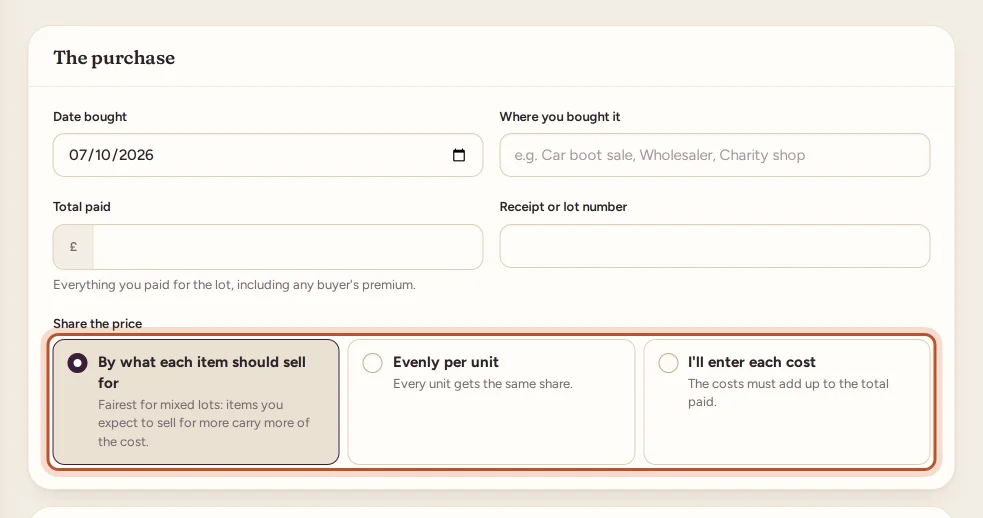
- Under The purchase, fill in:
- Date bought;
- Where you bought it (optional): feeds the Sourcing report;
- Total paid: everything you paid for the lot, including any buyer's premium;
- Receipt or lot number (optional).
- Under Share the price, choose one:
- By what each item should sell for: items you expect to sell for more carry more of the cost.
- Evenly per unit: every unit gets the same share.
- I'll enter each cost: the costs must add up to the total paid.
- Under What was in it, add a row per item with its SKU, the Item name and the Qty. When sharing by value, fill in Sells for (each). Use Add an item for more rows.
- Watch the Cost of each row and the line Shared out: … of … at the bottom; it turns green when the shares match the total.
- Add Notes if you like and click Save purchase.
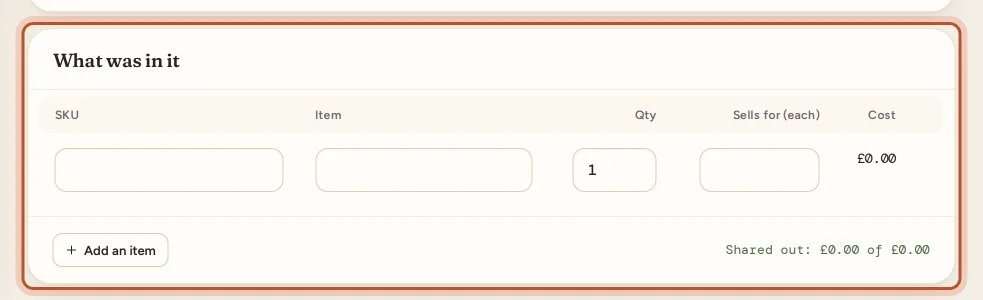
As you type a SKU, the row says New item or, for something you already stock, In stock: adds … more.
Record a job lot in the app
- Tap + on the Stock tab and choose A job lot ("One price for several items").
- Fill in The purchase: Bought on, where you bought it, Total paid and the Receipt or lot number.
- Choose Share the price: By what each sells for, Evenly per unit or I'll enter each cost.
- Under What was in it, add each item's SKU, Product name, Quantity and, when sharing by value, Sells for (each). Each item shows Its share.
- Tap Save purchase.
How the price is shared
By what each item should sell for
Each item's weight is its expected price × its quantity. The total paid is split in proportion.
Example: you pay 60.00 for a box with 1 coat you expect to sell for 50.00, 2 shirts at 15.00 each and 4 ties at 5.00 each. The weights are 50, 30 and 20 (100 in all), so:
| Item | Weight | Share of 60.00 | Cost per unit |
|---|---|---|---|
| Coat × 1 | 50 | 30.00 | 30.00 |
| Shirts × 2 | 30 | 18.00 | 9.00 |
| Ties × 4 | 20 | 12.00 | 3.00 |
You need an expected price on at least one item. An item with none gets no share, so fill in every row.
Evenly per unit
The total paid ÷ the number of units. The same 60.00 over 7 units is about 8.57 each, so the coat would carry the same cost as a tie.
I'll enter each cost
Type each row's Cost yourself. If they do not add up to the total paid, ProfitClerk tells you by how much and does not save until they match.
Shares are worked out to the penny, with any odd pennies going to the rows with the largest remainders, so they always add up exactly to what you paid.
What saving does
- Each row becomes a stock purchase of that SKU at its share: a new item for a new SKU, or a restock of an item you already have.
- Each one is a new FIFO lot on the item, and blends into its average cost like any restock. See how item costs flow into profit.
- New SKUs count towards your plan's SKU limit; restocking existing ones never does.
- The lot is listed under Lot purchases. See your lot purchases.
To compare what you paid with what you can make before you buy, try the deal calculator under Deal calculator in the sidebar.
Questions people ask
Which way of sharing the price should I choose?
By what each item should sell for is the fairest for mixed lots: items worth more carry more of the cost. Evenly per unit suits lots of similar things. Enter each cost yourself when you know them.
What happens to an item I leave Sells for empty?
When sharing by value, an item with no expected price gets no share of the cost, so its sales would show no item cost. Give every item a rough price.
Can a job lot include items I already stock?
Yes. Type the existing SKU: the line says In stock and adds the units to that item as a restock at its share of the price.
Do the shares always add up to what I paid?
Yes. Shares are rounded to the penny so they add up exactly to the total paid. If you enter costs by hand, they must add up before you can save.
Is the buyer's premium part of the lot price?
Include it, along with anything else you paid to get the lot, in Total paid. It is then shared across the items like the rest of the price.
Thanks for telling us.