Add a stock item and what it cost you
Add an item to your ProfitClerk stock with its SKU, quantity and total cost, on the website or in the app, so every eBay sale of it shows its real profit.
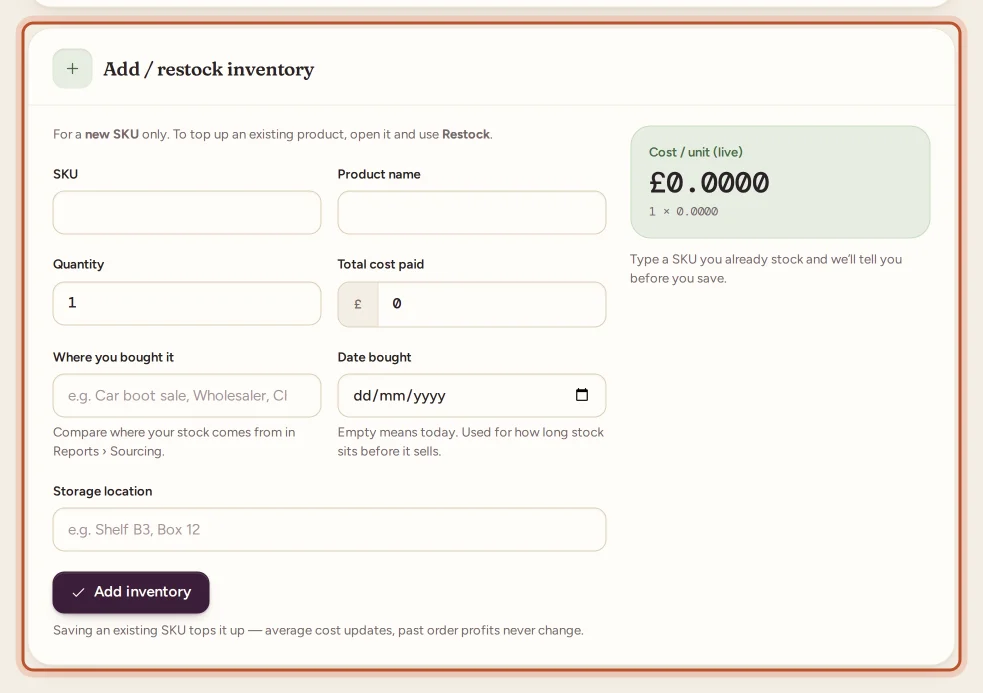
To add stock, go to Inventory on the website and fill in Add / restock inventory with the SKU, product name, quantity and total cost paid, or tap + › Stock in the app. Use the same SKU as your eBay listing: when a sale of it comes in, ProfitClerk takes the units off your stock and uses their cost to work out the profit.
On the website
- Go to Inventory in the sidebar and click Add stock (or scroll down to Add / restock inventory).
- Fill in:
- SKU: the custom label on your eBay listing.
- Product name: how you want the item to appear.
- Quantity: how many units you bought.
- Total cost paid: what you paid for all of them together.
- Optionally add:
- Where you bought it: a shop, car boot sale, wholesaler or auction. It feeds the Sourcing report.
- Date bought: leave it empty for today. It is used for how long stock sits before it sells.
- Storage location: a shelf or box, so the item is quick to find when it sells. The new-sale notification and the To ship list show it.
- Check Cost / unit (live) on the right: the total cost ÷ the quantity, worked out as you type.
- Click Add inventory.
You land on the item's own page, where you can restock it, edit it and see how it sells. See your stock item page.
In the app
- Open the Stock tab and tap +, then Stock ("One item, or more of one you have").
- Fill in SKU, Product name, Quantity and Total cost ("What you paid for all of them, delivery included."). The cost of one unit shows as you type.
- Set Bought on and, if you like, Shelf or location.
- Tap Save inventory.
If the SKU is already in stock, the app says "Already in stock: … Saving adds to it."
What to put in the total cost
The total cost is what one buy of these units cost you. It becomes the item cost of every unit, so include what you want counted against the sales:
- the price you paid;
- delivery or postage you paid to receive them;
- a buyer's premium at auction.
Do not include eBay fees or the postage to your buyers: ProfitClerk takes those from eBay's data on each sale.
Several different items for one price
Bought a box of mixed items for one price? Use Buy a lot instead, so the price is shared out across the items. See job lots.
What happens when it sells
- eBay sends the sale; ProfitClerk finds the item by its SKU.
- The units sold are taken off Remaining.
- Their cost is recorded on the sale, both as an average and FIFO cost, and frozen there.
If a sale's SKU does not match any item, it shows as unmatched with No item cost. See match eBay sales to your stock.
Who can add stock
Owners and managers can add and change stock. Team members with view-only access see the Inventory page without the form. New SKUs count towards your plan's SKU limit; see plans and limits.
Questions people ask
What SKU should I use?
Exactly the custom label (SKU) on your eBay listing. That is how sales find the item and its cost. Capitals do not matter, but every other character does.
Should the total cost include delivery?
Yes, if you want it in your item cost. Enter everything you paid for the units, for example the price plus the delivery you paid to receive them.
What if I type a SKU I already have?
ProfitClerk tells you before you save: Restocking … with how many are left and how many there will be. Saving then adds to that item instead of creating a duplicate.
Is there a limit to how many items I can add?
Your plan sets how many different SKUs you can track. Restocking an item you already have is never limited. See plans and limits.
Can I add stock I bought months ago?
Yes. Set Date bought to the day you bought it, so days to sell and the unsold stock report are right.
Thanks for telling us.