Plans and what each one includes
Compare ProfitClerk plans by eBay accounts, orders a month, SKUs, team seats and the two-year history import, and see how much of your plan you have used.
Every ProfitClerk plan works out profit in exactly the same way. What changes from plan to plan are the limits: how many eBay accounts you can connect, how many orders sync each month, how many SKUs you can keep in stock, how many teammates you can invite, and whether you can import two years of eBay history.
You can see every plan, its limits and your own usage on the Billing page on the website, and under More › Your plan in the app.
What every plan card shows
Each plan card on the website lists the same five rows:
- eBay accounts: how many eBay seller accounts you can connect to the workspace.
- Orders / month: how many orders your plan includes in one calendar month. Each plan also has a margin on top, so a busy month keeps syncing for a while past this number.
- SKUs: how many stock items you can keep in your inventory.
- Team seats: how many teammates you can invite, besides you.
- 2-year history: whether the two-year eBay history import is Included or Not included.
When a limit says Unlimited, there is no cap on that plan. Some plans also list extra features under the limits.
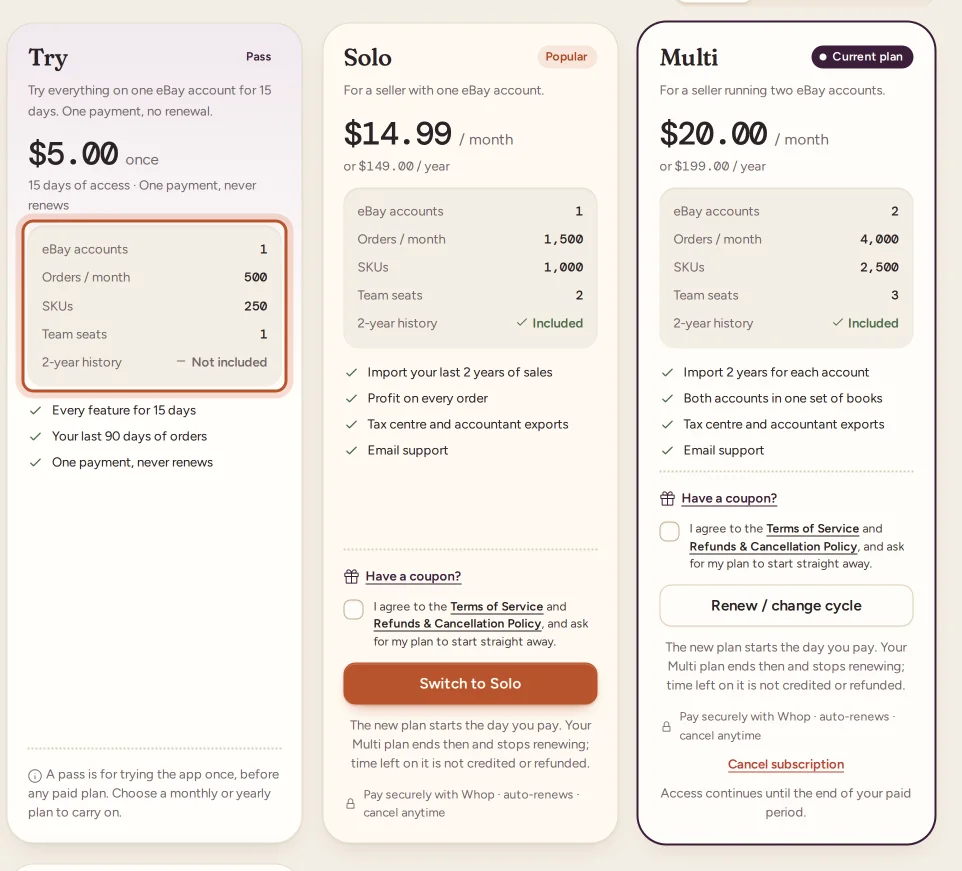
In the app, the plans screen shows the same limits on each plan, for example "eBay accounts: 2", "4,000 orders a month" or "Unlimited SKUs".
Extra eBay accounts
Some plans let you add extra eBay accounts without moving to a bigger plan. When a plan offers them, its card on the website's Billing page has an Extra eBay accounts box with the price of each one and the most you can add.
- Open Billing under Workspace.
- On the plan you want, set Extra eBay accounts to the number you need.
- Choose the plan and pay as usual.
Each extra account is charged with the plan, on the same monthly or yearly payment, and renews with it. Discount codes and offers take money off the plan's price, not the extra accounts. The eBay accounts meter then counts up to the plan's accounts plus your extra ones.
To change the number later, choose your plan again with the new number. It starts straight away and the old payment stops renewing, the same as changing plan (see Changing your plan).
Extra eBay accounts are bought on the website only. A plan bought in the App Store or Google Play comes with the plan's own accounts.
Monthly or yearly
Most plans can be paid monthly or yearly. Use the Monthly / Yearly switch above the plan cards to see both prices. The yearly price shows what it comes to each month and how much you save compared with paying monthly. The limits are the same whichever you choose: a yearly plan still counts orders per calendar month.
The pass is different: it is paid once, lasts a set number of days and never renews.
See how much of your plan you have used
On the website:
- Open Billing in the sidebar under Workspace.
- Look at the card called Usage on the [plan] plan.
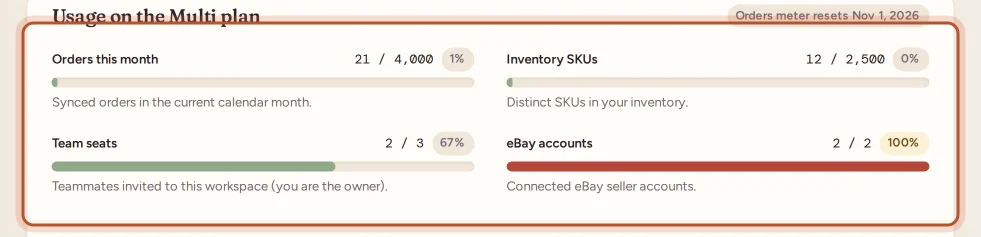
It has a meter for each limit:
- Orders this month: orders synced in the current calendar month. The badge at the top says when the orders meter resets.
- Inventory SKUs: the distinct SKUs in your inventory.
- Team seats: teammates invited to the workspace. You, the owner, are not counted.
- eBay accounts: the eBay seller accounts you have connected, against the plan's accounts plus any extra ones.
Each meter shows the number used, the limit and a percentage. When a meter reaches 80% it turns amber and a note at the bottom of the card tells you that you are close to a limit.
In the app, open More › Your plan. The Usage this month section shows the same four meters, for example "1,240 of 4,000".
What happens when you reach a limit
Reaching a limit never deletes anything. It stops that one thing from growing:
- Past the orders limit, orders keep syncing into the plan's margin. At the end of the margin, new orders stop syncing until the next month or until you move to a bigger plan.
- At the SKU, team seat or eBay account limit, you cannot add another one.
You can read more in What happens when you reach a plan limit.
Which plan is right for you
- If you sell on one eBay account and want to see what ProfitClerk does, start with the pass.
- If you run more than one eBay account, count them first: the eBay accounts row is usually the deciding limit. When a plan fits apart from one or two accounts, extra eBay accounts may be cheaper than the next plan up.
- If you want profit figures for sales you made before you joined, pick a plan where 2-year history says Included.
- If you work with a partner or staff, check Team seats.
You can change plan at any time. Moving to a bigger plan takes effect straight away. See Changing your plan.
Need more than the biggest plan?
Below the plan cards there is a box called Need more eBay accounts or higher limits?. Use Contact us to tell us how many eBay accounts and orders you have, and we will set up a plan around your business. See Need more eBay accounts or higher limits.
Questions people ask
Is there a free plan or a free trial?
No. A new workspace has no plan until you buy one. If you want to try ProfitClerk first, the one-time pass gives you a short period of access and never renews.
Do all plans calculate profit the same way?
Yes. Every plan tracks profit, fees, stock, expenses and tax in the same way. Plans differ in how many eBay accounts, orders, SKUs and teammates they allow, and whether the two-year history import is included.
When does the orders count reset?
The orders meter counts orders sold in the current calendar month and starts again on the first day of the next month. The date is shown next to the usage card on the Billing page.
Can I add another eBay account without moving to a bigger plan?
On plans that offer them, yes. Add extra eBay accounts on the plan card on the website's Billing page. Each one is charged with the plan and renews with it.
Do teammates count towards the team seats?
Yes. Every person you invite takes a seat. You, the workspace owner, do not use a seat.
Where can I see the price of each plan?
Prices are shown on each plan card on the Billing page and on the plans screen in the app. In the app the price comes from the App Store or Google Play, in your own currency.
Thanks for telling us.