When a renewal payment fails
What happens when a ProfitClerk renewal payment does not go through, how long you keep access, the emails you get and how to fix it before syncing pauses.
If a renewal payment for your ProfitClerk plan does not go through, you keep full access for a few days while it is tried again or you fix it. The plan shows Payment due on the website or Payment problem in the app, and the workspace owner gets an email. If the renewal is still missing after that, the workspace becomes read-only until a plan is paid for again.
Before the renewal
Seven days before a monthly or yearly plan's period ends, the owner gets an email, "Your [plan] plan renews on [date]". For plans that renew automatically it says the amount that will be charged to your saved payment method. If your card has expired or changed, this is the best time to fix it.
Plans bought on the website
What happens after the period ends without a renewal:
- The first few days: nothing changes. The plan stays active while the payment is retried.
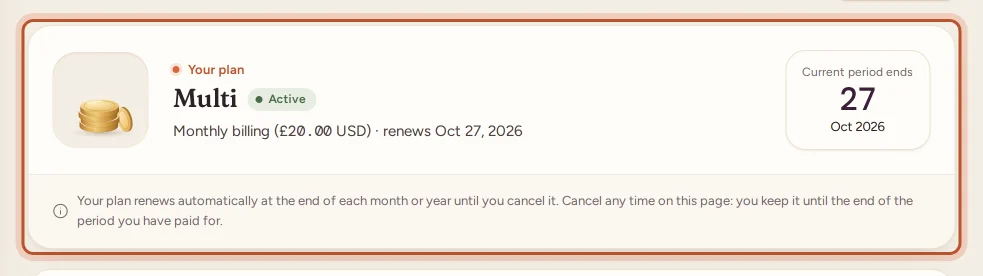
- Three days after the period ended: the plan's badge on the Billing page changes to Payment due and the line under it says "period ended [date]". The owner gets an email, "We have not received your renewal", with the date to renew by.
- Ten days after the period ended: if no renewal has arrived, the plan ends. The workspace becomes read-only, order syncing stops, and the owner gets an email that the subscription has ended.
Fix it
- Open Billing and use Renew / change cycle on your current plan, or Renew now in the email. Pay with a working card. The plan starts again straight away for a full month or year.
- If the card was simply declined once, for example for lack of funds, the payment provider may retry it. Once a payment goes through, the plan carries on as normal.
Plans bought in the App Store or Google Play
Apple and Google retry failed renewals themselves:
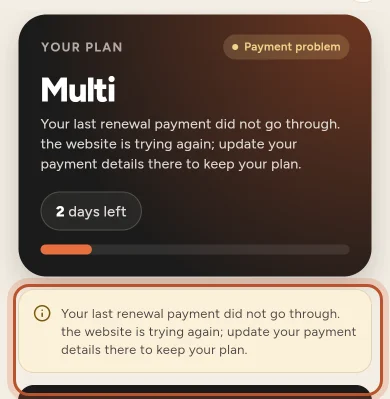
- While the store is retrying within its grace period, the plan shows Payment problem in the app and you keep full access. The note says your last renewal payment did not go through and that the store is trying again.
- If the payment still fails, or the store puts the subscription on hold, the plan shows Expired and the workspace is read-only until the payment goes through. When it does, the plan becomes Active again by itself.
Fix it
Update the payment method in the store:
- iPhone or iPad: Settings › your name › Payment & Shipping (or More › Your plan › Manage in the App Store).
- Android: Google Play › your profile picture › Payments & subscriptions (or More › Your plan › Manage in Google Play).
ProfitClerk picks up the store's change within a few minutes.
If the plan has already ended
Nothing is lost. Your orders, stock, costs and reports stay in the workspace, read-only. Choose any plan to start again:
- Website: Billing › pick a plan › pay.
- App: More › Your plan › Choose a plan.
The next sync brings in the orders sold in the meantime, as far back as eBay allows. See Read-only mode without a plan.
Check your payment history
Billing › Transactions lists every payment. A failed attempt shows the status failed, and no money was taken for it. See Receipts and payment history.
Questions people ask
Do I lose access as soon as a renewal fails?
No. You keep full access for a few days while the payment is sorted out. The workspace only becomes read-only if the renewal is still missing after that.
How will I know a renewal failed?
The plan shows Payment due on the website or Payment problem in the app, and the workspace owner gets an email headed "We have not received your renewal" with the date to renew by.
My card has changed. How do I pay with the new one?
For a website plan, choose your plan again on the Billing page and pay with the new card; it starts straight away. For an App Store or Google Play plan, update the payment method in your store account.
Is my data affected if the plan lapses?
No. Your data stays exactly as it is. The workspace is read-only until a plan is active again, and then the next sync catches up.
Thanks for telling us.