Try it first: the one-time pass
The pass lets you try ProfitClerk for a set number of days. You pay once, it never renews, and each workspace and eBay account can use it once.
The pass is the way to try ProfitClerk before you commit to a plan. You pay once, you get full use of ProfitClerk for a set number of days, and it never renews. There is no free trial, and nothing is charged when the pass ends.
What the pass includes
The pass is shown as its own card on the Billing page, marked Pass. The card shows:
- the one-off price, followed by once
- how long it lasts, for example "15 days of access"
- One payment, never renews
- its limits: eBay accounts, orders a month, SKUs, team seats and whether the two-year history import is included
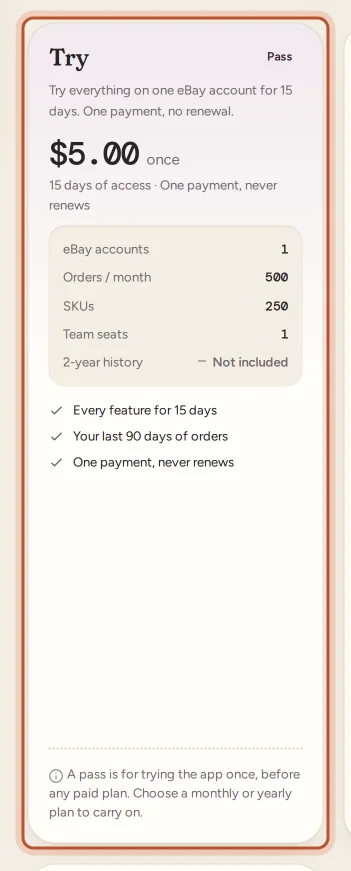
The pass is made for trying ProfitClerk. Its limits are smaller than the monthly and yearly plans, and the two-year history import is normally Not included. Check the card for the current limits.
Buy the pass
A brand-new workspace is welcomed with Choose how to start at the top of the Billing page. It offers the pass or a plan.
On the website:
- Open Billing under Workspace in the sidebar.
- On the pass card, tick the box to agree to the Terms of Service and the Refunds & Cancellation Policy.
- Select Buy the pass and pay on the secure checkout page.
In the app:
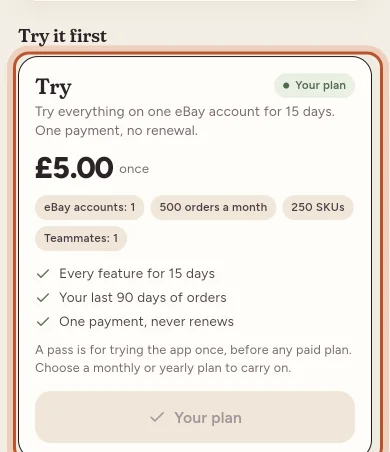
- The plans open by themselves after you sign up. You can also open them from More › Your plan › Choose a plan.
- Scroll to Try it first and tap the pass.
- Confirm the payment with your App Store or Google Play account.
While the pass is running
The top of the Billing page shows the pass name with a Pass badge, the number of days left and the end date. In the app, More › Your plan shows Pass, paid once and the days left.
Three days before the pass ends, the workspace owner gets an email (and a push notification, if they are turned on) as a reminder.
When the pass ends
The pass ends exactly on its last day. There is no grace period and no renewal.
After that, the workspace is read-only: every order, report and export you already have stays there to look at, but new orders stop syncing and nothing can be added or changed until you choose a plan. See Read-only mode without a plan.
As soon as you buy a monthly or yearly plan, syncing starts again and you can make changes.
Who can use the pass
The pass is for trying ProfitClerk once:
- Once per workspace. The pass can only be bought before the workspace has paid for anything else. After a paid plan, the pass card says "A pass is for trying the app once, before any paid plan."
- Once per eBay account. If an eBay seller account already used a pass in another ProfitClerk workspace, it will not sync on a second pass. The message says "This eBay account has already used a pass in another workspace." Choose a monthly or yearly plan to sync it.
Moving from the pass to a plan
You do not have to wait for the pass to end. Choose a plan on the Billing page (or on the plans screen in the app) at any time. The new plan starts straight away and replaces the pass, and its limits apply from that moment. See Plans and what each one includes.
Questions people ask
Does the pass turn into a subscription?
No. The pass is one payment and never renews. When it ends nothing more is charged, and the workspace becomes read-only until you choose a plan.
Can I buy the pass a second time?
No. A workspace can buy the pass only before it has made any other payment, and an eBay account that already used a pass in another workspace cannot sync on a second one.
Do I lose my data when the pass ends?
No. Your orders, stock, costs and reports stay in the workspace. They become read-only until you buy a plan, and then everything carries on where it stopped.
Can I switch to a plan before the pass runs out?
Yes. Choose any monthly or yearly plan at any time. It starts straight away and replaces the pass.
Can I cancel the pass?
There is nothing to cancel. The pass has no renewal, so it simply ends on its last day.
Thanks for telling us.