Buying a plan in the app (App Store or Google Play)
Buy a ProfitClerk plan in the iPhone or Android app with your App Store or Google Play account, restore a purchase on a new phone, and see where it is managed.
In the ProfitClerk app you buy a plan through the store on your phone: the App Store on iPhone and iPad, and Google Play on Android. You pay with the account you already use in that store, and the plan unlocks your whole workspace, on the website too.
Where to find the plans in the app
The plans screen, Choose your plan, opens:
- by itself after you sign up or sign in, if you are the owner and the workspace has no plan yet
- when you try to do something your plan does not allow, for example adding stock with no plan, or connecting one more eBay account than your plan includes
- from More › Your plan (Choose a plan or Change plan)
You can close it with Not now and look around first. Without a plan the workspace is read-only; see Read-only mode without a plan.
Buy a plan
- Open the plans screen.
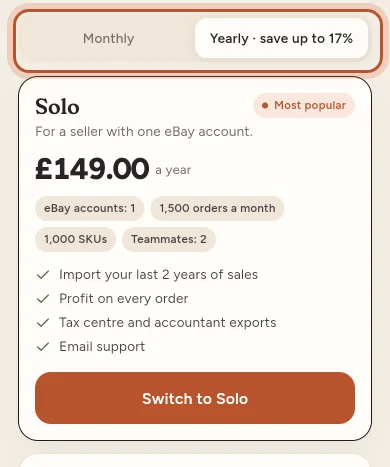
- Choose Monthly or Yearly at the top.
- Look through the plans. Each one shows its price from the store and its limits (eBay accounts, orders a month, SKUs and teammates). A plan marked Most popular is the one most sellers pick.
- Tap Choose [plan]. To try first, scroll to Try it first and tap the pass.
- The App Store or Google Play payment sheet opens. Confirm with Face ID, Touch ID, your password or your Google account.
- The app says Waiting for the store to confirm your payment…, then Thank you! Your plan is active.
The plan is checked with the store before it is switched on, so it can take a few seconds. If the payment is cancelled or declined, you see The purchase did not go through. Nothing is charged in that case.
Renewal and the store's rules
Under the plans you see the store's renewal terms:
- iPhone and iPad: payment is charged to your Apple ID when you confirm. Subscriptions renew automatically unless you turn renewal off at least 24 hours before the period ends.
- Android: payment is charged to your Google Play account when you confirm. Subscriptions renew automatically until you cancel them in Google Play › Subscriptions.
The pass is a one-off purchase and never renews.
Links to the Terms of Service and Privacy Policy are under the renewal terms.
Restore purchases
Use Restore purchases at the bottom of the plans screen when:
- you deleted and reinstalled the app
- you moved to a new phone with the same Apple ID or Google account
- you bought a plan but the app did not switch it on
If the store finds a running purchase, the plan comes back. If not, you see No purchases to restore were found.
See your plan
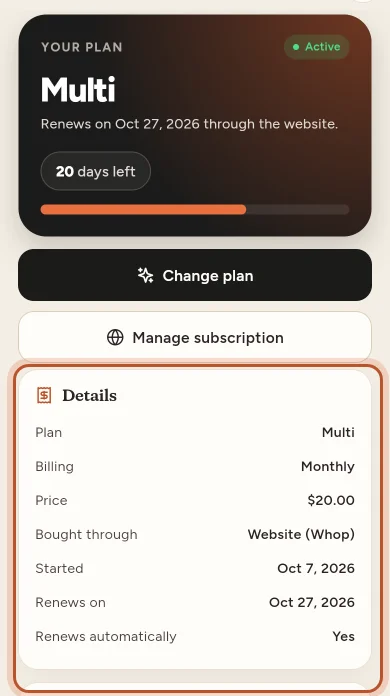
Open More › Your plan. It shows:
- the plan and its status, such as Active, Cancelling or Payment problem
- Bought through (for example App Store or Google Play)
- Renews on or Ends on, the days left and whether it Renews automatically
- your usage this month and your payments
Changing or cancelling a plan bought in the app
A plan bought in the app is billed by the store, so it is changed and cancelled there. On More › Your plan, tap Manage in the App Store or Manage in Google Play to open your subscriptions. See Changing your plan and Cancelling your plan.
When the app cannot sell you a plan
- Your plan is billed on the website. The app says: "Your plan is billed on the ProfitClerk website. Change it there, or cancel it under Your plan."
- Your plan was bought in the app on another device. The app says it was bought on another device. See A plan bought in the app or on another device.
- "The store is not available on this device right now." Check you are signed in to the App Store or Google Play and try again.
- "Plans are not on sale in the app yet." Buy your plan on the ProfitClerk website instead.
Questions people ask
How do I pay for a plan in the app?
With your App Store account on iPhone or iPad, or your Google Play account on Android. You can use any payment method saved there, such as a card, Apple Pay or Google Pay.
Why is the price in the app different from the website?
The app shows the price set in the App Store or Google Play, in your own currency. It can differ from the website price.
I got a new phone. Do I have to buy again?
No. Sign in, open the plans and tap Restore purchases. If the same App Store or Google Play account has a running purchase, your plan comes back.
Can I buy a plan in the app if I already pay on the website?
No. A plan bought on the website is billed there, so the app tells you so and does not sell a second plan on top.
Who can buy a plan in the app?
Only the workspace owner. Teammates see the plans with "Only the workspace owner can choose a plan. Ask them to pick one."
Thanks for telling us.