Buying a plan on the website
Buy a monthly or yearly ProfitClerk plan on the website: pick a plan, add a discount code if you have one, agree to the terms and pay by card at checkout.
To buy a plan on the website, open Billing, choose a plan, tick the box to agree to the terms and select Choose [plan]. You then pay by card on a secure checkout page, and the plan starts as soon as the payment is confirmed.
Only the workspace owner can buy a plan. If you are a teammate, ask the owner.
Step by step
- Sign in on the website and open Billing in the sidebar, under Workspace.
- Use the Monthly / Yearly switch above the cards to pick how often you want to pay. Yearly shows how much it saves.
- Find the plan you want. Compare the limits on each card: eBay accounts, orders a month, SKUs, team seats and the two-year history import.
- If you have a discount code, select Have a coupon? and type it in. Offers that need no code are already taken off the price shown.
- Tick the box: "I agree to the Terms of Service and Refunds & Cancellation Policy, and ask for my plan to start straight away."
- Select Choose [plan] (or Switch to [plan] if you already have one).
- You go to the secure checkout page. Enter your card details and pay.
- You come back to ProfitClerk, where the page says Payment received and "Thank you — your plan is active."

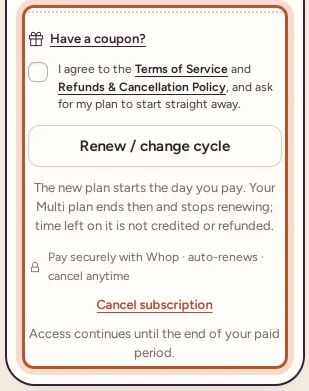
Under the buy button, a small line names the payment provider ("Pay securely with …") and says auto-renews · cancel anytime for monthly and yearly plans.
After you pay
- The Payment received page shows when the current period ends and a View receipt button.
- A receipt is emailed to the workspace owner.
- The top of the Billing page shows your plan with an Active badge, the billing cycle and the renewal date.
- Order syncing starts (or restarts), and every page that was read-only can be changed again.
See Receipts and payment history for where to find your receipts later.
If the payment is not confirmed straight away
Sometimes the page says Awaiting payment confirmation. This means the payment provider has not told us about the payment yet. It usually takes only a few minutes. Refresh the page in a moment: your plan activates by itself as soon as the payment is confirmed. You do not need to pay again.
If you see "We couldn't reach …. Review your order below and try again.", the checkout page did not open. Review the order summary and continue to pay from there.
Renewals
Monthly and yearly plans bought on the website renew automatically at the end of each period, until you cancel. You get an email before the renewal date. If a renewal payment fails, you keep access for a few days while the payment is tried again; see When a renewal payment fails.
Things that stop a checkout
- The plan is billed by the App Store or Google Play. If you bought your plan in the app, the website shows Manage subscription and Change plan, which explain how to change it in the store on your phone. See A plan bought in the app or on another device.
- The pass is no longer available. The pass can only be bought before any other payment. See Try it first: the one-time pass.
- The coupon is not accepted. The message says why, for example "That coupon has expired." or "This workspace has already used that code." See Discount codes and offers.
Questions people ask
Who can buy a plan?
Only the workspace owner. Teammates do not see the Billing page and are asked to contact the owner instead.
When does my plan start?
Straight away, as soon as the payment is confirmed. The page says "Payment received" and your workspace is fully unlocked.
Does a website plan renew by itself?
Yes. Monthly and yearly plans bought on the website renew automatically until you cancel. The line under the buy button says so before you pay.
The payment page says "Awaiting payment confirmation". What now?
The payment provider has not told us yet. This usually takes a few minutes; refresh the page and your plan activates automatically once the payment is confirmed.
Can I buy on the website if I already pay through the app?
No. A plan bought in the App Store or on Google Play is changed and cancelled there, so the website shows "Manage subscription" instead of a checkout.
Thanks for telling us.