Cancelling your plan and what happens next
Cancel a ProfitClerk plan on the website, in the app or in the App Store or Google Play. You keep full access until the paid period ends, and your data stays.
You can cancel a ProfitClerk plan at any time. Cancelling stops the next renewal: you keep full access until the end of the period you have paid for, and after that the workspace becomes read-only. Nothing is deleted.
Only the workspace owner can cancel. Where you cancel depends on where the plan was bought.
Cancel a plan bought on the website
- Open Billing under Workspace in the sidebar.
- Under your current plan's card, select Cancel subscription.
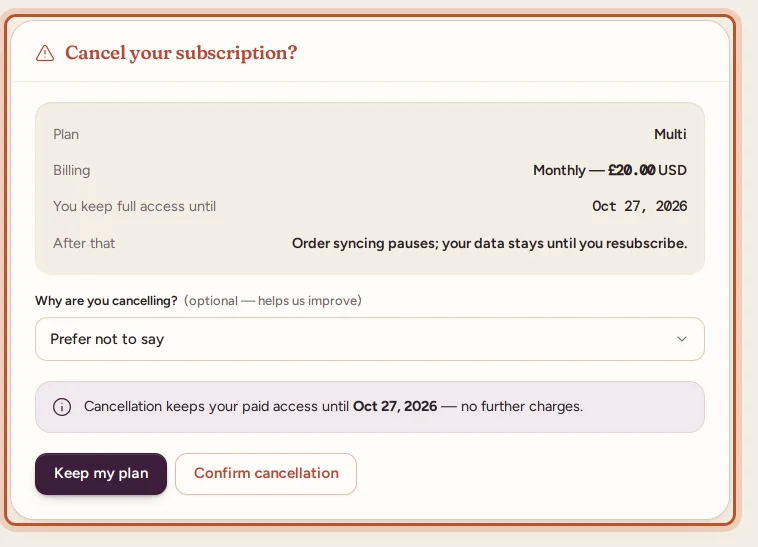
- The cancel page shows your plan, how you are billed, You keep full access until and After that ("Order syncing pauses; your data stays until you resubscribe.").
- If you like, pick a reason under Why are you cancelling? It is optional and helps us improve.
- Select Confirm cancellation and confirm. To go back without cancelling, select Keep my plan.
You see "Subscription cancelled. You keep full access until [date]." The Billing page then shows your plan as cancelled with the date your access ends, and you get an email confirming it.
Cancel a website plan from the app
If you bought on the website but are on your phone:
- Open More › Your plan.
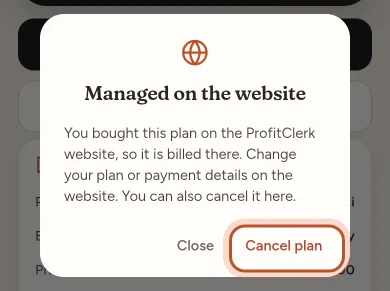
- Tap Manage subscription. The dialog Managed on the website opens.
- Tap Cancel plan and confirm: "Cancel your plan? You keep it until the end of the period you paid for, then your workspace becomes read-only."
The app says Your plan will not renew. and the status changes to Cancelling.
Cancel a plan bought in the App Store or Google Play
Apple and Google bill these plans, so you turn off renewal in the store:
- iPhone or iPad: More › Your plan › Manage in the App Store, or open Settings, tap your name, then Subscriptions › ProfitClerk, and cancel.
- Android: More › Your plan › Manage in Google Play, or open the Google Play app, tap your profile picture, then Payments & subscriptions › Subscriptions › ProfitClerk, and cancel.
Within a few minutes ProfitClerk shows the plan as Cancelling with its end date. If you turn renewal back on in the store before that date, it goes back to Active.
On the website, a plan bought in the app has no cancel button. Manage subscription explains where to cancel it on your phone. See A plan bought in the app or on another device.
Plans with nothing to cancel
- The pass is a single payment and never renews, so it simply ends on its last day.
- A plan given by ProfitClerk does not renew either. It ends on its own date. If you try to cancel it you see "This plan was given to you by ProfitClerk and does not renew, so there is nothing to cancel."
What happens when the plan ends
On the end date the workspace becomes read-only:
- Every order, report, export and figure stays there to look at.
- New eBay orders stop syncing, and nothing can be added or changed.
- Account settings keep working: your profile, security, the Billing page and contact.
See Read-only mode without a plan for the full list.
To carry on, choose any plan on the Billing page or in the app. Everything resumes straight away, and the next sync picks up the orders you missed, as far back as eBay allows.
Refunds
Refunds are covered by the Refunds & Cancellation Policy, linked next to the tick box on the Billing page and under More › Legal & privacy in the app. A refunded payment ends the plan straight away. For plans bought in the app, refunds are requested from Apple or Google.
Questions people ask
Do I lose access as soon as I cancel?
No. You keep full access until the end of the period you have paid for. Cancelling only stops the next renewal.
Is my data deleted when the plan ends?
No. Your orders, stock, costs and reports stay in the workspace, read-only, until you choose a plan again. Only deleting your account removes them.
Can I change my mind after cancelling?
Yes. Before the end date, choose a plan on the Billing page to carry on without a break. After it ends, buy any plan and syncing picks up again.
Why is there no cancel button on the website?
Either your plan was bought in the app, so it is cancelled in the App Store or Google Play, or it is a pass or a plan given by ProfitClerk, which never renews and has nothing to cancel.
Will I be charged again after I cancel?
No further renewal payments are taken for that plan. You get an email confirming the cancellation and the date your access ends.
Thanks for telling us.