A plan bought in the app, website or another device
One ProfitClerk plan covers your workspace everywhere. Here is where to change or cancel it when you bought it on the website, in the App Store or on Google Play.
A ProfitClerk workspace has one plan, wherever it was bought. Once it is active, the website and the app on all your devices use it. To change or cancel it, though, you go back to where it was bought, because that is who bills you:
| Bought | Billed by | Change or cancel |
|---|---|---|
| On the website | Card payment on the website | On the website's Billing page (or Cancel plan in the app) |
| In the iPhone or iPad app | Apple (App Store) | iPhone Settings › your name › Subscriptions |
| In the Android app | Google (Google Play) | Google Play › Payments & subscriptions › Subscriptions |
To check where yours was bought, open More › Your plan in the app and look at Bought through.
Bought in the app, managed on the website
When the plan was bought in the app, the top of the website's Billing page says: "Your plan was bought in the ProfitClerk app through [store], and [store] bills it. To change or cancel it, open your subscriptions in [store] on your phone."
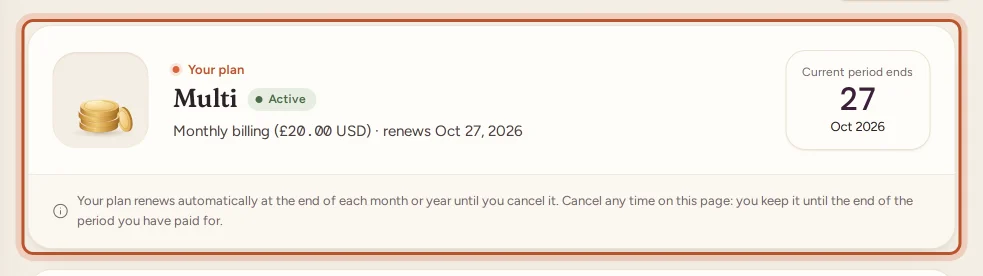
- Select Manage subscription (or Change plan on any plan card).
- A dialog, Manage in the App Store or Manage in Google Play, explains the steps:
- App Store: open Settings on your iPhone or iPad, tap your name, then Subscriptions › ProfitClerk.
- Google Play: open the Google Play app, tap your profile picture, then Payments & subscriptions › Subscriptions › ProfitClerk.
- Use Open App Store subscriptions or Open Google Play subscriptions to go straight there.
Changes you make in the store show in ProfitClerk within a few minutes. The website has no checkout and no cancel button for this plan.
Bought on the website, managed in the app
If you bought on the website and open the app:
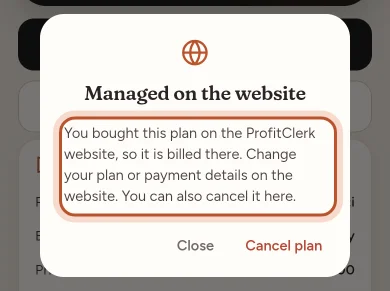
- More › Your plan shows Manage subscription. It opens Managed on the website: "You bought this plan on the ProfitClerk website, so it is billed there. Change your plan or payment details on the website. You can also cancel it here."
- Cancel plan in that dialog stops the renewal. You keep the plan until the end of the period you paid for.
- On the plans screen, the plan buttons open the same dialog: the app does not sell a second plan on top of a website plan.
To change plan or payment details, sign in on the website and open Billing. See Changing your plan.
Bought in the app on another phone or tablet
If the plan was bought through a different device's store, for example on an iPhone while you are now using an Android tablet, the app shows Bought on another device:
"You bought this plan in the ProfitClerk app on another phone or tablet, and it is billed there. Open ProfitClerk on that device to change or cancel it."
You can use the plan normally on this device. Only changing or cancelling needs the other one.
Same store, new phone
If your new phone uses the same Apple ID or Google account as before:
- Install ProfitClerk and sign in to your workspace.
- Your plan is already there. If it is not, open the plans and tap Restore purchases.
Moving where you pay
To move a plan from the app to the website (or the other way), cancel it where it was bought and let it run to its end date. Then buy the new plan in the other place. A plan bought in the app replaces a website plan straight away, including any paid days it had left, so it is best to buy once the old plan has ended.
Questions people ask
Do I need to buy a plan on each device?
No. A workspace has one plan. Once it is bought anywhere, the website and the app on every phone and tablet use it as soon as you sign in.
I bought on my iPhone. Why can I not change the plan on the website?
Apple bills plans bought in the App Store, so they can only be changed or cancelled in the App Store. The website's Manage subscription button explains where.
The app says my plan was bought on another device. What does that mean?
The plan was bought in the ProfitClerk app on a different phone or tablet, through that device's store. Open ProfitClerk on that device, or its store's subscription settings, to change or cancel it.
Can I buy a second plan on top?
No. While a plan bought in one place is renewing, the others do not sell another plan on top. Change the existing plan where it was bought instead.
My new phone does not show my plan. What should I do?
Sign in to the same workspace. If the plan was bought with the same App Store or Google Play account, open the plans and tap Restore purchases.
Thanks for telling us.