Need more eBay accounts or higher limits?
If the biggest ProfitClerk plan is not enough for your eBay accounts, orders or team, send us the contact form and we will set up a plan around your business.
If you need more eBay accounts, more orders a month or a bigger team than the biggest ProfitClerk plan offers, send us the contact form with the topic More accounts or higher limits. For bigger businesses we set up a plan around how many eBay accounts, orders and team members you have.
First, check the existing plans
Every plan card on the Billing page lists how many eBay accounts, Orders / month, SKUs and Team seats it includes. Moving to a bigger plan takes effect straight away, so check whether one of them already fits. See Plans and what each one includes.
If you only need one or two more eBay accounts, plans that offer them let you add extra eBay accounts on the website's Billing page, charged with the plan.
Ask for more on the website
-
Open Billing under Workspace in the sidebar.
-
Below the plan cards, find Need more eBay accounts or higher limits? and select Contact us.

The Need more box below the plans -
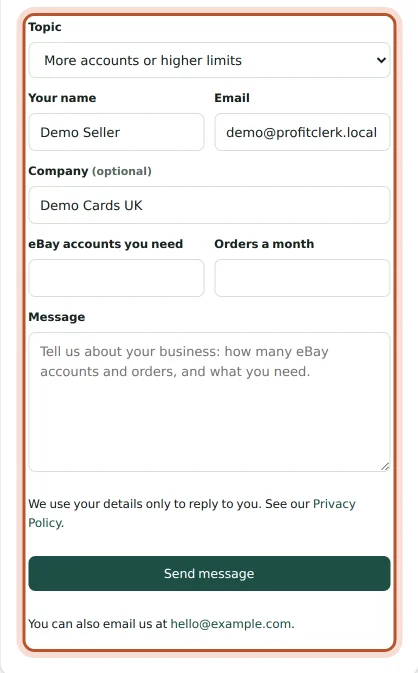
The contact page opens with the topic More accounts or higher limits already chosen.
-
Check Your name and Email, and add your Company if you like (it is optional).
-
Fill in eBay accounts you need and Orders a month.
-
In Message, tell us about your business: how many eBay accounts and orders, and what you need.
-
Select Send message.
You see "Thanks, we have your message", and a copy is emailed to you. We reply by email, usually within one working day.
The contact page is also linked from the pricing section on the ProfitClerk website, so you can ask before you sign up.
Ask for more in the app
- Open the plans screen, from More › Your plan or when the app tells you a limit is reached.
- Scroll to Need more eBay accounts or higher limits? and tap Contact us.
- The in-app contact form opens on More accounts. Fill in eBay accounts you need, Orders a month and Your message, then tap Send message.
What helps us reply quickly
- The number of eBay accounts you sell on, and on which eBay sites.
- Orders a month, roughly, across all accounts, and in your busiest month.
- How many people need to sign in, and whether they should be able to change things or only look.
- Whether you need your past sales: the two-year history import brings in older orders.
- Anything special, such as accounting software or how you want to pay.
While you wait
Your current plan keeps working as normal. If you are already at a limit:
- At the eBay accounts limit, your connected accounts keep syncing; you just cannot add another.
- At the orders limit, new orders wait until next month or until your plan changes. See What happens when you reach a plan limit.
Questions people ask
How many eBay accounts can I connect?
It depends on your plan; the eBay accounts row on each plan card shows the number. If you need more than the biggest plan offers, contact us for a plan built around your business.
How quickly will I hear back?
We reply by email, usually within one working day, and you get an emailed copy of your message straight away.
What should I put in the message?
How many eBay accounts you need, roughly how many orders you sell a month, how many people will use ProfitClerk, and anything else you need.
Do I need an account to send the form?
No. The contact page works whether you are signed in or not. If you are signed in, your name and email are filled in for you.
Thanks for telling us.