Changing your plan (upgrade, downgrade, monthly or yearly)
Move to a bigger or smaller ProfitClerk plan, or switch between monthly and yearly billing, on the website or in the App Store or Google Play where you bought it.
You can move to another plan, or between monthly and yearly billing, whenever you like. Where you do it depends on where you bought the plan: plans bought on the website are changed on the Billing page, and plans bought in the app are changed in the App Store or Google Play.
Only the workspace owner can change the plan.
Check where your plan was bought
- Website: the top of the Billing page shows your plan, its status, the billing cycle and the renewal date. The plan cards have buy buttons.
- App: More › Your plan shows Bought through, for example the website, the App Store or Google Play.
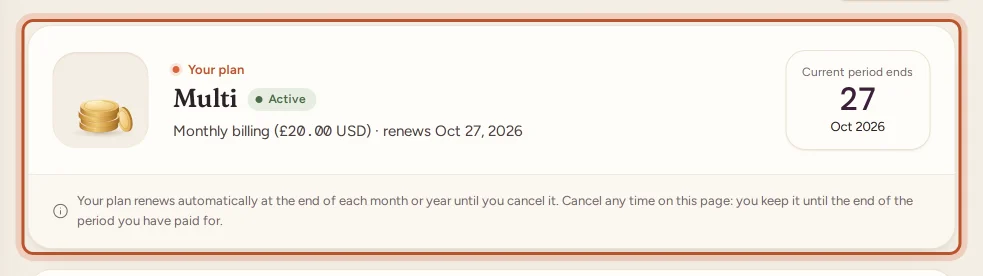
If your plan was bought in the app, the website shows a note that the store bills it, with a Manage subscription button. Follow A plan bought in the app or on another device instead.
Change a plan bought on the website
- Open Billing under Workspace in the sidebar.
- Use the Monthly / Yearly switch to choose how often you want to pay.
- On the plan you want, select Switch to [plan]. To stay on the same plan but change between monthly and yearly, use Renew / change cycle on the card marked Current plan.
- Tick the box to agree to the terms and pay at checkout, as when you first bought.
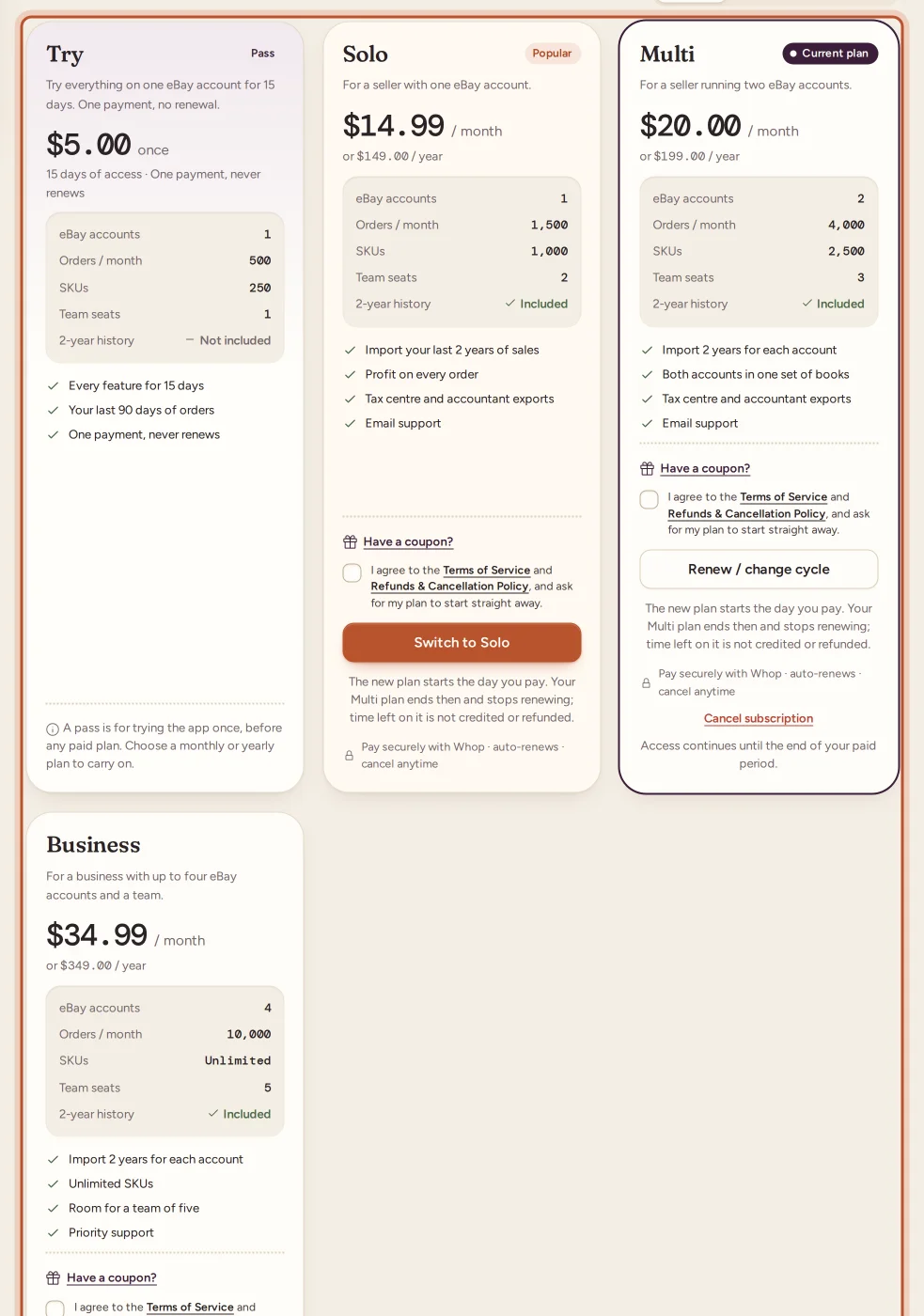
The new plan starts as soon as the payment is confirmed:
- Its limits apply straight away. If you were near a limit, the note on the usage card says it: "upgrading takes effect immediately."
- A new full month or year starts from that day, and your previous plan ends at that moment and is cancelled with the payment provider, so it never renews alongside the new one. Time left on the previous plan is not credited or refunded (the plan cards say so under the button), so the best time to switch is close to your renewal date, unless you need the higher limits now.
- You get a receipt by email, and the payment is listed under Transactions.
Moving to a smaller plan
You can move to a smaller plan the same way. Nothing is deleted if you are already over one of its limits:
- SKUs, team seats or eBay accounts: you keep what you have, but you cannot add more until you are under the limit.
- Orders a month: if this month's orders are already over the new limit, new orders stop syncing until the month resets.
See What happens when you reach a plan limit.
Change a plan bought in the app
The store bills the plan, so the store changes it.
iPhone or iPad:
- Open More › Your plan and tap Manage in the App Store, or open Settings, tap your name, then Subscriptions › ProfitClerk.
- Pick another plan or another length.
Apple treats a move to a bigger plan as an upgrade, which starts straight away. A move to a smaller plan starts at your next renewal.
Android:
- Open the plans screen from More › Your plan › Change plan and tap Switch to [plan], or tap Manage in Google Play to see your subscription.
- Confirm in the Google Play sheet.
The new Google Play plan replaces the old one.
The change shows in ProfitClerk (website and app) within a few minutes.
Plans given by ProfitClerk
If ProfitClerk gave your workspace a plan, the Billing page shows it and More › Your plan says Given by ProfitClerk. You can still buy any plan; the plan you buy replaces the one you were given.
Need more than the biggest plan?
If the biggest plan is still not enough, ask us for a plan built around your business. See Need more eBay accounts or higher limits.
Questions people ask
When does a new plan take effect?
A plan bought on the website starts as soon as the payment is confirmed, and its limits apply straight away. In the App Store, an upgrade is immediate and a move to a smaller plan waits for your next renewal.
Is the time left on my old plan carried over when I switch on the website?
No. On the website the new plan starts a new full month or year from the day you pay, and the old plan ends at that moment and stops renewing, so you are never charged for both. Time left on it is not credited or refunded, so switching close to your renewal date wastes the least.
What happens if I move to a smaller plan while I am over its limits?
Nothing is deleted. You simply cannot add more of that thing, and if you are past the orders limit and its margin, new orders stop syncing until the next month.
Why can I not change my plan on the website?
Your plan was bought in the app, so the App Store or Google Play bills it. Change it in the store's subscription settings on your phone.
Can a teammate change the plan?
No. Only the workspace owner can buy, change or cancel a plan.
Thanks for telling us.