What happens when you reach a plan limit
What ProfitClerk does when you reach your plan's limit for orders a month, SKUs, team seats or eBay accounts, how you are warned, and how to carry on.
Each ProfitClerk plan has four limits: orders a month, SKUs, team seats and eBay accounts. When you reach one, only that one thing stops growing: nothing is deleted, and everything else keeps working. To carry on, move to a bigger plan, which takes effect straight away.
The limits and what happens at each
Orders a month
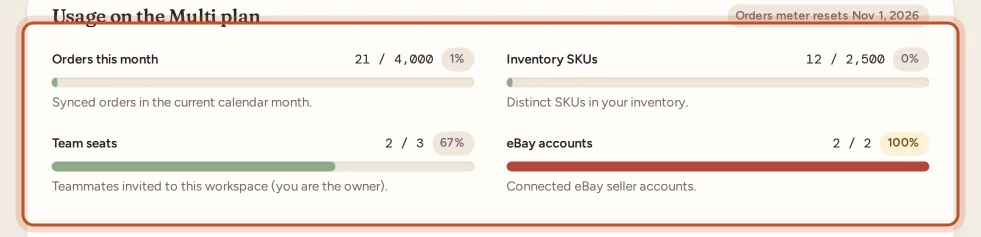
The meter Orders this month counts the orders sold in the current calendar month that have synced.
Each plan has a margin on top of its order limit, so a busy month is not cut off at the line. The hint under the meter says how far syncing goes, for example "Your plan includes 1,500 orders a month. Syncing carries on up to 1,800 before it pauses."
- At 80% of the limit, the owner gets a warning email and app notification ("You've used 80% of your … orders this month"), so there is time to move to a bigger plan first.
- Past the limit, orders keep syncing into the margin. The meter shows how many more can sync this month, and the owner gets one email and notification: "You've passed your … order limit".
- At the end of the margin, new eBay orders stop syncing for the rest of the month. Orders already synced, and their profit, stay as they are, and the owner gets an email: "Order syncing paused for this month".
Each of these comes once a month at most.
Syncing starts again on the first day of next month, or as soon as you move to a plan with a higher limit. The orders sold in the meantime are picked up by the next sync.
SKUs
Inventory SKUs counts the distinct SKUs in your stock. At the limit you cannot add another stock item. You see a message like "You've reached the [number] SKU limit on the [plan] plan. Upgrade to add more inventory."
You can still edit the items you have, and removing items you no longer need frees up room.
Team seats
Team seats counts the teammates in the workspace. You, the owner, are not counted. At the limit you cannot invite anyone else. Removing a teammate frees a seat.
eBay accounts
eBay accounts counts the eBay seller accounts connected to the workspace. The limit is your plan's accounts plus any extra eBay accounts on your plan. At the limit you cannot connect another one. Disconnecting an account you no longer use frees the slot.
On the website, plans that offer them let you add extra eBay accounts when you choose the plan on the Billing page. Each one is charged with the plan and renews with it. See Plans and what each one includes.
Two-year history import
This is not a count but a feature. If your plan does not include it, the import is not offered, and the message says the plan "does not include the two-year history import". Choose a plan where 2-year history says Included.
How you are warned
- Usage meters. On the Billing page, each meter turns amber at 80% and red near 100%. A note says "You're close to a plan limit — upgrading takes effect immediately."
- Overview. The overview page shows "You're close to a plan limit" with the meters concerned and a View plans button. You can dismiss it.
- Email. For orders, the owner gets an email at 80% of the limit, when the month passes the limit, and when syncing pauses at the end of the margin, each once a month.
- In the app. More › Your plan › Usage this month shows each meter, for example "3,950 of 4,000". When you try something your plan does not allow, the plans screen opens with Your plan's limit is reached and the reason.
What to do at a limit
- Open Billing on the website, or More › Your plan in the app.
- Compare the plans and pick one with a higher limit for what you need.
- Select Switch to [plan] and pay. The higher limits apply as soon as the payment is confirmed.
If your plan was bought in the App Store or Google Play, change it there. See Changing your plan.
When even the biggest plan is not enough
If you need more eBay accounts, more orders or more teammates than any plan offers, use Contact us under Need more eBay accounts or higher limits? on the Billing page. See Need more eBay accounts or higher limits.
A limit is not the same as having no plan
Reaching a limit only stops one thing. If the workspace has no active plan, everything that changes data stops, and the workspace is read-only. See Read-only mode without a plan.
Questions people ask
Does reaching a limit delete anything?
No. Reaching a limit only stops that one thing from growing. Everything you already have stays and keeps working.
My orders stopped syncing in the middle of the month. Why?
Your workspace has synced the orders your plan includes this calendar month and the margin on top. New orders sync again from the first of next month, or straight away when you move to a bigger plan.
Do orders stop the moment I reach the order limit?
No. Each plan has a margin, so a busy month is not cut off at the line. Orders keep syncing past the limit, and the meter says how many more can sync. Syncing pauses only at the end of the margin.
Will I get a warning before I reach a limit?
Yes. At 80% the usage meter turns amber and the overview shows "You're close to a plan limit". For orders, the owner also gets an email (and a notification in the app) at 80% of the month's limit, again when the month passes the limit, and again if syncing pauses at the end of the margin.
Does a yearly plan have a yearly order limit?
No. The order limit is per calendar month on both monthly and yearly plans.
Do deleted stock items free up SKUs?
Yes. The SKU meter counts the distinct SKUs in your inventory now, so removing items you no longer need brings it down.
Thanks for telling us.