Read-only mode without a plan
Without an active plan your ProfitClerk workspace is read-only: every figure stays to look at, but orders stop syncing and changes need a plan. Here is what works.
When a workspace has no active plan, it is read-only. You can still open every page and see every figure, report and export, but new eBay orders stop syncing and nothing can be added or changed until you choose a plan. Your data is never deleted because a plan ended.
When a workspace is read-only
A workspace is read-only when:
- it is new and has not bought a plan or pass yet (there is no free trial)
- its pass has ended (a pass never renews)
- its plan was cancelled and the paid period is over
- a renewal payment failed and was not fixed in time
- a payment was refunded
While a cancelled plan still has paid time left, or a failed renewal is being tried again, the workspace keeps full access.
What keeps working
- Every page: the overview, orders, stock, expenses, mileage, reports, tax centre and shipping.
- Every report and export (CSV and the rest), with the figures you already have.
- Signing in and out, your profile, password, two-step sign-in and sign-in history.
- Language, notification settings and the weekly profit email setting.
- The Billing page: buying a plan, cancelling, receipts.
- Legal pages, Download my data and the contact form.
- The free calculators.
- Taking things away: disconnecting an eBay account or accounting software, removing a teammate or cancelling an invitation.
What stops
- eBay order sync and finance updates, so no new sales, fees or refunds arrive.
- Accounting software sync, repeating expenses and tax reminders.
- Every change: adding or editing stock, item costs, expenses, trips, label costs and teammates.
- Connecting a new eBay account or accounting software, and the two-year history import.
What you see
On the website, if you are the owner, trying to make a change takes you to the Billing page with the message "This needs an active plan. Your figures stay here to look at; choose a plan to sync orders and make changes." The top of the page says No active plan. with a red note that order syncing has stopped. A new workspace instead sees Choose how to start.
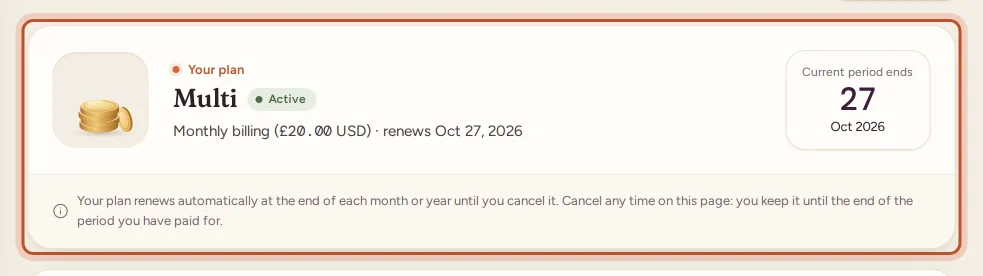
If you are a teammate, you go back to the overview with the note "This workspace has no active plan, so it is read-only for now. Ask the workspace owner to choose a plan."
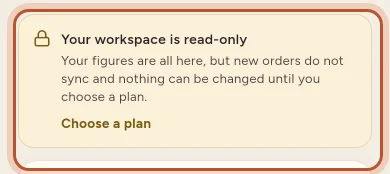
In the app, Home shows Your workspace is read-only: "Your figures are all here, but new orders do not sync and nothing can be changed until you choose a plan." Trying to add or change something opens the plans screen with Choose a plan to carry on.
Get out of read-only mode
- Website: open Billing and choose a plan or, for a new workspace, the pass. App: open More › Your plan › Choose a plan.
- Pay. See Buying a plan on the website or Buying a plan in the app.
Everything resumes straight away. The next sync brings in the orders sold while the workspace was read-only, as far back as eBay allows. If you were away for a long time, use the two-year history import (on plans that include it) to fill any gap.
Read-only is not the same as reaching a limit
If your plan is active but you have reached one of its limits, only that one thing stops: for example, orders stop syncing at the monthly order limit while everything else still works. See What happens when you reach a plan limit.
Questions people ask
Is my data deleted when my plan ends?
No. Every order, report and export stays in the workspace. Only deleting your account removes your data.
Can I still download my reports and exports?
Yes. Every page, report and export opens as normal, with the figures you had when the plan ended.
Will the orders I missed come in when I buy a plan again?
Yes. When a plan is active again, the next sync picks up the orders sold in the meantime, as far back as eBay lets ProfitClerk look.
I am a teammate and the workspace is read-only. What can I do?
Only the workspace owner can choose a plan. Ask them to buy one; you will see "Ask the workspace owner to choose a plan" until they do.
Can I disconnect eBay without a plan?
Yes. Taking things away always works without a plan, including disconnecting eBay or accounting software and removing a teammate.
Thanks for telling us.