Match eBay sales to your stock by SKU
ProfitClerk links each eBay sale to your stock through the listing's SKU. Learn how matching works, why sales end up unmatched and how to give them a cost.
Every eBay sale is linked to your stock through its SKU, the custom label on your eBay listing. When a sale's SKU matches a stock item, ProfitClerk takes the units off that item and records their cost on the sale. When it matches nothing, the sale is marked unmatched and has No item cost until you give it one.
How matching works
When a sale arrives from eBay, ProfitClerk:
- reads the SKU of the item sold (eBay's Custom label (SKU));
- looks for a stock item in Inventory with exactly that SKU, ignoring capitals and spaces at either end;
- if it finds one, takes the units sold off its Remaining, records their cost on the sale (average and FIFO) and marks the sale paid;
- if not, saves the sale anyway as unmatched, so nothing is lost.
A sale is matched once, when it first finds its stock item, so its stock is never taken off twice.
Why a sale is unmatched
- The listing has no custom label on eBay. Give it its cost on eBay listings instead; see eBay listings without a SKU.
- The SKU on eBay and in Inventory are spelt differently, for example a missing dash or a 0 instead of an O.
- The item was never added to Inventory, or was deleted.
The order's page tells you which SKU it looked for: "The SKU … matched no inventory item".

Find unmatched sales
- Orders: choose Unmatched in the Status menu, or No item cost in Confidence.
- App: in the Sales tab, tap Unmatched or No item cost.
- After a manual sync on Overview, the message says how many unmatched orders there are.
Give a sale its item cost
For a sale that is already in ProfitClerk, set its cost directly.
On the website
- On Orders, find the sale and click Add cost in the Cost column. For a sale that has a cost already, click Edit.
- Type the Cost / unit. Line COGS ≈ shows the total for the quantity.
- Click Save.
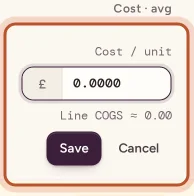
You can also do this on the order's page with Set cost.
In the app
Open the sale in Sales, tap Item cost (or Add the item cost), enter the Cost per unit and tap Save. The hint says it: the cost changes this sale's profit only.
Many sales at once
Use Import costs on Orders to bring the costs in from a spreadsheet, matched by order number, SKU or title. See import item costs.
Make future sales match
Pick whichever is easier:
- Add the item to Inventory with the SKU exactly as on the listing. See add a stock item.
- Change the SKU in ProfitClerk: open the stock item, click Edit details and correct the SKU to match eBay.
- Change the custom label on eBay to match the SKU in ProfitClerk.
From then on, every new sale of that listing finds the item automatically.
Correcting a sale that matched with the wrong cost
A sale that matched takes the item's cost at the moment it sold. If that was wrong, because you restocked late or entered the wrong price, click Edit in the Cost column on Orders and set the right Cost / unit. Profit and cost of goods update everywhere: Overview, reports, the item's stats and the CSV export.
Questions people ask
Where do I find the SKU on eBay?
It is the Custom label (SKU) field of your listing in Seller Hub. Whatever you type there is what ProfitClerk receives with each sale.
Does the SKU match care about capitals or spaces?
Capitals do not matter and spaces at the start or end are ignored. Every other character must be the same, so ABC-1 and ABC1 are different SKUs.
I added the item after the sale. Will the old sale pick up the cost?
Do not count on it. New sales of that SKU match automatically, but for a sale that is already in ProfitClerk, set its cost with Add cost or import your costs.
Does setting a cost on an unmatched sale take units off my stock?
No. It gives the sale an item cost but does not link it to a stock item. If those units are gone from your shelf, lower the item's Remaining with Edit.
Can one stock item match listings with different SKUs?
No. One stock item has one SKU. Give the listings the same custom label on eBay, or keep a stock item for each SKU.
Thanks for telling us.