Low stock: what it means and where to see it
ProfitClerk marks items that are running out with a Low stock badge. See where low stock shows on the website and in the app, and what to do about it.
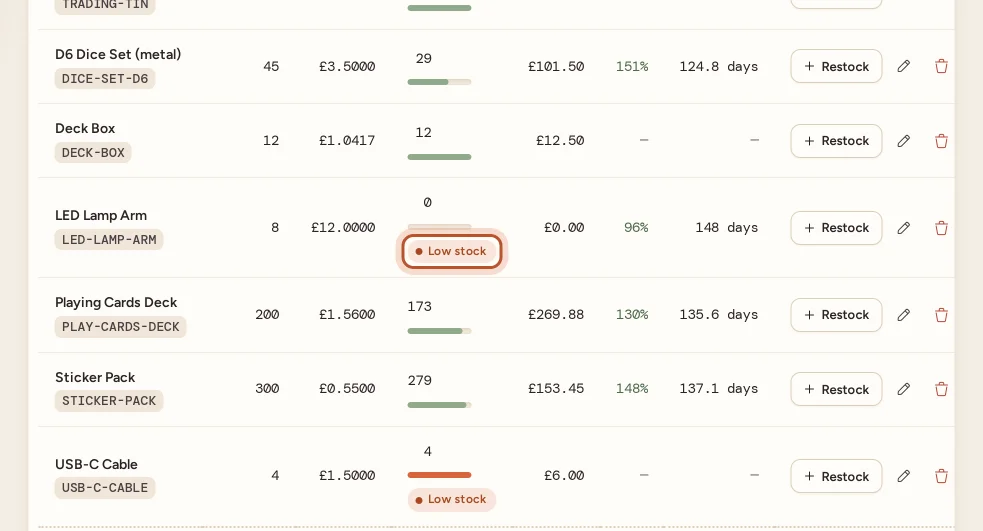
An item is low stock when its remaining units are at or below the low-stock level (the website and the app count the same way). ProfitClerk then shows a Low stock badge on it, counts it on the Inventory page and lists it in the app, so you know what to restock before it runs out. It is only a reminder: it never blocks anything and never changes your eBay listings.
Where you see it
On the website
- Inventory, top of the page: the Low stock card shows how many items are low and the level, for example "SKUs with 5 or fewer units left".
- Your stock table: the Remaining column has a bar showing how much of what you bought is left, and a Low stock badge on items that are low.
- An item's page: a Low stock badge under its name with "… or fewer units left — time to think about a restock."
In the app
- Home: a Low stock section lists the items running out, with All stock to open the Stock tab.
- Stock tab: the top card shows how many items are low (for example 3 low), and the Low stock chip filters the list to them.
- An item's page: the count of units is shown in a warning colour when it is low.
What to do about it
- Check the count. Is the number on the shelf what ProfitClerk says? If not, correct it with Edit. See restock or correct quantities.
- Decide whether to buy more. Open the item's page: How it sells shows units sold, ROI and average days to sell, and the Product timeline shows how quickly it has sold.
- Restock when you buy more: Restock on the item's row or page (in the app, Restock on the item's page), with the quantity and the total cost.
- Update eBay yourself if needed. ProfitClerk never changes your listings, so adjust the quantity on eBay as usual.
Running out completely
When Remaining reaches 0, the item stays in your Inventory with its history and costs. If eBay sells more units than you have on record (for example, the listing still had stock you never entered), the sale still comes in:
- the units beyond your stock are costed at the item's average cost;
- the sale's item cost is tagged Estimated;
- Remaining stays at 0.
Restock the item with what you really bought, and correct the sale's cost on Orders with Edit if you know it. See cost confidence.
The opposite problem: stock that does not sell
Low stock tells you what is selling out. To see what is not selling, open Unsold stock from the Inventory page (in the app, Unsold stock on the Stock tab). It shows how long units have been on the shelf and suggests what to do, such as listing items that are not listed or trying a price drop. See unsold stock.
Questions people ask
When does an item count as low stock?
When its remaining units are at or below the low-stock level. The Low stock card on Inventory says what the level is, for example SKUs with 5 or fewer units left. The website and the app use the same rule.
Can I change the low-stock level?
Not yet. The level is the same for every item and is set for the whole service. Use the badge as a prompt and decide yourself when to restock.
Does low stock stop my sales or change my eBay listings?
No. ProfitClerk only reads from eBay, so it never changes a listing's quantity. The badge is information only and never stops you adding stock.
What happens when an item runs out completely?
It stays in your Inventory with 0 remaining and the Low stock badge. If it sells again on eBay, the extra units are costed at the average and tagged Estimated until you restock.
Thanks for telling us.