How item costs flow from your stock into profit
Follow an item's cost from the day you buy it to the sale: average cost, FIFO lots, the cost frozen on each sale, and what later changes do and do not touch.
An item's cost travels with it from the day you buy it to the day it sells. When you add or restock stock, ProfitClerk updates the item's average cost and opens a FIFO lot. When a sale comes in, it takes the units off the item and freezes both costs on the sale. That frozen cost is the Item cost in the sale's profit, and nothing you do to your stock later changes it.
1. You buy stock
Every way of adding stock records units and what they cost:
- Add stock for a new item, or Restock for more of one you have;
- Buy a lot, which shares one price across several items (job lots);
- a return recorded as Back in stock, which puts units back at what they cost on the sale.
Each buy does two things to the item:
| Track | What happens |
|---|---|
| Average | The item's one cost per unit blends in the new buy: (units on hand × current average + cost of the buy) ÷ (units on hand + units bought) |
| FIFO | A new lot opens with this buy's units, cost per unit, date and where it came from, behind the older lots |
2. The units wait on the shelf
While they wait, they count towards your stock value at the average cost. Their lot keeps its own cost and date, which you can see under Open lots (FIFO layers) on the item's page.
3. A sale comes in
When eBay sends a sale whose SKU matches the item, ProfitClerk:
- takes the units sold off Remaining;
- records the average cost per unit at that moment;
- takes the units from the oldest lots first and records their cost as the FIFO cost per unit (mixed, if the sale spans two lots);
- notes when those units were bought (for days to sell) and where (for the Sourcing report).
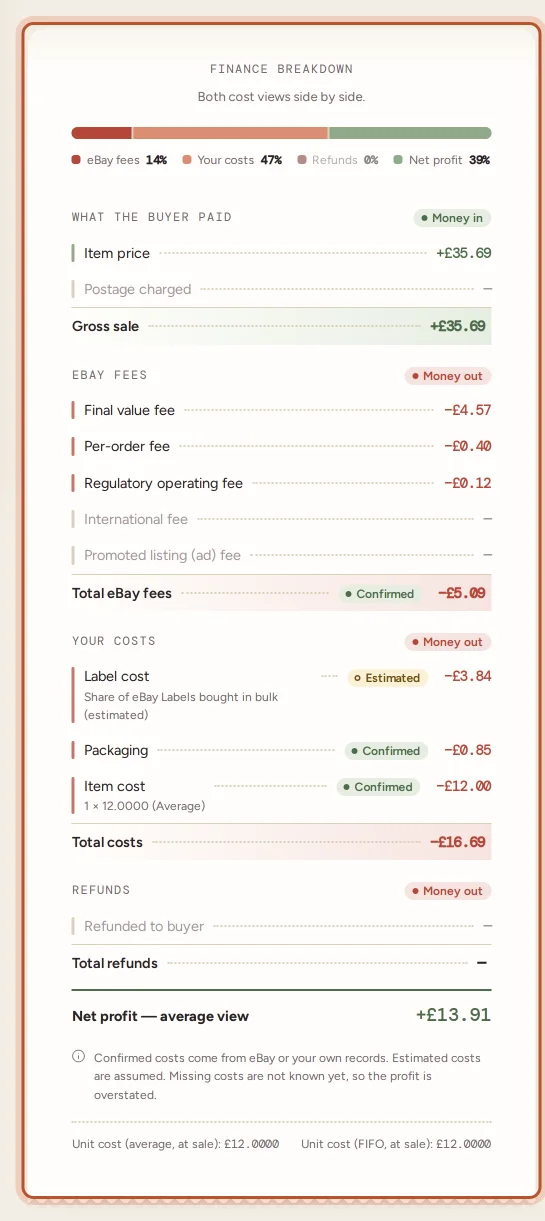
Both costs are now frozen on the sale. The profit uses the one your cost view shows. See average cost vs FIFO.
When the shelf is short
If the sale needs more units than Remaining, the extra units are costed at the item's average, and the item cost is tagged Estimated. Remaining stays at 0.
When nothing matches
A sale whose SKU matches no item has no item cost. See match eBay sales to your stock.
4. Later changes
| What you do later | Past sales | Future sales |
|---|---|---|
| Restock at a new price | Unchanged | Use the new average; FIFO reaches the new lot when older ones are used up |
| Correct Remaining with Edit | Unchanged | Fewer or more units to draw on; costs unchanged |
| Change the SKU or name | Unchanged | Sales match the new SKU |
| Delete the item | Unchanged | Sales of that SKU are unmatched |
| Set a cost on one sale with Edit | That sale only | Unchanged |
| Record a return Back in stock | That sale's item cost drops for the returned units | Units back on the shelf at their old cost |
This is deliberate: the cost of a sale is what the item cost when it sold. If a past cost was wrong, for example because you restocked after the sale came in, fix that sale on Orders with Edit in the Cost column. The profit and cost of goods update on Overview, in reports and in the item's stats.
Seeing it on the item's page
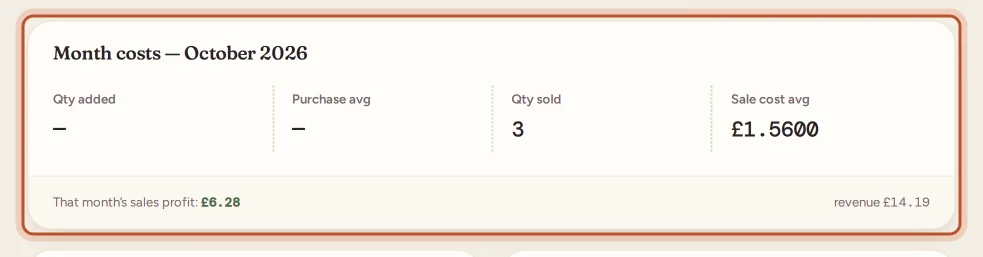
Pick a month on the item's page to see:
- Month costs: Qty added and Purchase avg (stock bought that month), Qty sold and Sale cost avg (the cost used on units sold), and that month's sales profit;
- Restock history: each buy with the average after it;
- Open lots (FIFO layers): what is left of each buy, with the lot that Sells next.
In your profit and loss
Stock is never an expense in ProfitClerk. In your profit and loss, it counts as a cost of the sales it went into, or, if your country and tax profile uses the cash basis, when you paid for it. Which basis applies to you is a question for your accountant or the official guidance.
Questions people ask
If I restock at a higher price, do old sales get more expensive?
No. Each sale keeps the cost it had when it sold. The new price only affects sales from then on.
Where can I see what cost a sale used?
On the order's page, the Item cost line shows the units × the unit cost and the cost view, and the foot of the breakdown shows the unit cost both ways.
What happens if a sale needs more units than I have on record?
The units you have are used first and the rest are costed at the item's average cost. The sale's item cost is tagged Estimated.
Do stock purchases count as an expense in my profit and loss?
Stock is counted as a cost when it sells, or when you buy it if your tax profile uses the cash basis. It is never entered as an expense.
Does a manual cost on one sale change my stock item's cost?
No. It changes only that sale. The stock item's average cost and lots stay as they are.
Thanks for telling us.