How your profit on each sale is calculated
See how ProfitClerk turns an eBay sale into profit: what the buyer paid, less eBay fees, postage label, packaging, item cost, return postage and refunds.
ProfitClerk works out the profit of every eBay sale as what the buyer paid, minus eBay's fees, your postage label, packaging, the item's cost, any return postage and any refund. The result is the Net profit you see on the Orders page, on each order's page and in every report.
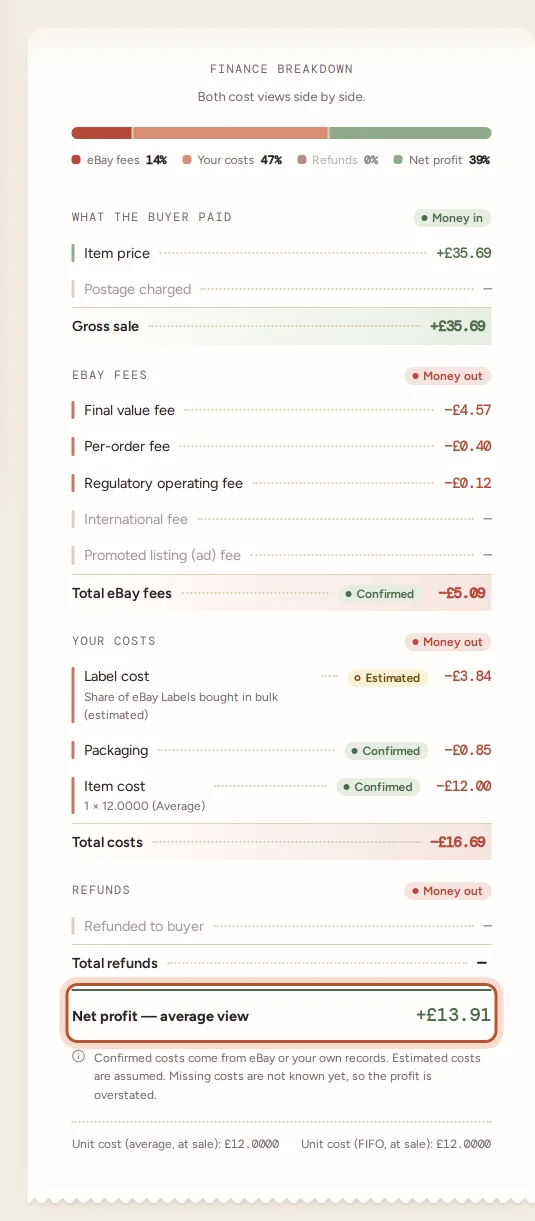
The calculation, line by line
Each order's page shows the same calculation in its Finance breakdown, in four groups.
1. What the buyer paid
- Item price: what the item sold for.
- Postage charged: the postage the buyer paid you.
Together they make the Gross sale. This is also the figure in the Sale column on the Orders page.
2. eBay fees
The fees come from eBay's own finance data for the order, not from a rate card, so they are the amounts eBay actually charged you:
- Final value fee
- Per-order fee
- Regulatory operating fee
- International fee
- Promoted listing (ad) fee
- Other eBay fees and Charity donation, when there are any
Fee credits from eBay (for example after a cancellation) reduce the total. See eBay fees explained for what each fee is.
3. Your costs
- Label cost: what the postage label cost you. It comes from eBay Labels, from a cost you typed or imported, or, when nothing better is known, it is assumed to equal the postage the buyer paid. The note under the line says which. See how label costs work.
- Packaging: what you entered for boxes, mailers and tape on this order.
- Item cost: the units sold × the cost of one unit from your stock records. The note shows the sum, for example "1 × 4.5000 (Average)".
- Return postage: only shown when you recorded a return and paid for its postage outside eBay.
4. Refunds
- Refunded to buyer: any refund eBay records for the order, full or partial, with the date it was made.
Net profit
Gross sale − eBay fees − your costs − refunds = Net profit.
The Margin is the net profit as a share of the gross sale. See margin, ROI and days to sell.
A worked example
A buyer pays 20.00 for an item and 3.20 for postage, so the gross sale is 23.20. Suppose eBay's fees on the order come to 3.10, the label cost 2.85, you used 0.40 of packaging and the item cost you 6.00.
| Line | Amount |
|---|---|
| Gross sale | +23.20 |
| eBay fees | −3.10 |
| Label cost | −2.85 |
| Packaging | −0.40 |
| Item cost | −6.00 |
| Net profit | 10.85 |
If the buyer were later refunded 5.00, the refund line would take the profit down to 5.85. These figures are made up to show the sum; your own fees come from eBay.
Where the item cost comes from
When a sale arrives from eBay, ProfitClerk looks for a stock item with the same SKU (the custom label on your listing). If it finds one, it takes the units out of stock and records what they cost at that moment, in two ways:
- Average: the average cost of all the units you had on the shelf.
- FIFO (first in, first out): the cost of the oldest units you bought.
Both are stored on every sale, and you choose which one your figures use. See average cost vs FIFO.
If no stock item matches, the sale is marked unmatched and shows No item cost. Its profit leaves out what the item cost you, so it is overstated until you add a cost. See sales with no item cost.
What is not in the profit of a sale
- Sales tax and VAT collected by eBay. They are listed in Order & buyer as "Collected from the buyer and paid by eBay" and do not change the profit.
- Business costs that belong to no order, such as an eBay shop subscription, listing fees, expenses and mileage. They appear in your profit and loss instead.
How sure the figures are
Every cost on a sale carries a tag: Confirmed, Estimated or Missing. A label cost assumed from the postage charged is estimated; fees still waiting for eBay's finance data are missing. Read cost confidence to see what each tag means and how to firm up your figures.
Questions people ask
Does the profit include eBay fees?
Yes. Every fee eBay charged on the sale is taken off, including the final value fee, the per-order fee, regulatory and international fees, Promoted Listings fees and any charity donation. Fee credits from eBay reduce the total.
Is the postage the buyer paid counted as income?
Yes. The gross sale is the item price plus the postage charged. What you paid for the label is then taken off as a cost, so postage only adds to profit if the buyer paid more than the label cost you.
Does sales tax or VAT that eBay collected count as my income?
No. Tax eBay collects from the buyer and pays on your behalf is shown on the order for reference but does not change the profit figures.
Why does the profit of an old sale not change when I restock?
The item cost is frozen when the sale comes in, so a later restock at a different price never rewrites past profit. If a past cost was wrong, correct it on that order with Edit or Add cost.
Can a sale show a loss?
Yes. If fees, postage, the item cost and any refund add up to more than the buyer paid, the net profit is negative and shown in red.
Thanks for telling us.