How refunds and returns affect your profit
How ProfitClerk handles full and partial eBay refunds, items sent back, return postage and restocking, and what each one does to the profit of the sale.
A refund to the buyer comes off the sale's profit as soon as eBay records it, and ProfitClerk picks it up for you. What happens to the item is up to you to record: if it comes back and goes on the shelf, its cost leaves the sale; if it is unsellable or never sent back, its cost stays a loss. Return postage you paid outside eBay comes off the profit too.
Refunds: picked up from eBay
Refunds arrive with eBay's finance data for the order, usually with the next sync after eBay makes them.
- On the order's page they appear under Refunds as Refunded to buyer, with the date.
- The order's status changes to partial refund or refunded (the whole sale), and the Orders list shows the refund date under the status.
- If eBay credits any fees back, the Fee credit shows in the order's eBay finance entries and the Total eBay fees goes down.
Partial refund
A partial refund simply comes off the profit. If you sold for 30.00, kept a profit of 9.00 and refunded the buyer 5.00 for a scuff, the profit becomes 4.00.
Full refund
When the whole sale is refunded, the refund equals the gross sale, so what the buyer paid nets to nothing. What is left is your costs: the item cost, the label, packaging and any fees eBay did not credit back. That is why a fully refunded sale usually shows a loss, until you record what happened to the item.
Returns: tell ProfitClerk what came back
Open the order and use the Returns card (in the app, Returns on the sale's page). When ProfitClerk reads your returns from eBay, the card lists them too, and Record what happened fills the form in from eBay's return; the Returns page lists every return waiting to be recorded.
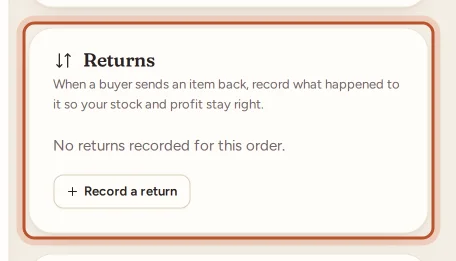
- Click Record a return.
- Under What happened, choose one:
- Back in stock: resellable. The units go back to the shelf at what they cost, and no longer count as a cost of this sale.
- Came back unsellable: damaged or faulty. The item cost stays a loss on this sale.
- Not sent back: the buyer kept it (refunded without a return). The item cost stays on this sale.
- Enter the Units and the Date.
- If you paid for the return postage outside eBay, enter it in Return postage you paid.
- Add a Note if you like, and click Record return.
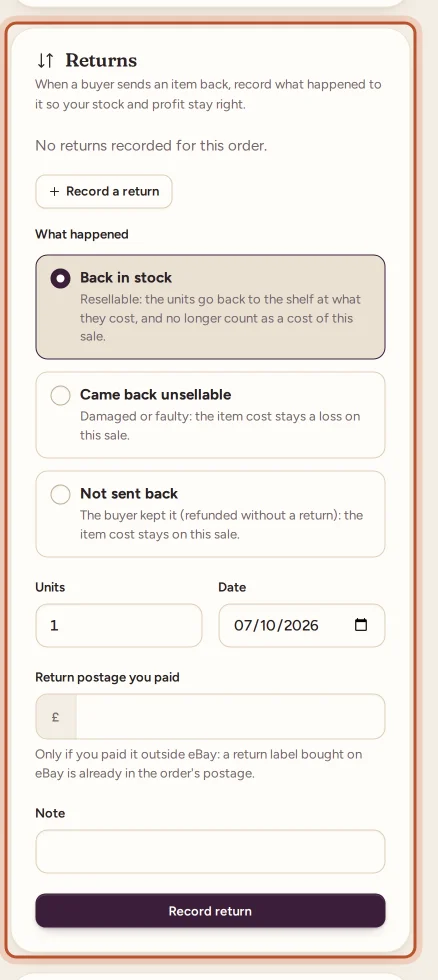
You can record returns until every unit of the order has one. Each return is listed with its units, outcome, date and postage, and has an Undo button.
What each choice does to the profit
| Outcome | Item cost on the sale | Stock |
|---|---|---|
| Back in stock | Removed for the returned units | Units added back to the item |
| Came back unsellable | Stays | No change |
| Not sent back | Stays | No change |
Return postage you enter is added as a Return postage line under Your costs, whichever outcome you choose. A return label you bought on eBay is counted already: once ProfitClerk reads your returns from eBay it shows as its own Return label (eBay) line, see returns from eBay.
Back in stock in detail
- The units go back to the same stock item, at the cost they had on this sale (the average cost and FIFO cost of the sale), as a new FIFO lot. The item's Restock history shows it with the tag Returned by a buyer.
- They are not counted as stock you bought, so they do not inflate your spend in reports such as Sourcing.
- The item cost line on the order notes how many units are back in stock and no longer a cost of this sale.
- You can only undo a back-in-stock return while those units are still on hand. Once they have sold again, the return stays.
A worked example
You sold a jacket for 40.00 including postage. eBay fees were 5.50, the label cost 3.80 and the jacket cost you 12.00, so the profit was 18.70. The buyer returns it and gets a full refund; eBay credits most of the fees back but keeps 0.40. You paid 4.10 to send a replacement return label by another carrier.
- Before you record anything: −12.00 item, −3.80 label, −0.40 fees = −16.20.
- Record Back in stock with 4.10 return postage: the 12.00 item cost leaves the sale, so the profit is −3.80 − 0.40 − 4.10 = −8.30, and the jacket is back on the shelf at 12.00.
These numbers are made up to show the sum.
Where returns show up elsewhere
- Orders: choose Returns recorded in the Status menu. In the app's Sales tab, tap Returned.
- Stock: the units back on the shelf appear in the item's Restock history.
- Profit and loss: return postage is a cost of the period in which you paid it.
For an order cancelled before you sent it, see cancelled orders.
Questions people ask
Do I need to enter refunds myself?
No. Refunds come from eBay with the order's finance data, with their date. You only record what happened to the item that came back, and any return postage you paid outside eBay.
Do eBay fees come back when I refund a buyer?
Often some do: eBay may credit fees back after a refund, and those credits reduce the fees on the order. Any fee eBay keeps stays a cost of the sale.
Should I enter the return label I bought on eBay?
No. A return label bought on eBay is already counted: in the order's postage, or as its own Return label (eBay) line once returns from eBay are read. Only enter return postage you paid somewhere else.
Why can I not choose Back in stock?
The order must be linked to an item in your Inventory under the same SKU, and the sale must have taken units off that item. Otherwise record the return as unsellable or not sent back.
Can I undo a recorded return?
Yes, with Undo on the order's Returns card, as long as the units put back in stock have not sold again.
Where do I find orders with returns?
On Orders, choose Returns recorded in the Status menu. In the app's Sales tab, tap the Returned chip.
Thanks for telling us.