How your stock value is calculated
ProfitClerk values your stock at what it cost you: units on hand × average cost. See where the figure appears, what moves it and how it differs from FIFO.
Your stock value in ProfitClerk is what the units on your shelves cost you: for each item, the units remaining × its average cost per unit, added up across all items. It is a cost figure, not a selling price, and it tells you how much money is tied up in stock.
Where you see it
On the website
- Inventory, top of the page: the Stock value card ("Remaining units × average cost"), next to SKUs tracked with the units on hand, and Low stock.
- Inventory table: the Value column for each item, and the total in the Total on hand row at the bottom.
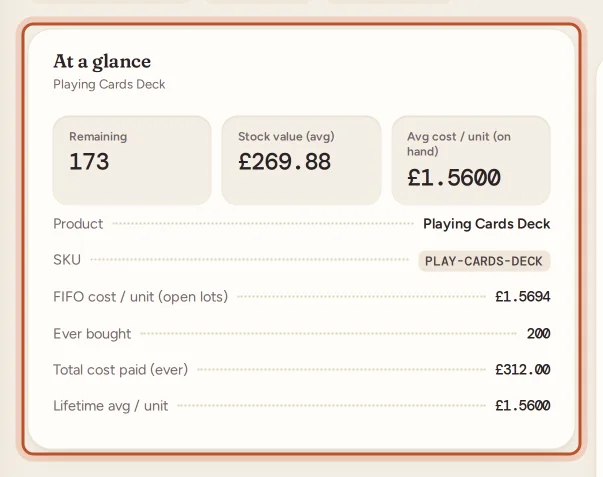
- An item's page, At a glance: Remaining, Stock value (avg) and Avg cost / unit (on hand), plus FIFO cost / unit (open lots) for comparison.

In the app
- Stock tab: the dark card at the top shows Stock value ("What the units on hand cost you"), with the number of items, units and how many are low.
- An item's page: … on hand under the count, and the Stock value tile next to Cost per unit and Ever bought.
How it is worked out
For each item:
Stock value = Remaining × average cost per unit
The average cost per unit is the item's single blended cost, which changes only when you restock. See how item costs flow into profit.
An example
| Item | Remaining | Average cost | Value |
|---|---|---|---|
| Phone case | 15 | 3.3333 | 50.00 |
| Lamp arm | 4 | 12.00 | 48.00 |
| Total | 19 | 98.00 |
What moves it
| Event | Effect on stock value |
|---|---|
| You add or restock an item | Goes up by what you paid |
| A sale of the item comes in | Goes down by the units sold × the average cost |
| You record a return as Back in stock | Goes up by those units at their cost on the sale |
| You lower Remaining with Edit | Goes down by the units removed × the average cost |
| You raise Remaining with Edit | Goes up by the units added × the average cost |
| You delete an item | Its value leaves the total |
Refunds alone do not change it: a refunded item only comes back into stock when you record the return.
Average vs FIFO for stock on hand
The item's page also shows FIFO cost / unit (open lots): the average cost of the units still in its open lots, the way FIFO sees them. Because FIFO sells the oldest units first, the units left are the newest ones, so this figure leans towards your latest buying price. When prices have risen, it is higher than the average; when they have fallen, lower. The stock value cards always use the average.
Keep it accurate
- Count your stock now and then and correct Remaining where it is off, with a note. See restock or correct quantities.
- Add stock with its real cost, including the delivery you paid to receive it.
- Use job lots for mixed boxes, so each item carries a fair share. See job lots.
Related reports
- Unsold stock shows the Money in stock by how long it has been on the shelf, and which items have not sold in 90 days. See unsold stock.
- Sourcing shows the value still on the shelf for each place you buy from.
- Profit and loss counts stock as a cost when it sells, or when you buy it if your tax profile uses the cash basis. See profit and loss.
Questions people ask
Is stock value what my items would sell for?
No. It is what the units on hand cost you to buy, not their selling price. It shows how much money is sitting on your shelves.
Why did my stock value go down when nothing sold?
Someone may have lowered an item's remaining quantity with Edit, or a sale came in for it. A refund on its own does not put units back; recording a return as back in stock does.
Does stock value use average cost or FIFO?
Average cost: each item's units on hand × its average cost per unit. The item's page also shows the FIFO cost per unit of its open lots for comparison.
Can I use this figure for my year-end accounts?
It is a useful starting point, but how you must value closing stock depends on your country's rules. Ask your accountant or check the official guidance.
Thanks for telling us.