Log business mileage and see what it is worth
Log sourcing runs and post office trips in ProfitClerk's mileage log. Each trip is valued at your country's mileage rate or your own, and exports as a CSV.
The Mileage log keeps your business trips by car or van, such as sourcing runs, trips to the post office and fairs. Each trip is valued at a mileage rate and comes off your profit as the Mileage cost in your profit and loss.
On the website, open Mileage in the menu. In the app, go to Money › Mileage.
Log a trip
- On the website, use the Log a trip form on the Mileage page. In the app, tap Log a trip.
- Enter the Date. Trips cannot be in the future.
- Optionally enter where you went From and To.
- Enter the Business purpose, for example "Sourcing at the car boot sale". It is required: a tax office will want to know why you went.
- Enter the Distance (one way) in miles or km.
- Tick There and back (counts the distance twice) if you returned the same way.
- Add Notes if you like, and select Log trip.
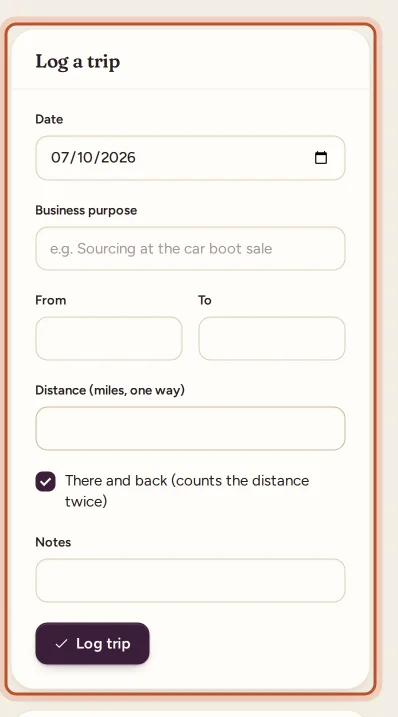
To change a trip, select the pencil next to it; the form switches to Change trip. Select the bin to delete it.
What your trips are worth
The top of the page shows, for the period you chose:
- Business distance: the total distance and the number of trips.
- Worth as an expense: what the trips come to at the mileage rate.
- Rate now: the rate that applies today, and any rule that comes with it.

Official rate or your own
By default ProfitClerk uses the official mileage rate for your home country from its country pack. Each trip is valued at the rate in force on the trip's date, so a rate change part-way through the year is handled for you.
Some countries' rates have rules, which ProfitClerk applies per tax year:
- a lower rate after a set distance in a tax year (shown as "… per mile after … miles in a tax year");
- a cap on the distance you can claim in a tax year.
Because those rules run per tax year, a short period such as 3 months still counts the distance you drove earlier in the same tax year.
Select Where this rate comes from to see the official source. Some countries have no official rate for the self-employed, and the page says so.
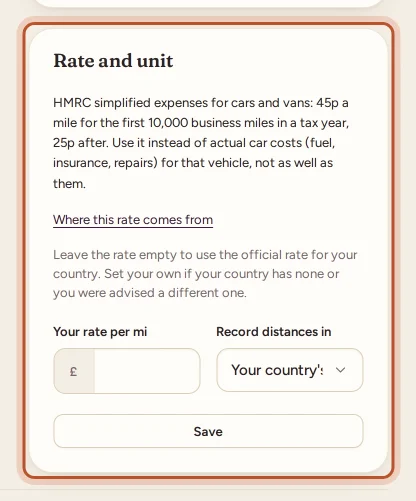
To use a different rate, enter it in Rate and unit › Your rate per mile (or per km) and select Save. Every trip is then valued at your rate. Leave it empty to go back to the official rate. Use your own rate only if your country has none or you were advised to.
Miles or kilometres
Under Record distances in, choose miles or km, or leave Your country's unit. Trips you already logged are converted, so you can switch at any time.
Mileage or vehicle costs, not both
Most tax offices let you claim either a mileage rate or the actual costs of running a vehicle (fuel, repairs, insurance), not both for the same vehicle. If you have Vehicle costs in your expenses in the same tax year as trips in the mileage log, ProfitClerk shows a warning so you can keep one.
Periods and export
Choose the period at the top: 3 months, 6 months, 12 months, This tax year or Last tax year. For month views you can also pick the month it ends on.
Select Export log to download the trips in the period as a CSV file. It has the date, from, to, purpose, distance, whether it was there and back, the value in your currency, and notes. In the app, Export log (CSV) opens the same file in your browser.
Where mileage shows up
- In the profit and loss as Mileage, taken off your profit.
- In the tax centre, on the form line your country uses for a mileage allowance, where the country pack has one.
- In the bookkeeping journal export, as a mileage entry.
Owners and managers can log trips and change the rate; viewers can see the log and export it.
Questions people ask
Should I enter the distance one way or there and back?
Enter the one-way distance. Tick There and back if you came back the same way, and the distance is counted twice.
Which mileage rate does ProfitClerk use?
The official rate for your home country, as kept in ProfitClerk's country pack, at the rate in force on each trip's date. You can set your own rate instead in Rate and unit.
Can I claim both mileage and fuel costs?
Most tax offices let you claim either a mileage rate or the actual costs of a vehicle, not both. ProfitClerk warns you when you have both in the same tax year; ask your accountant which suits you.
Can I record kilometres instead of miles?
Yes. In Rate and unit, choose miles or km under Record distances in. Leave it on Your country's unit to use the usual one for your country.
Why is my trip worth nothing?
Your country may have no official mileage rate in ProfitClerk. Set your own rate per mile or km in Rate and unit, and every trip is valued at it.
Thanks for telling us.