The tax centre: forms, set-aside, deadlines
ProfitClerk's tax centre fills your country's tax forms from your eBay sales and shows tax to put aside, thresholds, deadlines and tax-year exports.
The tax centre turns your eBay sales, costs, expenses and mileage into the boxes of your country's tax forms. It also shows how much tax to put aside this quarter, how close you are to tax thresholds, the deadlines coming up, and one-click exports for the tax year.
On the website, open Tax in the menu. In the app, go to Money › Tax centre.
Your country pack
What the tax centre shows depends on your home country, set in your country and tax profile. Each country ProfitClerk supports has a pack with its tax forms, thresholds, deadlines, the usual rate to put aside and, where it applies, the margin scheme.
The pack card at the top shows:
- the country and its main tax form;
- your basis (cash or accrual) and whether you are registered for VAT or GST, and on which scheme;
- Rules checked on a date, or Rules not yet confirmed.
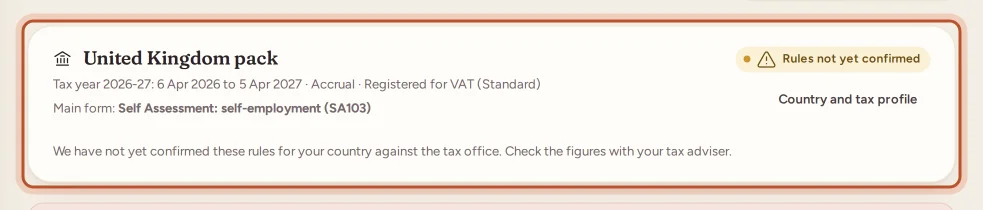
Rules not yet confirmed means the rules in that pack have not yet been checked against the tax office. Treat its figures with extra care and check them with your tax adviser.
If you have not chosen a country, the page asks you to Set your country. If there is no pack for your country yet, your reports and exports still follow your tax profile: use the profit and loss and the bookkeeping journal for your return.
Switch between This tax year and Last tax year at the top.
Tax to put aside
Tax to put aside is a budgeting figure for the current quarter so far. It adds up:
- a percentage of the quarter's profit (or of turnover in countries where contributions are charged on sales). The page says whether this is your rate or the usual rate for your country;
- the VAT or GST to pay for the quarter, if you are registered.
To use your own percentage, enter it in Your tax settings › My rate for tax to put aside and select Save. Leave it empty to use the usual rate for your country.
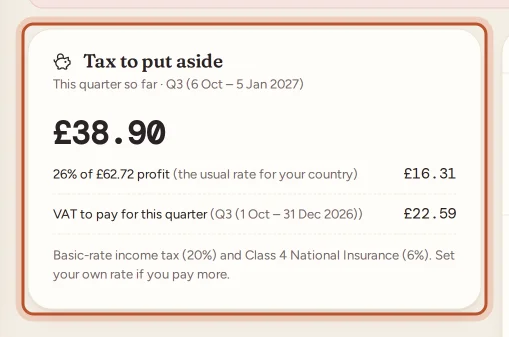
The amount is a guide to help you save, not what you will owe. Your actual tax depends on your whole situation.
Thresholds
The Thresholds card shows each threshold in your country pack, such as when eBay must report your sales to the tax office, a trading allowance, VAT or GST registration, or a small-business exemption. For each one you see:
- how far you are, in money and/or number of sales, and over which window (this calendar year, this tax year, the last 12 months…);
- Below, Getting close or Reached;
- the date you would reach it at your current pace;
- a Rule link to the official source, where there is one.
When you get close to or reach a threshold, a warning appears at the top of the page under Needs your attention.
Deadlines
Coming up lists returns, payments, VAT or GST returns and updates due in the next four months, with how many days are left. Deadlines that only apply to registered sellers are shown only if you are registered.
Your tax forms
Each form in your pack is filled in line by line from your figures: turnover, cost of goods (by your basis), eBay fees, Promoted Listings, postage, packaging, expenses by category, mileage, profit and, if registered, VAT or GST. Some forms are for the tax year; others are split By quarter.
A line marked not tracked is something ProfitClerk does not know about, such as other business income. Add it yourself if it applies.
Tax-year exports
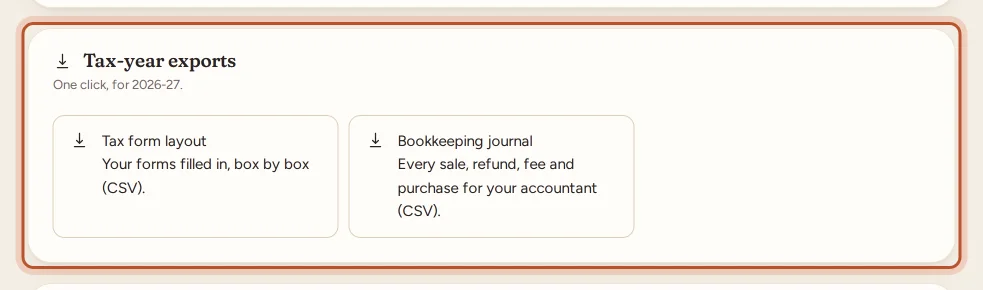
Under Tax-year exports you can download, for the tax year shown:
- Tax form layout: your forms filled in, box by box (CSV).
- Bookkeeping journal: every sale, refund, fee, purchase, expense and trip for your accountant (CSV).
- DATEV (Germany) or FEC (France), where your pack includes them.
- Margin scheme stock book, if you use the margin scheme. See VAT margin scheme.
For DATEV, add your consultant and client numbers in Your tax settings so the file imports straight away. For FEC, add your SIREN for the file name.
US sellers
If your home country is the United States, the tax centre also has a Form 1099-K reconciliation: see Form 1099-K and your eBay sales. Sales tax eBay collected as marketplace facilitator is kept out of your revenue.
Reminder emails
With Email me before deadlines and when I get close to a threshold ticked in Your tax settings (it is on by default), you get an email about a week before each deadline, and when you get close to or reach a threshold. Each reminder is sent once.
Owners and managers can change the tax settings and see the settings card; everyone in the workspace can view the tax centre and download its exports.
Questions people ask
Is the tax centre tax advice?
No. Its figures are estimates from your eBay data to help you prepare. Check your return with your tax office or an adviser before you file or pay.
Why does it say "Rules not yet confirmed"?
The rules in your country's pack have not yet been checked against the tax office. The figures still work, but check them with your tax adviser. Once they are checked, the pack shows Rules checked on and a date.
How is the amount to put aside worked out?
It is a percentage of this quarter's profit, or of turnover in countries where contributions are charged on sales, plus any VAT or GST for the quarter if you are registered. You can set your own percentage in Your tax settings.
My country has no pack. Can I still use ProfitClerk for tax?
Yes. Your reports and exports still follow your country and tax profile. Use the profit and loss and the bookkeeping journal export for your return.
Can I turn off the tax reminder emails?
Yes. Untick Email me before deadlines and when I get close to a threshold in Your tax settings and save.
Thanks for telling us.