Check your Form 1099-K against your eBay sales
US eBay sellers can compare the 1099-K eBay sent with ProfitClerk's gross sales for the year, see why they differ and what the sales tax eBay collected changes.
If you sell on eBay in the United States, eBay may send you a Form 1099-K with the gross amount of your sales. ProfitClerk compares it with your own gross sales for the same year, so you can see whether they match and why they might not.
The comparison is in the tax centre: Tax on the website, or Money › Tax centre in the app. It appears when your home country is the United States in your country and tax profile.
Enter your 1099-K figures
- Open the tax centre and choose the tax year the 1099-K is for (This tax year or Last tax year).
- In Form 1099-K reconciliation, enter:
- Box 1a gross amount;
- Box 3 number of payment transactions.
- Select Compare.
The figures are saved for that year, so you only enter them once.
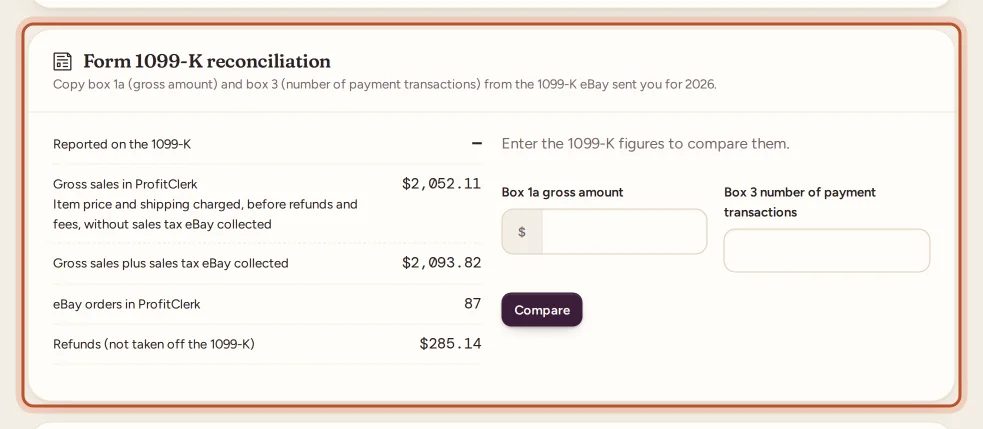
What you see
- Reported on the 1099-K: the box 1a amount you entered.
- Gross sales in ProfitClerk: item price and shipping charged, before refunds and fees, without the sales tax eBay collected.
- Gross sales plus sales tax eBay collected.
- Difference between the 1099-K and the closest of the two.
- eBay orders in ProfitClerk, next to the number of transactions you entered.
- Refunds (not taken off the 1099-K).
Then one of three results:
- Matches your gross sales.
- Matches your gross sales once the sales tax eBay collected is included. That tax is not your income: Schedule C line 1 uses the amount without it.
- Does not match. See below.
Small differences, within about 1%, count as a match.
Why the 1099-K looks bigger than your income
The 1099-K is gross. It does not take off:
- refunds you gave buyers;
- eBay fees and Promoted Listings;
- what the items cost you, postage and other expenses.
It may also include sales tax eBay collected as the marketplace facilitator. eBay pays that tax to the state itself; it is never your income. See Sales tax collected by eBay.
Your profit and loss shows the full picture: sales, less refunds, less every cost, down to net profit.
When it does not match
- Check every eBay account is connected. A 1099-K covers the eBay account it was issued for. If you sell on several, connect them all, or compare each 1099-K with the right account's sales.
- Check your orders go back to January. If you connected part-way through the year, older orders may be missing. Use Import two years under Two years of history in Settings to bring in older orders.
- Check the transaction count. A big gap between eBay orders and box 3 often points to missing orders.
- Remember that refunds are not taken off the 1099-K, so they are not a reason for a difference.
If it still does not match, compare with the reports in eBay Seller Hub, and ask a tax professional.
The US tax form in the tax centre
For US sellers, the tax centre also fills in your country pack's form lines from your figures, keeps sales tax eBay collected out of your revenue, and lists your deadlines. See The tax centre.
Questions people ask
Why is my 1099-K higher than my profit?
The 1099-K is a gross figure. Refunds, eBay fees, item costs and other expenses are not taken off it, and it may include sales tax eBay collected. Your profit takes all of those into account.
The 1099-K matches only once sales tax is included. Is that a problem?
No. It means eBay included the sales tax it collected. That tax is not your income; ProfitClerk notes that Schedule C line 1 uses the amount without it. Check with a tax professional how to report it.
Why does it not match at all?
Usually because an eBay account is not connected or was not synced for the whole year. Check every account you sold on is connected, and that orders go back to the start of the year.
Do I see this if I am not in the US?
No. The Form 1099-K reconciliation only appears in the tax centre when your home country is the United States.
Can a viewer enter the 1099-K figures?
No. Owners and managers can enter and save the figures; viewers can see the comparison once it is saved.
Thanks for telling us.