VAT margin scheme and your stock book
Use the second-hand VAT margin scheme with ProfitClerk: VAT worked out item by item on your margin, a stock book for the tax year and a CSV export.
On a second-hand VAT margin scheme you pay VAT only on your margin: the selling price of each item less what you paid for it. ProfitClerk works this out item by item from your sales and item costs, and keeps a margin scheme stock book for the tax year that you can download.
Turn it on
The margin scheme is part of your country and tax profile:
- On the website, go to Settings › Country and tax profile. In the app, go to More › Country and tax.
- Tick I am registered for VAT.
- Choose Margin scheme (second-hand goods). It only appears if your country pack includes a margin scheme.
- Select Save profile.
Only the workspace owner can change this.
How the VAT is worked out
For each item sold to a buyer in your home country:
- Selling price: what the buyer paid, less any refund.
- Purchase price: the item cost on the sale.
- Margin: selling price less purchase price.
- VAT on the margin: the VAT inside the margin at your country's standard rate.
Two rules follow the scheme:
- An item sold at a loss has no VAT, and its loss does not reduce the VAT on other items.
- An item sold abroad is listed, but without margin VAT.
The profit and loss then shows VAT on your sales (estimate) with Margin scheme under it, and the Tax collected report explains the margin estimate.
The Margin scheme card
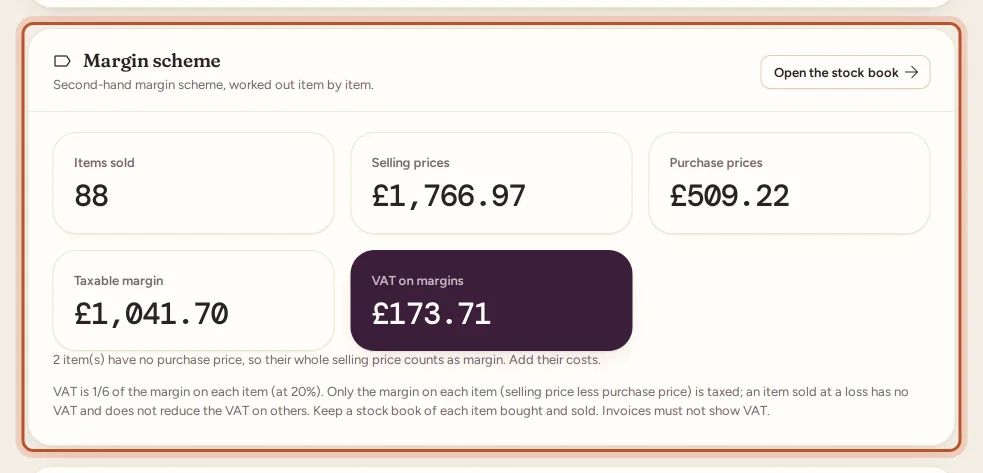
In the tax centre (Tax on the website, Money › Tax centre in the app), the Margin scheme card shows the tax year's:
- Items sold;
- Selling prices and Purchase prices;
- Taxable margin;
- VAT on margins.
It warns you when items have no purchase price. Select Open the stock book to see every item.
The stock book
The Margin scheme stock book lists every item sold in the tax year, with:
- the item and its SKU;
- the date sold, and the date bought where it is known;
- Selling price, Purchase price, Margin and VAT included;
- a note when the item was Sold abroad, has No purchase price, or was Sold at a loss: no VAT.
The totals at the top add up the VAT on margins, items sold, selling prices and purchase prices.

Use This tax year or Last tax year in the tax centre to choose the year before you open the book.
Download the stock book
Select Margin scheme stock book on the stock book page, or under Tax-year exports in the tax centre. You get a CSV with each item's purchase price, margin and VAT for the tax year. Keep it with your records: margin schemes usually require a stock book of each item bought and sold.
Things to check
- Margin schemes have conditions, for example on how the goods were bought and what your invoices may show. ProfitClerk applies the scheme to every sale once you choose it.
- Reduced-rate or zero-rated items and exports change the real figure.
- If you also use the standard scheme for some goods, your actual VAT return will differ from the estimate.
Questions people ask
How do I turn on the margin scheme in ProfitClerk?
In your country and tax profile, tick that you are registered for VAT and choose Margin scheme (second-hand goods), then save. Only the workspace owner can change this.
Why do some items show no VAT?
An item sold at a loss has no VAT and does not reduce the VAT on other items. Sales to buyers abroad are listed without margin VAT. Each row says which applies.
What if an item has no purchase price?
Its whole selling price counts as margin, so the VAT is overstated. The stock book warns you how many items this affects; add their item costs.
Can I use the margin scheme for every item I sell?
The scheme has conditions, such as how you bought the goods. ProfitClerk applies it to every sale once you choose it, so check the official guidance or ask an accountant which items qualify.
Is the margin scheme in every country?
The stock book appears where your country pack has a margin scheme, such as the UK second-hand margin scheme and its equivalents in some EU countries.
Thanks for telling us.