Sales tax and VAT collected by eBay
See the sales tax, VAT and GST eBay collected from your buyers as marketplace facilitator, the tax you collected yourself, and where your buyers are.
In many places eBay collects sales tax, VAT or GST from your buyers and pays it to the tax authority itself, as the marketplace facilitator. That money is never yours: it is not part of your sale price, your profit or your income. The Tax collected report shows how much eBay collected, any tax you collected yourself, and where your buyers are.
On the website, go to Reports › Tax collected. In the app, go to Money › More reports › Sales tax and VAT.
What eBay collects
Examples of tax eBay collects and pays itself:
- US state sales tax;
- Canadian provincial sales tax and GST;
- VAT on low-value imports into the UK and the EU;
- GST in places such as Australia and New Zealand.
eBay passes the tax amount on each order, and ProfitClerk reads it on every sync. It keeps it apart from your sales, so it never inflates your revenue. Payouts are the same: eBay's tax is not part of the money paid to you. See eBay payouts.
The report
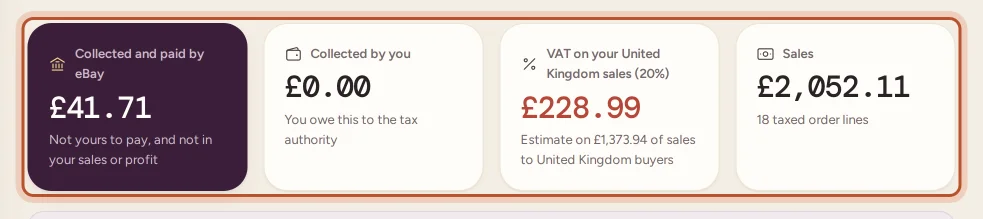
At the top you see, for the period:
- Collected and paid by eBay: not yours to pay, and not in your sales or profit.
- Collected by you: tax you charged yourself. You owe this to the tax authority.
- Your own VAT or GST estimate, if you are registered (see below).
- Sales, and how many order lines were taxed.
By month
By month splits the tax eBay collected by type (such as US state sales tax, Canadian provincial sales tax, GST, VAT or Regional sales tax), next to the tax you collected and your sales.
Where your buyers are
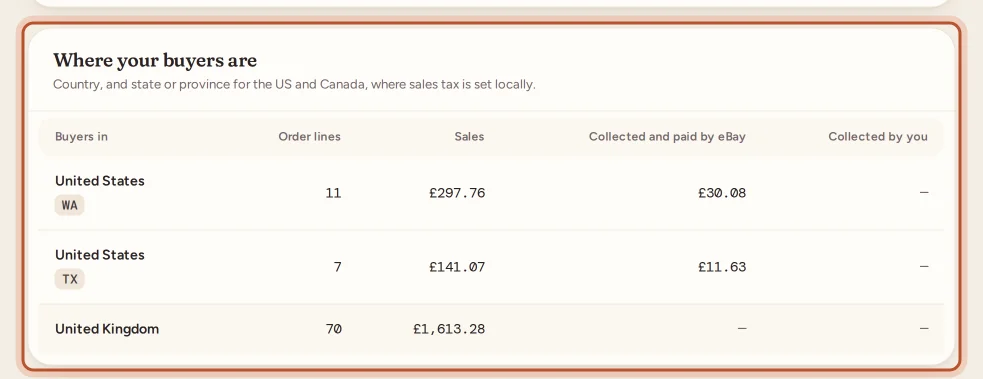
Where your buyers are lists the country, and the state or province for the US and Canada, where sales tax is set locally. For each you see order lines, sales, tax collected by eBay and tax collected by you. Orders without an address show as Unknown.
VAT or GST on your own sales
If you are registered for VAT or GST in your country and tax profile, the report adds an estimate of the tax you owe on your own sales, by scheme:
- Standard scheme: the tax inside sales to buyers in your home country, after refunds, assuming every item is standard-rated.
- Flat Rate Scheme: your flat percentage of sales after refunds.
- Margin scheme: the tax inside your margin on home-country sales. Sales at a loss count as zero. See VAT margin scheme.
If you are not registered, the report suggests setting it in your tax profile if you are.
The same estimate appears in the profit and loss as VAT on your sales (estimate).
US sellers and the 1099-K
Your Form 1099-K may include the sales tax eBay collected. ProfitClerk shows your gross sales with and without it, so you can see which one matches. See Form 1099-K and your eBay sales.
Periods and export
Choose 3 months, 6 months, 12 months, This tax year or Last tax year at the top. Select Export CSV for the month-by-month figures, by tax type, followed by the table of where your buyers are.
Older orders
Tax is read from eBay on each sync. For orders from before this report existed, use Re-import orders in Settings to fetch it, up to 90 days back.
Questions people ask
Is the sales tax eBay collected part of my income?
No. eBay collects it from the buyer and pays it to the tax authority itself as the marketplace facilitator. ProfitClerk keeps it out of your sales, profit and tax figures.
What is "Collected by you"?
Tax you charged buyers yourself rather than eBay. You owe that to the tax authority, so it comes off your sales in the profit and loss.
Why are older orders missing tax?
Tax is read from eBay on each sync. For orders from before the report existed, use Re-import orders in Settings to fetch it, up to 90 days back.
I am VAT registered. Does this report show the VAT I owe?
It shows an estimate of the VAT or GST on your own sales, worked out by your scheme. Reduced-rate or zero-rated items and exports change the real figure, so check it before filing.
Why is a buyer's place shown as Unknown?
eBay did not give an address for that order, so it cannot be placed in a country or state.
Thanks for telling us.