eBay payouts: what each payout was made of
See what each eBay payout to your bank was made of in ProfitClerk: sales, refunds, fees, ads and postage, any unexplained gap, and VAT on sales and costs.
Each time eBay pays money into your bank, ProfitClerk shows what that payout was made of: the sales, refunds, eBay fees, ad fees, postage labels and other adjustments behind it. That lets you match the deposit in your bank to your eBay activity.
On the website, payouts are on the Accounting page under eBay payouts. In the app, go to Money › eBay payouts.
Get your payouts
Payouts come from your connected eBay accounts. The first time, ProfitClerk reads the payouts from the last 90 days. Then:
- Select Get payouts from eBay on the Accounting page (in the app, Money › More reports › Accounting › Read new eBay payouts now) to check for new ones at any time.
- If you have connected accounting software, new payouts are also checked every hour.
Each check reads the last week again, because a recent payout can still change, for example from On its way to Paid.
The payouts list
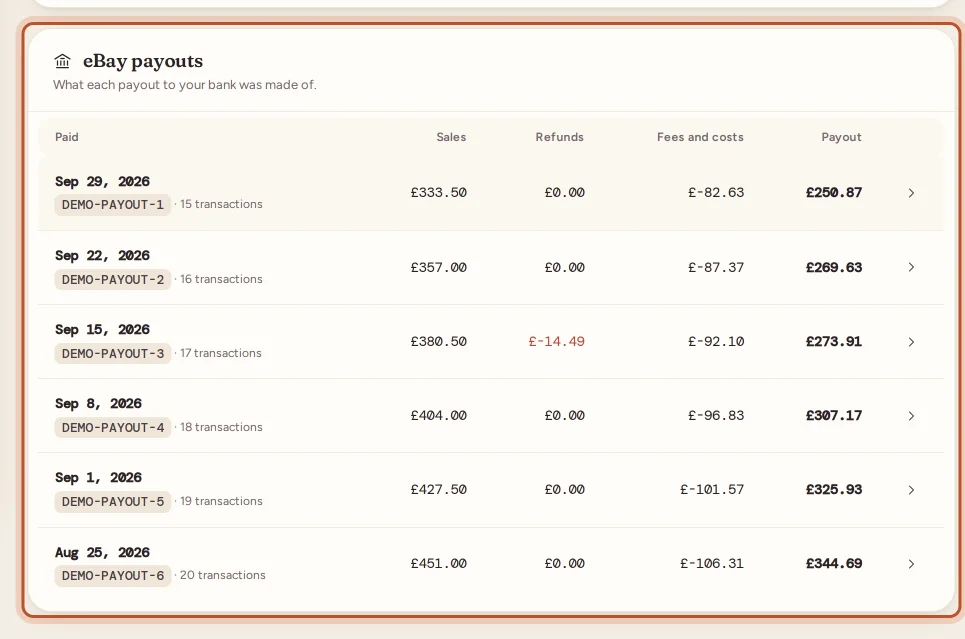
For each payout you see:
- Paid: the payout date, eBay's payout reference and how many transactions it covered. A payout that has not been paid yet shows its status, such as On its way, eBay is retrying, Failed at eBay or Reversed.
- Sales, Refunds (including disputes) and Fees and costs.
- VAT/GST, when your accounting software uses tax rates.
- The Payout amount that reached your bank.
- In your books, when accounting software is connected: Posted, Waiting, Not posted, Could not post, or Before a date.
Select a payout to open it.
Inside one payout
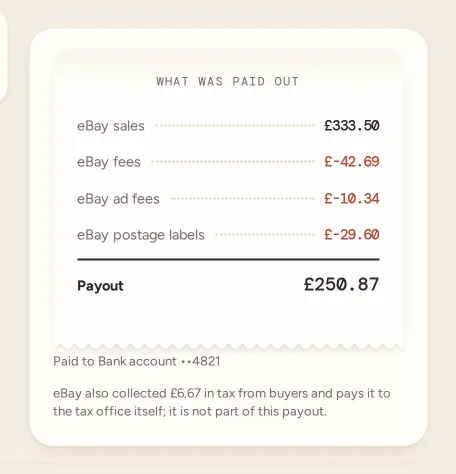
What was paid out lists the payout line by line. Costs show as negative amounts:
- eBay sales: what buyers paid for the sales in the payout, before fees.
- Refunds to buyers.
- eBay fees: final value and other selling fees.
- eBay ad fees: Promoted Listings.
- eBay postage labels bought through eBay.
- Disputes and chargebacks.
- Charity donations made from sales.
- Other eBay adjustments: anything else eBay charged or credited, such as an express payout fee.
The lines add up to the Payout total. Lines that are zero are left out.
Unexplained differences
Sometimes the transactions eBay listed for a payout do not add up to the amount it paid, for example when money was held back or a transaction was not listed. ProfitClerk then shows Not explained by eBay's transactions with the difference, and a note with what the listed transactions came to.
When the payout is posted to accounting software, that difference goes on Other eBay adjustments, so your books still match the bank. Check it against your eBay Seller Hub payments if it is large.
VAT on sales and costs
When your accounting software is connected, the payout page also shows What gets posted: each line with the account and tax rate it will use, the amount including tax, the tax and the net. Under it you see Tax on sales and Tax on costs for that payout. The tax is worked out from the rates in your own accounting software, not from fixed rates in ProfitClerk.
Without a connection, the page tells you to connect accounting software to see the accounts and tax rates each line would use.
Tax eBay collected
If eBay collected sales tax or VAT from buyers on these sales, the page says how much. That tax is not part of the payout and not your income: eBay pays it to the tax office itself. See Sales tax collected by eBay.
Payouts and your profit
Payouts show cash: what reached your bank and when. Your profit and loss shows profit: sales and costs in the period, including item costs and expenses that never pass through eBay. The two will not match, and they are not meant to.
To post each payout as one summary in your books, see Connect your accounting software.
Questions people ask
Why does my payout not match my sales?
A payout is sales less refunds, eBay fees, ad fees, postage labels and other adjustments for the transactions eBay paid out together. The payout page lists each of those lines so you can see where the difference went.
What does "Not explained by eBay's transactions" mean?
The transactions eBay listed for the payout do not add up to the amount it paid, for example because of a hold or a transaction eBay did not list. ProfitClerk shows the gap on its own line rather than hiding it.
How far back are payouts read?
The first time, payouts from the last 90 days are read. After that, new payouts are added and the last week is checked again, as recent payouts can still change status.
Is the sales tax eBay collected in my payout?
No. eBay collects that tax from buyers and pays it to the tax office itself. The payout page tells you how much it was, for reference.
Do I need accounting software to see payouts?
No. Anyone in your workspace can see payouts and their breakdown. Connecting Xero, QuickBooks or FreeAgent adds posting each payout to your books.
Thanks for telling us.