Repeating expenses: add, pause, resume or stop
Set rent, software and phone bills to repeat weekly, monthly, quarterly or yearly in ProfitClerk, then pause, resume, change or stop them at any time.
A repeating expense is a cost ProfitClerk adds to your expenses for you on each due date: rent, software, a phone contract, insurance. You set it up once, choose how often it repeats, and you can pause, resume, change or stop it whenever you like.
Set up a repeating expense
- Go to Expenses › Add expense on the website, or Money › Expenses › Add expense in the app.
- Fill in the expense as usual: date, category, description, amount, VAT or GST included and business use. See Record your business expenses.
- Under Repeats, choose Every week, Every month, Every 3 months or Every year. The default is Does not repeat.
- Optionally set Until (optional) to the last date it should be added, for example when a contract ends.
- Save.
The Date paid is the first date. If it is today or earlier, ProfitClerk adds every date from then up to today straight away, and tells you how many it added. Later dates are added on the day they fall due.
Each expense it adds shows Repeats in the list, and counts in your profit and loss and tax figures like any other expense.
See what repeats
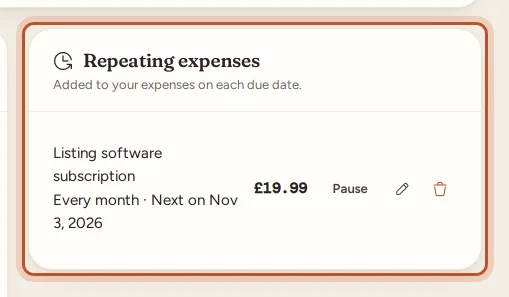
On the website, the Repeating expenses card on the Expenses page lists them. In the app, open Money › Expenses and tap Repeating expenses. Each one shows how often it repeats and either:
- Next on a date, while it is running;
- Paused, if you paused it;
- Ended, once its Until date has passed.
Pause and resume
Select Pause to stop new dates being added for a while, for example while your storage unit is empty. Select Resume to start again.
An expense that has Ended cannot be resumed. To continue it, edit it, set a later Until date or leave Until empty, save, and then select Resume.
Change a repeating expense
Select the pencil next to it (website) or tap it (app). You can change the category, description, payee, amount, tax, business use, how often it repeats and the end date.
Changes apply to the next dates only. Expenses already added stay as they are, so edit those one by one if they were wrong. If you change how often it repeats, the new rhythm starts from the next date that was due.
Stop repeating
On the website, select the bin next to the repeating expense. In the app, open it and tap the bin, Stop repeating. Confirm, and no more dates are added.
Stopping never deletes what was already added. Those expenses stay in your list, your profit and loss and your exports.
Who can change them
Owners and managers can set up, pause, resume, edit and stop repeating expenses. Viewers can see them but not change them.
While your workspace has no plan it is read-only and nothing is added. Dates missed in that time are added once a plan starts again.
Questions people ask
When is a repeating expense added?
On each due date, early in the morning. If the first date is today or in the past, the dates up to today are added straight away when you save it.
What happens to dates that fell while an expense was paused?
When you resume it, the dates missed during the pause are added up to today. Delete any you did not actually pay.
Does stopping a repeating expense delete what was already added?
No. Stopping only ends the repeat. Expenses already added stay in your list and in your profit and loss.
Is the receipt copied to every date?
No. A receipt you attach when you set up the repeat goes on the first expense only. Add a receipt to the others by editing them.
Can I change the amount when my bill goes up?
Yes. Edit the repeating expense and save. The new amount is used from the next date; expenses already added keep the old amount.
Thanks for telling us.