Reconnect eBay when sync stops working
eBay sales stopped coming in, or you got a sync problem email? Here is how to see what went wrong and reconnect your eBay account so everything catches up.
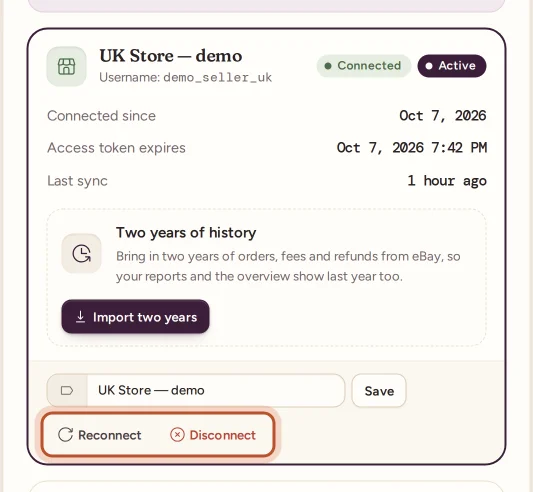
If eBay sales stop coming in, open Settings and look at your eBay account. If it shows Error and a Last error about signing in or access, select Reconnect, sign in to the same eBay account on eBay's page, and allow access again. The account starts syncing straight away, and any missed orders, fees and refunds catch up by themselves.
How you find out
ProfitClerk tells you in several places when an account stops syncing:
- Settings: the account's badge turns to Error, and Last error shows what eBay said. The Connection health card shows a Last sync error box.
- Overview: the eBay connection card shows Error and an old Last sync.
- Email: after an account has failed to sync for more than an hour, the owner gets one email, "Your eBay account … is not syncing", with what eBay said and an Open settings button. It is sent once per problem, not every 15 minutes.
- App notification: "eBay sync needs attention", if you have that notification switched on.
- Weekly email: the weekly profit email also mentions an eBay account that is failing to sync.
Reconnect on the website
- Open Settings (Workspace & eBay tab).
- Under the account with the problem, select Reconnect.
- On eBay's page, sign in to the same eBay account and allow access.
- You return to Settings with "eBay account connected (read-only)."
The account's error clears, and the next sync (within 15 minutes, or Sync now) catches up.
Reconnect in the app
- Go to More › eBay accounts and tap the account.
- Tap Sign in to eBay again.
- Sign in to eBay in your browser and allow access, then tap Back to the app.
Reconnecting needs an active plan and is only open to the workspace owner.
Common reasons and what to do
| What you see | What it means | What to do |
|---|---|---|
| A message about an expired or invalid sign-in, token or grant | eBay ended ProfitClerk's access, for example after a long time, a password change or removed access | Reconnect |
| A message about eBay being unavailable or a server error | eBay is having a problem | Wait; the sync tries again every 15 minutes |
| A note that the plan's limit was reached, or that no plan is active | ProfitClerk has paused syncing, not eBay | See When syncing is paused |
| A note that a call limit is used up | eBay's limit on requests was reached for a while | Nothing; syncing carries on by itself |
A plan or call-limit pause never turns the account to Error: the note appears under Last error while the account stays Connected.
After reconnecting
- Each sync asks eBay for orders changed since the last successful sync, so a few days off are covered without you doing anything.
- Fees and refunds are read from where ProfitClerk last stopped.
- If the account was down for a long time, or you think orders were skipped, use Re-import missed orders to fetch orders by the date they were created, up to 90 days back. See Re-import missed orders.
Still not working?
- Check that the eBay account still exists and can sell.
- Make sure you agreed to every permission on eBay's page.
- If you have several accounts, make sure you reconnected the right one: the Username under each account shows which eBay user it is.
- Contact us from Contact us on the website or More › Contact support in the app, with the text under Last error.
For how syncing works in general, see How syncing with eBay works.
Questions people ask
Do I lose orders while the account is not syncing?
No. eBay keeps them. Once the account works again, the next sync picks up everything that changed since the last good one, with its fees and refunds.
Will reconnecting create a second copy of the account?
No, as long as you use Reconnect on that account and sign in to the same eBay account. Its name, history and orders stay as they are.
Why did eBay ask me to sign in again?
eBay's sign-in for apps lasts a long time but not for ever, and it can also end if you change your eBay password or remove the app's access. Reconnecting gives ProfitClerk a fresh one.
I reconnected but the account still shows Error. What now?
Select Sync now, then check Last error. If eBay itself is having problems, wait and try again later. If the message mentions your plan, see the article on paused syncing.
Can a manager reconnect the account?
No. Only the workspace owner can reconnect, because it means signing in to the eBay account.
Thanks for telling us.