How syncing with eBay works
ProfitClerk checks eBay every 15 minutes for new and changed orders, fees and refunds. See what each sync brings in and when to use the Sync now button.
ProfitClerk syncs with eBay by itself every 15 minutes. Each sync asks eBay for orders that are new or have changed since the last one, reads the fees, refunds and other money movements eBay has recorded, and works out each affected order's profit again. You do not need to do anything; Sync now is there when you want a sale straight away.
What a sync brings in
Orders (from eBay's orders data):
- each item sold, with its SKU, quantity and sale price
- the postage the buyer paid
- the buyer's name and delivery address, for the Shipping page
- the eBay site the item was listed on
- cancellations and changes to the order
Money (from eBay's financial records):
- every fee eBay charged, by type, including Promoted Listings fees tied to a sale
- refunds, full or partial, with the date
- eBay Labels postage, including bulk label purchases shared over their orders (see eBay Labels bought in bulk)
- sales tax eBay collected from the buyer, kept apart from your income
- charges that belong to no order, such as a shop subscription, which count as eBay fees in your profit and loss
Listings: when items were listed, relisted, changed price or ended. These appear on each product's timeline.
Payouts are read on the Accounting page (Get payouts from eBay), and every hour when accounting software is linked. See eBay payouts.
How sales meet your stock
Each sale is matched to your Inventory by SKU. When it matches, ProfitClerk takes the item's cost off the sale and lowers its own count of what you have left. When it does not, the order still comes in, without an item cost, so you can match it later. Use exactly the same SKU in ProfitClerk as on your eBay listing.
Sync now
To fetch new orders straight away:
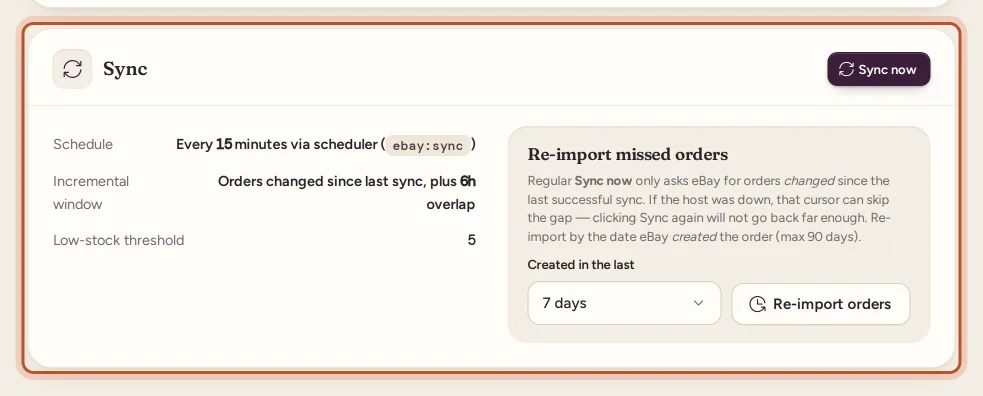
- Website: Sync now at the top of the Overview, or in the Sync card in Settings.
- App: the circular arrows at the top of Home or More › eBay accounts, then Sync now.
When it finishes you see what changed, for example "Synced 4 order line(s); updated fees/refunds on 6 row(s)." Extra lines may say that fees for some orders will fill in on the next syncs, or that some orders are unmatched and need their SKUs added in Inventory.
Sync now fetches your active eBay account. The automatic sync covers every connected account.
Checks that run in the background
Besides the 15-minute sync, ProfitClerk double-checks your figures:
- A small overlap. Each sync looks a few hours back past the last one, so an order eBay updates late is not missed.
- Nightly sweep. Once a night, the last 30 days of eBay's financial records are read again, to catch anything eBay dated in the past.
- Missing sales. If a recent order still has no sale record from eBay, ProfitClerk looks it up again 2, 4 and 7 days after the sale.
If eBay's financial records cannot be read on one sync, they are read again from the same point on the next one, so nothing is skipped.
Check the connection
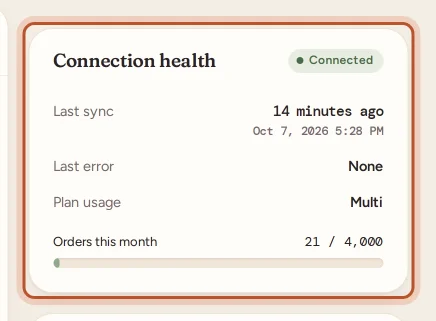
In Settings, the Connection health card shows the Last sync, the Last error (or None) and your Plan usage. Each account shows its own Last sync too. The Overview's eBay connection card shows the active account at a glance.
Notifications from syncing
In the app (and in the browser, if you turn them on), ProfitClerk can tell you about:
- new sales with their profit (not for the orders brought in by an account's first sync)
- refunds
- payouts sent
- an eBay account that has stopped syncing
Choose which ones you get in More › Notifications.
When syncing stops
- eBay refuses the sign-in: the account shows Error, and after an hour of failures we email the owner. See Reconnect an eBay account.
- Your plan's monthly order limit is reached, or there is no plan: see When syncing is paused.
- A gap after an outage: see Re-import missed orders.
- eBay's call limit is used up for a while: the sync waits and carries on at the next run, with no action needed.
Questions people ask
How quickly does a new sale appear?
Within about 15 minutes, on the next automatic sync. Select Sync now to fetch it straight away.
Why does a new order show no eBay fees yet?
eBay sometimes records fees a little after the sale. ProfitClerk reads them on the following syncs, and the order's profit updates by itself.
Does syncing change my stock on eBay?
No. When a sale matches an item in your inventory, ProfitClerk lowers its own count of what you have left. Nothing is written back to eBay.
Who can use Sync now?
The owner and managers. Viewers see the figures but cannot start a sync.
Does a refund made weeks later still reach the original order?
Yes. Refunds and late fee credits are matched to their order whenever eBay records them, and that order's profit is worked out again.
Thanks for telling us.