Connect more than one eBay account
Connect several eBay seller accounts to one ProfitClerk workspace, name them, choose the active one, and see their sales together or one account at a time.
You can connect several eBay seller accounts to one ProfitClerk workspace, up to the number your plan allows. Every connected account syncs by itself, and all their sales come into the same Overview, Orders and reports. You can give each account a name, choose which one is active, and filter orders by account.
Connect another account
On the website:
- Open Settings (Workspace & eBay tab).
- In the eBay accounts card, select Connect another account.
- Sign in on eBay's page with the other eBay account and allow read-only access.
In the app: More › eBay accounts › Connect another eBay account.
The new account becomes the active account. Only the workspace owner can connect accounts.
When your plan's limit is reached
If you already have as many accounts as your plan allows, Settings says "Your plan allows 1 eBay account(s). Upgrade to connect more." (with your plan's number, extra accounts included). You can:
- add extra eBay accounts to a monthly or yearly plan on the website's Billing page, when the plan offers them: each one is charged with the plan and renews with it (see Plans and what each one includes)
- move to a plan with more accounts
- or ask for a plan built around your business: More eBay accounts or higher limits
The pass covers the eBay accounts shown on its card.
What you see for each account
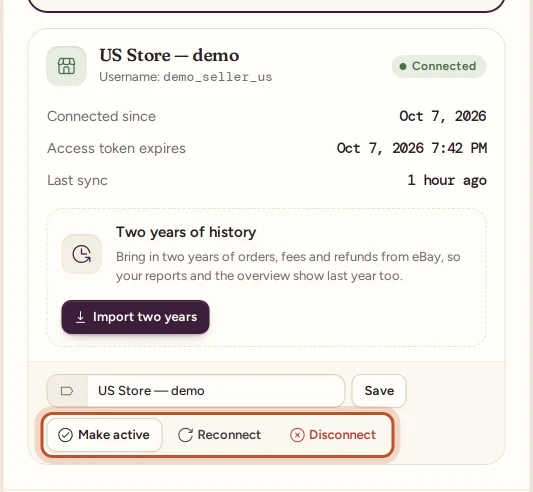
Each account in Settings shows:
- its name (your label, or the eBay username if you have not set one) and Username
- a Connected or Error badge, and Active on the active account
- Connected since, Access token expires and Last sync
- Last error, when the last sync failed
- Two years of history: the import for this account
In the app, More › eBay accounts lists each account with its last sync and status. Tap an account for its actions.
Name your accounts
A clear name helps when you look at orders, for example "UK shop" and "Clearance account".
- Website: type in the Label box under the account and select Save. You see "Account label updated."
- App: tap the account, then Rename, and fill in Name for this account.
Choose the active account
One account is always the active one. It is:
- the account Sync now fetches straight away (the automatic sync covers every account)
- the account shown in the eBay connection card on the Overview
- the account the Overview's two-year import shortcut works on
To change it, select Make active under another account (in the app, Make it the active account). You see that the account "is now the active eBay account". Making an account active never hides the others' sales.
See sales by account
- Overview and reports add up all accounts together.
- Orders has an Account filter: choose one account, or All accounts.
- An order's page shows which eBay account it came from.
- Breakdowns can group sales by eBay site, which helps when your accounts sell on different sites. See Which eBay sites are supported.
Stock across accounts
Stock belongs to the workspace, not to one eBay account. Sales are matched to your inventory by SKU, whichever account they came from. If two accounts sell the same item with the same SKU, they draw on the same stock and the same cost.
Sync and history for each account
- Every connected account is synced every 15 minutes, one after another.
- If one account fails to sync, the others carry on. The failing account shows Error and its Last error. See Reconnect an eBay account.
- The two-year history import runs for one account at a time. Start it for each account separately. See The two-year eBay history import.
Remove an account
Select Disconnect under the account. Its orders stay in your workspace. See Disconnect an eBay account.
Questions people ask
How many eBay accounts can I connect?
As many as your plan allows. The Billing page shows the number for each plan, and Settings tells you when you have reached it.
Do all my accounts sync, or only the active one?
Every connected account syncs by itself every 15 minutes. Sync now fetches the active account straight away.
Are the sales of different accounts mixed together?
They share one workspace, so the Overview and reports add them up. Each order remembers its eBay account, and the Orders page can filter by account.
Can I keep separate stock for each account?
Stock is shared across the workspace and matched by SKU. If two accounts sell the same SKU, both sell from the same stock item.
Can I have two separate workspaces instead?
Each ProfitClerk login has its own workspace. If you want accounts kept fully apart, with separate stock and reports, use a separate login and plan for each.
Thanks for telling us.