When eBay syncing is paused by your plan
Why ProfitClerk stops bringing in new eBay orders when your plan's monthly order limit is reached or your plan ends, and how to get syncing going again.
ProfitClerk pauses bringing in new eBay orders in two situations: when your plan's monthly order limit is used up, and when your workspace has no active plan. Nothing is lost: eBay keeps your orders, and they come in as soon as you upgrade, a new month starts or you choose a plan. Your eBay connection itself is fine, so there is nothing to reconnect.
The monthly order limit is reached
Each plan includes a number of orders a month. The meter counts orders sold in the current calendar month, across all your eBay accounts.
What you see
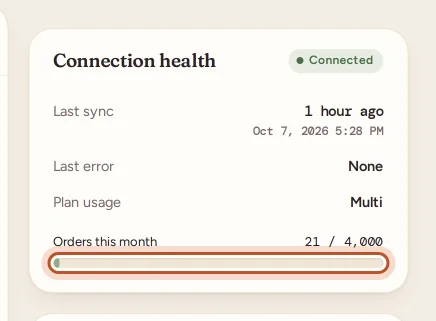
- Settings: the Connection health card shows Orders this month against your plan's limit. The bar turns amber, then red, as you get close.
- Overview: "You're close to a plan limit" appears as you approach it, with View plans and Dismiss. The Plan usage card shows when the orders meter resets.
- Email: once a month, the owner gets "You've reached your … order limit", saying order syncing is paused for this month.
- App notification: "Monthly order limit reached", saying new orders wait until next month and existing orders stay up to date.
- Last error under the account may show "You've reached the monthly order limit … Upgrade or wait for next month's cycle." The account stays Connected.
What still works
- The sync keeps running every 15 minutes for orders already in ProfitClerk: their fees, refunds, cancellations and label costs stay up to date.
- Everything else works as normal: stock, expenses, reports, tax and the app.
How to carry on
- Upgrade now: move to a plan with more orders a month on the Billing page or under More › Your plan. The new limit applies straight away, and the next sync brings in the orders that were waiting. See Change your plan.
- Wait: on the first day of the next month the count starts again, and new orders sync once more.
If you are on the biggest plan and still need more, see More eBay accounts or higher limits.
There is no active plan
A new workspace has no plan until you buy one, and a plan that ends (or a Try pass that runs out) leaves the workspace without one.
What you see
- Overview: "Choose the Try pass or a plan to start syncing your eBay orders" for a new workspace, or "Your trial or subscription has ended — eBay sync is paused", with View plans.
- App Home: "Your workspace is read-only", with Choose a plan for the owner.
- Sync now: answers that your subscription is not active.
- Settings: Last error says that the subscription is not active.
What still works
Your workspace becomes read-only: every page, figure and report stays, and downloads work, but no orders sync and nothing can be changed. Connecting a new eBay account or reconnecting one also needs a plan. You can still disconnect an account. See Read-only without a plan.
How to carry on
The owner chooses a plan on Billing or in the app's plans screen. Syncing restarts on its own at the next automatic sync, or straight away with Sync now, and catches up on everything since the last successful sync. If you were away a long time, see Re-import missed orders.
The eBay account already used a Try pass
The Try pass is once per eBay seller. If the eBay account you connected used a pass in another ProfitClerk workspace first, new orders do not sync on a pass here, and you see "This eBay account has already used a pass in another workspace." Choose a monthly or yearly plan to sync it. See Try it first: the one-time pass.
Not a plan problem?
If the account shows Error and the message is about signing in or access, eBay has refused ProfitClerk's access. See Reconnect eBay when sync stops working. To see your usage in detail, see Usage limits.
Questions people ask
Are orders lost while syncing is paused?
No. eBay keeps them. Once you move to a bigger plan, or a new month starts, the next sync brings in the orders that were waiting.
Do existing orders still update while I am over the limit?
Yes. Orders already in ProfitClerk keep getting their fees, refunds and cancellations. Only new orders wait.
When does the monthly order count start again?
On the first day of each calendar month. The orders meter counts orders sold in the current month.
Why does it say my eBay account already used a pass?
The Try pass is once per eBay seller. If that eBay account used a pass in another workspace, choose a monthly or yearly plan to sync it.
Can I still see my figures without a plan?
Yes. Every page and figure stays, read-only. You just cannot sync or change anything until you choose a plan.
Thanks for telling us.