The two-year eBay history import
How the two-year import works: which plans include it, how to start it, what it reads from eBay month by month, how long it takes and what to do if it stops.
The two-year import brings up to two years of past orders, eBay fees and refunds into ProfitClerk for one eBay account. You start it yourself, from Settings or the app, on plans that include it. It runs in the background, a month at a time, and when it finishes your reports and the Last 12 months card cover last year as well as this one.
Connecting an account does not import this history by itself: the first sync brings in only your recent orders.
Who can use it
- Plans: included with plans that show 2-year history as Included on the Billing page. Not included with the Try pass. If your plan does not include it, Settings says "Your plan does not include the history import" and names the plans that do, with See plans.
- Roles: the owner or a manager can start it.
- Accounts: it runs for one eBay account at a time. Start it for each connected account.
Start the import
On the website:
- Open Settings (Workspace & eBay tab).
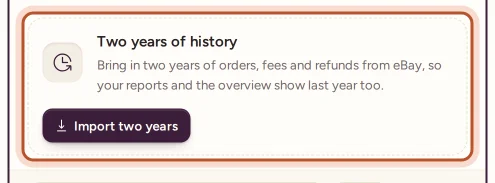
- Under the eBay account, find Two years of history.
- Select Import two years.
You see "Importing two years of history for…" with the account's name. The Overview also offers Import two years for your active account, in a notice called See your last two years.
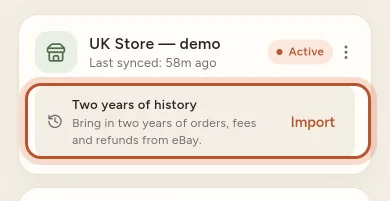
In the app: More › eBay accounts, then Import under Two years of history for that account.
What it does, step by step
The import works through three stages, shown as it runs:
- Orders. It asks eBay for your orders month by month, from two years ago up to the start of the current month. The current month is left to the normal sync.
- Fees and refunds. It reads eBay's financial records for the same two years, a month at a time: fees, refunds, fee credits, eBay Labels costs and ad fees. Refunds that happened after a sale are included, right up to today.
- Working out profit. Every imported order is worked out again with its fees, refunds and cancellations, exactly as a new sale would be.
Follow its progress
- Settings: Importing, the current stage, the number of orders so far and a percentage bar.
- Overview: Importing your last two years from eBay with a progress bar. The page refreshes now and then while you are at the top of it.
- App: "Importing · 45% done" under the account, and a card on Home.
- Last 12 months: "Still importing: these figures are not complete yet."
How long it takes depends on how many orders you have and how busy eBay is. If eBay's call limits are reached, the import pauses and carries on by itself.
When it finishes, Settings shows Imported on with the date and the number of orders, the app shows "Imported · orders:" with the count, and you can get a notification: "Your last two years are in".
If the import stops
When a step fails, ProfitClerk tries it again after a short pause, then after longer ones. If eBay keeps refusing it, the import stops:
- Settings shows The import stopped: with eBay's reason.
- The Overview shows The history import stopped.
- The app says the two-year import stopped and can be restarted from Settings.
Select Try again. If eBay's reason mentions signing in or access, reconnect the account first.
Your plan's order limit
Imported orders are from earlier months, and the orders meter counts only orders sold in the current calendar month. So the import does not use up this month's allowance; this month's orders come in through the normal sync as usual. See Plans and what each one includes.
After the import
- Add item costs. eBay does not know what your stock cost, so imported sales without a cost are flagged. The Last 12 months card counts them and links to Add item costs. See Add missing item costs.
- Compare years. The Last 12 months card now compares your year with the one before.
- Tax years. Reports such as profit and loss and eBay fees can cover whole past tax years.
For a short overview aimed at new users, see See your last two years of eBay sales.
Questions people ask
Which plans include the history import?
The paid monthly and yearly plans that list 2-year history as Included on the Billing page. The Try pass does not include it.
Can I run the import twice?
No need. Once an account's import has finished, it is not repeated, and the normal sync keeps the account up to date from then on.
Can I use ProfitClerk while the import runs?
Yes. It runs in the background, so you can leave the page, close the app or carry on working.
Why does it go back two years and not further?
eBay only gives apps up to two years of orders, so that is as far back as any import can reach.
The import stopped. Do I lose what it brought in?
No. Select Try again and it starts afresh; orders that are already in are not duplicated.
Who can start the import?
The workspace owner or a manager. Viewers can see its progress.
Thanks for telling us.